
Telegram ID: What It Is and How to Find User, Group, or Channel IDs

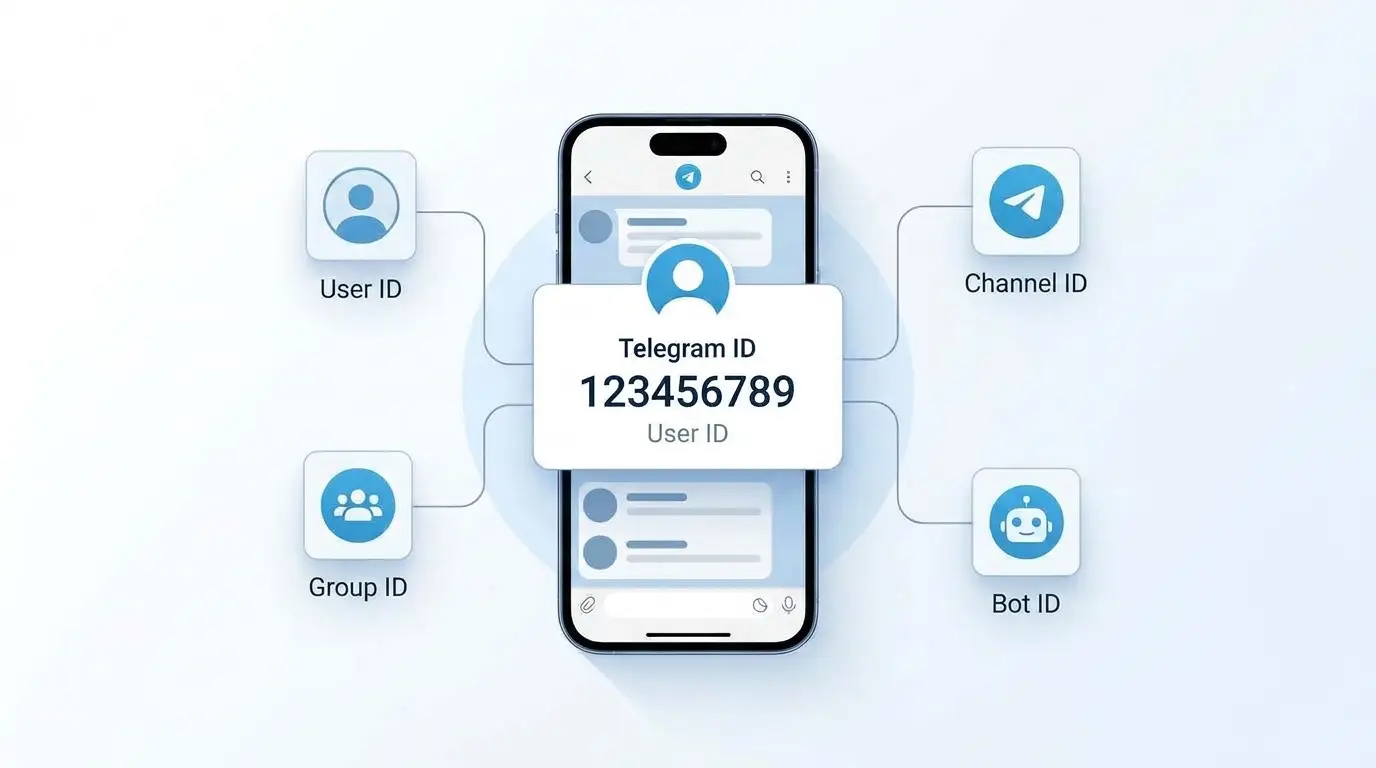
Hi! Every Telegram user, group, channel, and bot has a unique numeric identifier called a Telegram ID. Telegram uses it to identify the specific account or chat within the platform.
Unlike a username (username), which can be changed, a numeric ID is a permanent identifier for the corresponding entity. This makes it especially useful when setting up Telegram bots, automating messages, and integrating Telegram with websites, CRM systems, and other services.
The standard Telegram interface doesn't provide a profile section where you can view your numeric ID. Depending on which ID you need, use a dedicated info bot or the Telegram Bot API.
- What Is a Telegram ID?
- What Is a Telegram ID Used For?
- Telegram ID vs. Username: Key Differences
- How to Find Your Telegram ID
- Method 1: Use a Telegram Info Bot
- Method 2: Create Your Own Telegram Bot
- Method 3: Use the Telegram Bot API
- How to Find Another User's Telegram ID
- Method 1: Ask Them to Use an Info Bot
- Method 2: Get It from a Message Sent to Your Bot
- Method 3: Use a Shared Group
- Can You Find Someone's Telegram ID by Username Alone?
- How to Find a Telegram Group ID
- Method 1: Use Your Own Telegram Bot
- Method 2: Use an Info Bot
- Method 3: Use the Telegram Bot API's getChat Method
- How to Find a Telegram Channel ID
- Method 1: Use Your Own Bot
- Method 2: Use the Channel Username with getChat
- Method 3: Use a Third-Party Info Bot
- Can You Find the ID of a Private Channel?
- How to Find a Telegram Bot ID
- From a Message Sent by the Bot
- Using the getMe Method
- Telegram ID vs. Chat ID vs. Message ID
- Why Can a Chat ID Be Negative?
- Using Telegram IDs for Automation and Integrations
- Connecting Telegram to WordPress
- Automatically Send Messages to a Group
- Checking User Access
- Common Telegram ID Errors
- Error: The Bot Can't Message a User
- Error: Invalid ID Format
- Error: Using getUpdates While a Webhook Is Active
- Is It Safe to Share Your Telegram ID?
- Where to Find a Telegram ID: Quick Reference
- FAQ: Frequently Asked Questions About Telegram IDs
- What Is a Telegram ID, in Simple Terms?
- How Do I Find My Telegram ID on My Phone?
- How Do I Find My Telegram ID on a Computer?
- Can I Find a Telegram ID Without a Bot?
- Does a Telegram ID Change When the Username Changes?
- Can You Find Someone on Telegram Using Their ID?
- Why Does a Telegram Group ID Start with a Minus Sign?
- Are User ID and Chat ID the Same?
- Is It Safe to Share Your Telegram ID?
- How Do I Find the ID of a Private Telegram Channel?
- Can I Use a Telegram ID to Send Messages Automatically?
- Is a Telegram ID Confidential Information?
This guide explains what a Telegram ID is, how it differs from a username, how to find your own ID, and how to look up the ID of another user, group, channel, or bot.
What Is a Telegram ID?
A Telegram ID is a unique numeric identifier that Telegram uses to identify users, bots, and chats.
It consists of numbers and does not depend on the profile name, phone number or public account link.
For example, a conditional Telegram user ID might look like this:
123456789A group or channel ID can have many more digits and differ in format.
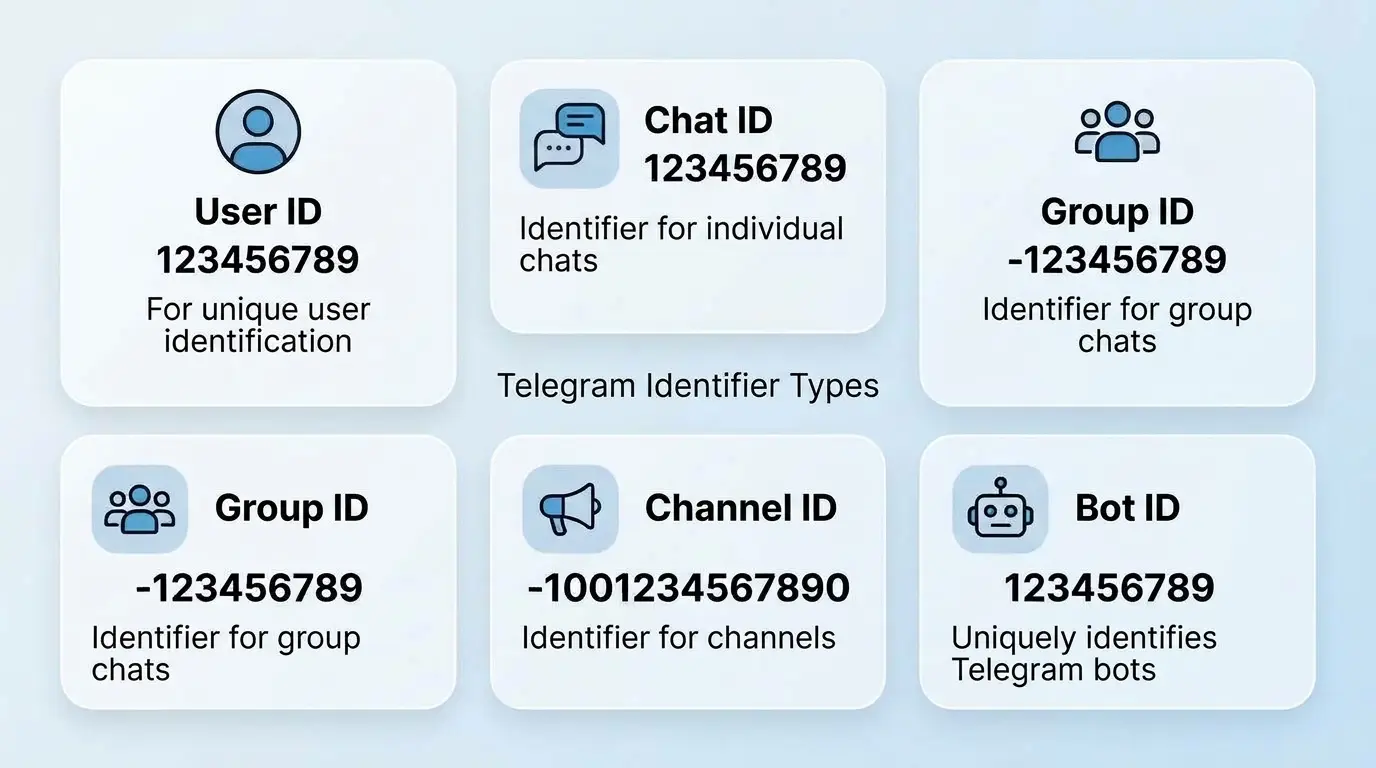
There are several types of identifiers in Telegram:
- User ID: the numeric identifier of a specific user.
- Chat ID: the identifier of a private dialogue or group chat.
- Group ID: a Telegram group.
- Channel ID: a Telegram channel.
- Bot ID: the numeric identifier of the Telegram bot.
- Message ID: the identifier of a separate message within the chat.
It is important not to confuse these concepts. For example, the User ID of a person and the Chat ID of a private conversation with him are not necessarily the same values. To work with the Telegram Bot API, you need to use exactly the identifier required by the specific method.
What Is a Telegram ID Used For?
In normal correspondence, a numerical identifier is practically unnecessary. Telegram independently determines interlocutors and chats, so the user only needs a name, contact or link to the profile.
However, Telegram ID plays an important role when developing and configuring integrations.
Most common usage scenarios:
- Development of Telegram bots. The ID allows you to determine exactly who you need to send a message to, who the command came from, or which chat to work with.
- Message Automation. You can use the ID to set up automatic sending of notifications, reports and event notifications.
- Integration with sites. For example, a WordPress site can send messages about new orders, requests or errors directly to Telegram.
- CRM connection. Identifiers help to associate Telegram conversations with customers and corresponding records in the system.
- Manage groups and channels. Bots can use the ID to interact with members, messages, and chat settings.
- Access Restriction. A developer can configure the execution of certain commands only for specified users or administrators.
For example, if the Telegram bot should send a message about a new order to the owner of an online store, you can specify its numeric ID in the integration settings. Then the bot will know where to send the notification.
Telegram ID vs. Username: Key Differences
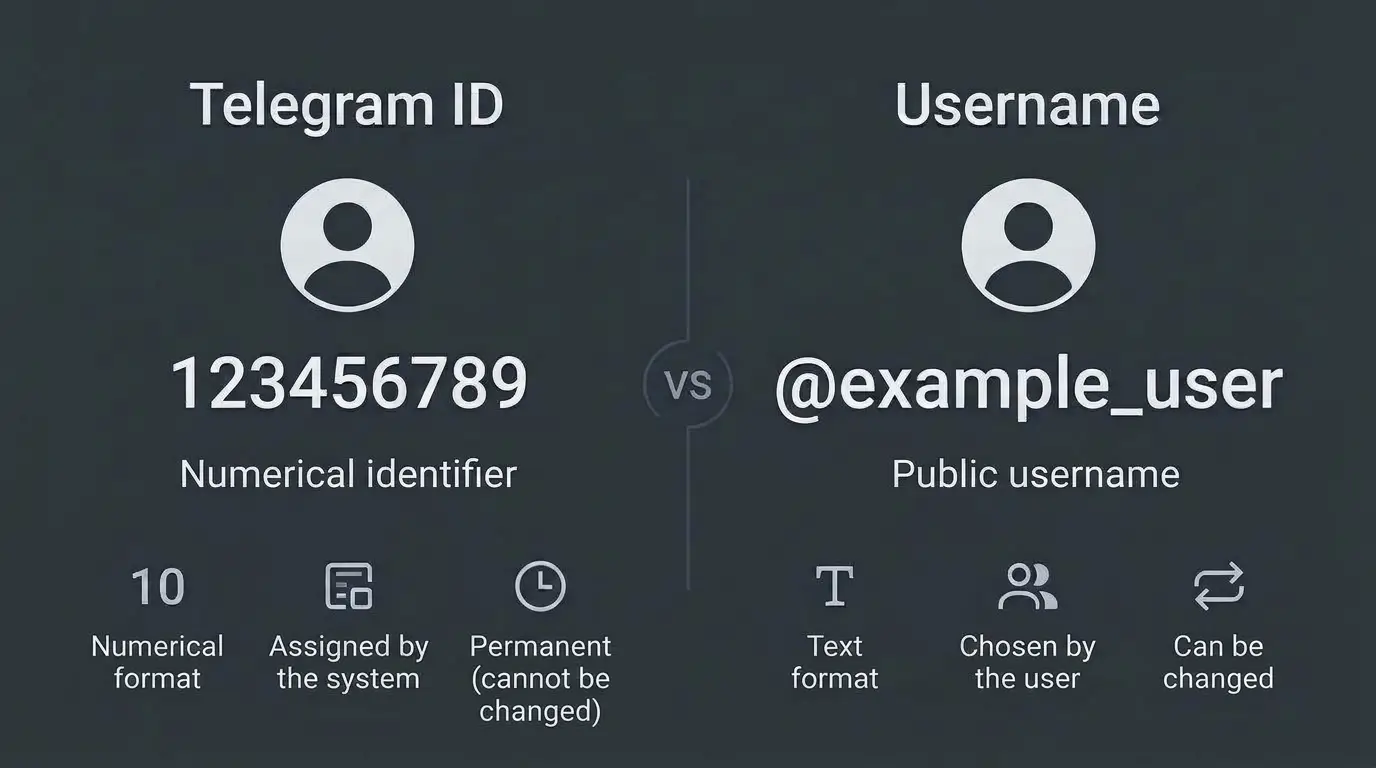
One of the most common mistakes is to consider Telegram ID and username to be one and the same. These are actually different identifiers that perform different functions.
Username is a public username that starts with @. It is used to find a profile and quickly go to correspondence.
Telegram ID is a numeric identifier used by the system to identify a particular account.
The main differences.
| Criterion | Telegram ID | Username |
|---|---|---|
| Format | Numerical | Textual |
| Example | 123456789 | @example_user |
| Possibility of change | Usually unchanged | You can change |
| Mandatory presence | Assigned by the system | Not mandatory |
| Usage in API | Numeric identifier | Public name if supported by the method |
| Uniqueness | Within the appropriate object type | Unique among active usernames |
| Visibility | Not shown by the standard interface | Can be public |
For example, a user can change their username from @old_name to @new_name. At the same time, his numerical User ID will remain the same.
This is especially important for automation. If the integration is tied to the username, changing it may result in the need to update the settings. Using a numeric ID avoids this dependency.
At the same time, ID should not be considered a universal identifier for all possible operations. Telegram has separate rules for users, chats and channels.
How to Find Your Telegram ID
The easiest way to find out your own Telegram ID is to use a special info bot.
Telegram has third-party bots that can display a numeric user ID after receiving a command or message.
Method 1: Use a Telegram Info Bot
This option is suitable for most users, as it does not require technical knowledge, API access or additional programs.
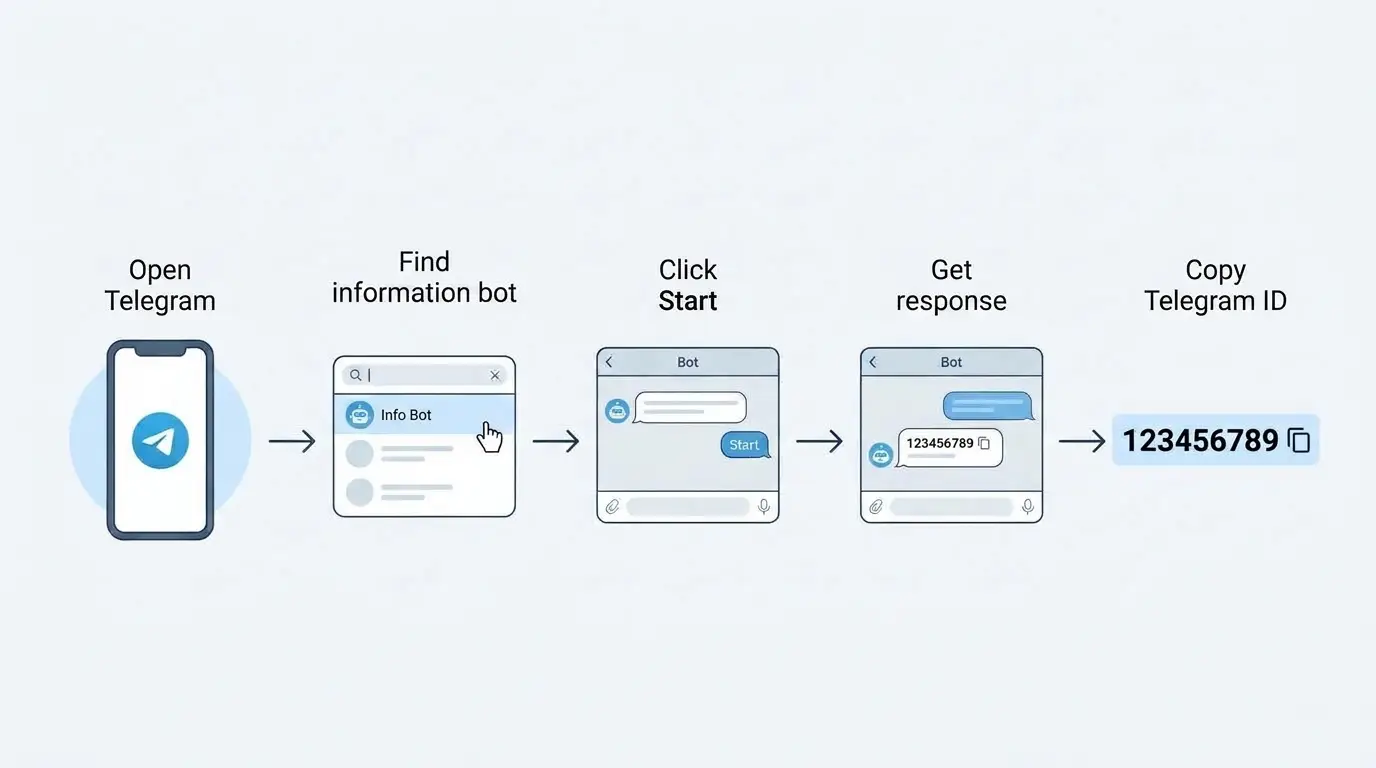
Sequence of actions:
- Open Telegram on your smartphone or computer.
- Go to the search and enter the name of the bot that shows Telegram profile information, for example
@userinfobot. - Make sure you opened the right bot and not a similar account.
- Click the Start button.
- Wait for the bot to respond with information about your profile.
- Find the string
IdorUser ID.
The response may contain the following information:
- numeric ID;
- username;
- surname, if specified;
- username if configured;
- interface language.
Starting a bot is usually enough to get your own ID. No additional personal messages or phone number required.
Please note: Third-party bots are not official Telegram tools. Do not send them passwords, authorization codes, login details, or other sensitive information. A simple command or message is enough to easily determine the ID.
Method 2: Create Your Own Telegram Bot
If you are engaged in development or want to receive a Telegram ID without using third-party services, you can create your own bot.
You'll need Telegram's official bot, BotFather.
Procedure:
- Find the official Telegram bot
@BotFather. - Open a dialog and send the command
/newbot. - Indicate the name of the future bot.
- Enter a username that must end with
bot. - Get Telegram Bot API access token.
- Start the created bot and send it a message.
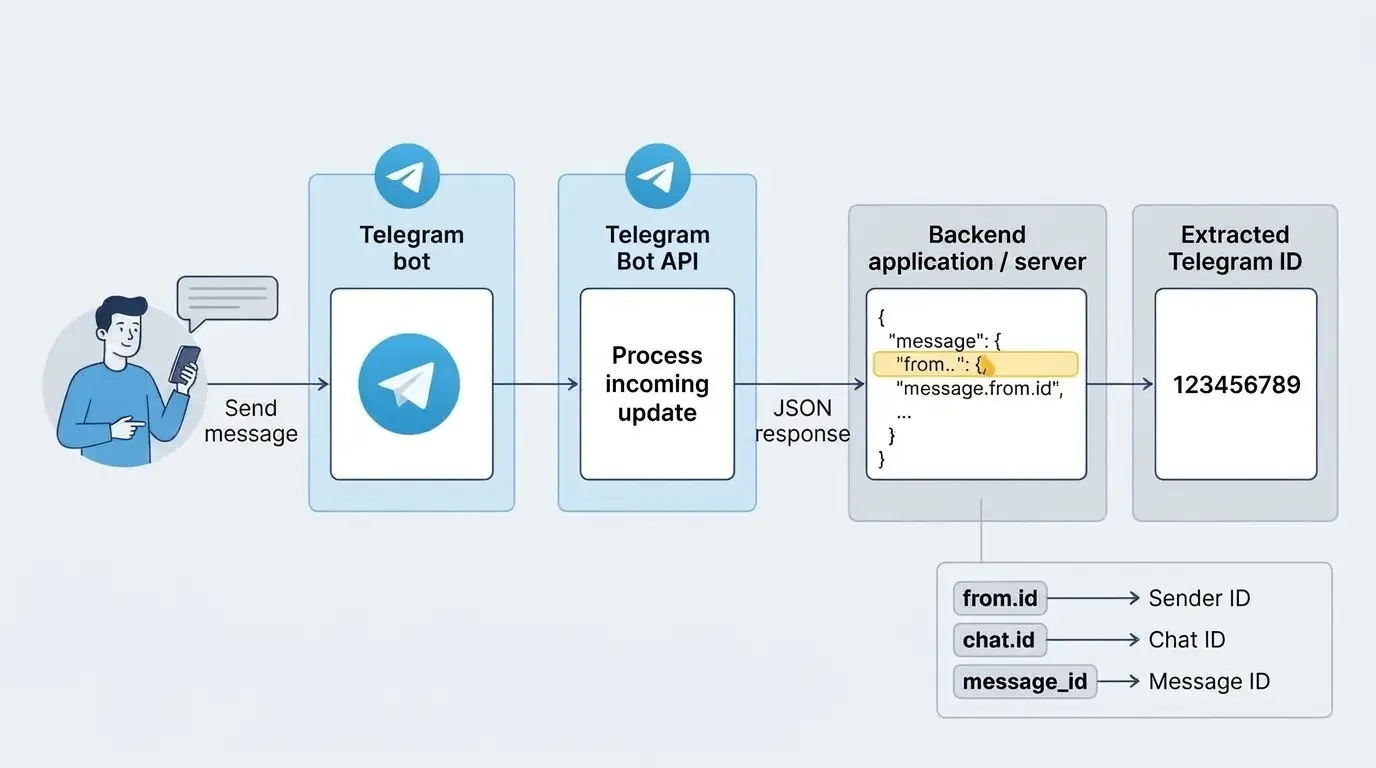
After that, the bot will be able to receive message information via the Telegram Bot API.
In an API response, the message object contains information about the message, and the from object contains information about the user who sent it.
The required value is in the field:
message.from.idIt contains the numeric User ID of the sender.
Important: The bot cannot start a normal private dialog with the user on its own. First, a person must open it and send a message or provide access to their profile in another supported way.
The bot token is a secret access key. Do not publish it on the site, public repository or messages.
Method 3: Use the Telegram Bot API
This option is more suitable for developers who want to get a Telegram ID programmatically.
Telegram provides an official API to interact with bots. Through it you can get information about messages, users and chats.
One of the available methods is getUpdates. It returns the updates received by the bot.
An address of the following format is used for verification:
https://api.telegram.org/bot<TOKEN>/getUpdatesInstead of <TOKEN> you need to substitute your own bot token received from BotFather.
If the bot has received a message, you can find a structure similar to this in the API response:
{
  "ok": true,
  "result": [
    {
      "update_id": 123456789,
      "message": {
        "message_id": 15,
        "from": {
          "id": 123456789,
          "is_bot": false,
          "first_name": "User",
          "username": "example_user"
        }
      }
    }
  ]
}
In this example, the value 123456789 in the field from.id is the Telegram ID of the user who sent the message.
In the real response, the structure may be larger and contain additional fields.
What is important to consider:
- The
getUpdatesmethod works to get updates if the bot does not use a webhook. - If the bot is configured with a webhook, you need to receive updates through it or change the way you receive data first.
- The bot must receive a message from the user to have relevant data.
- The access token cannot be transferred to third parties.
This method is too complicated for the average user. But if you are developing an integration or your own Telegram bot, using the official API is the most controlled option.
How to Find Another User's Telegram ID
Sometimes you don't need to find your own ID, but someone else's numeric ID. For example, to configure a bot, add a user to an access list or integrate with CRM.
There are several ways to do this. The choice depends on whether you can write to the person, whether you're in a group with them, and whether you have access to messages they've sent.
Method 1: Ask Them to Use an Info Bot
If a person can perform a simple action on their own, it's best to ask them to open the infobot and send you the resulting ID.
Sequence of actions:
- Send a person a link to an informational Telegram bot.
- Ask to open a dialog with the bot.
- Click Start or Run.
- Find the numeric User ID in the response.
- Send you the received value.
This method does not require access to someone else's account and does not involve the transmission of passwords or authorization codes.
Method 2: Get It from a Message Sent to Your Bot
If you are developing a Telegram bot, you can get the ID of another user through the message he sent to this bot.
For example, a person starts a bot and writes any message to it. Telegram then transmits a corresponding update containing information about the sender.
To get an ID, you need to contact the field:
message.from.idIf the message was received in a group, the structure may also contain message.chat.id. In this case, these two values represent different objects:
message.from.idis the user who sent the message;message.chat.idis the group in which the correspondence took place.
This is an important point when developing integrations: if you mix up these values, the bot can send messages to the wrong place.
Method 3: Use a Shared Group
If you and the right person are in the same Telegram group, you can get their ID using a bot that has access to the relevant information.
General Sequence:
- Add your own bot to the group.
- Make sure the bot has the necessary access to messages.
- Receive a message or other event that contains information about the desired user.
- Check the
from.idfield in the corresponding API object.
It is important to consider the privacy mode of bots (Privacy Mode). When it is enabled, the bot does not receive all normal group messages. He usually sees commands, messages addressed to him, and individual service events. Appropriate settings or administrator rights may be required to receive more messages.
You should not turn off Privacy Mode without a real need. Limited access is sufficient for most integrations.
Can You Find Someone's Telegram ID by Username Alone?
Not always. Username itself does not contain a numeric ID.
For example, if you only know @example_user, that doesn't mean you can just convert it to a numeric ID.
In the Telegram Bot API, some methods allow you to use a public username instead of a numeric Chat ID, but this does not make username a full replacement for User ID.
Receiving a numeric identifier requires an available Telegram user object or a message in which Telegram transmits its data.
How to Find a Telegram Group ID
Telegram Group ID is required primarily for administration and automation. For example, if you want the bot to send messages to the work chat, post order notifications or report technical errors on the site.
Unlike a personal User ID, a group ID usually has a negative value.
Method 1: Use Your Own Telegram Bot
This is one of the easiest ways to get a group ID, especially if you plan to use it for automation.
First create a bot through BotFather if you don't already have your own.
Next, do the following:
- Open the desired group in Telegram.
- Add your bot to it.
- Send a test message or command to the group that the bot can receive.
- Get updates via
getUpdatesif the bot is running without a webhook. - Find the object
message. - Check
message.chat.id.
Conventional example structure:
{
  "message": {
    "message_id": 25,
    "chat": {
      "id": -123456789,
      "title": "Working Group",
      "type": "group"
    },
    "text": "Test message"
  }
}
In this case the group ID is -123456789.
If you are getting information about a supergroup, the ID is often in the format with the prefix -100.
For example:
-1001234567890This is a common supergroup and channel ID format in the Telegram Bot API. However, you should not add or remove this prefix yourself: use the value returned by the API.
Method 2: Use an Info Bot
You can use a third-party bot that determines the ID of groups and chats.
General Algorithm:
- Find an info bot that supports group ID detection.
- Add him to the right group.
- Grant the necessary rights if necessary.
- Follow the bot's instructions or send the appropriate command.
- Get a numeric group ID.
Not all info bots are created equal. Some require admin rights, others can identify the ID through messages or service events.
Do not grant administrative rights to a third-party bot if they are not required to obtain an ID.
Method 3: Use the Telegram Bot API's getChat Method
If the group has a public username, it can be identified using the getChat.
For example, for a group with username @example_group, you can execute a request in the following format:
https://api.telegram.org/bot<TOKEN>/getChat?chat_id=@example_groupThe API response will contain information about the chat, including the field id.
If the group is private, you should usually use its numeric ID instead of username. The bot must have access to the corresponding chat to receive this value.
Important: For supergroups and other chats that require appropriate permissions, the ability to obtain information depends on bot access. The mere fact of the existence of a group does not guarantee that any bot will be able to obtain its data.
How to Find a Telegram Channel ID
Channel ID is required if you are setting up auto-posting, integrating Telegram with WordPress, or want to send messages via a bot.
For example, after publishing a new article on the site, you can automatically send its title and link to the Telegram channel.
For this, you need to know the channel ID and give the bot the necessary rights.
Method 1: Use Your Own Bot
This option is suitable for channel owners and developers.
- Create a Telegram bot with BotFather.
- Open the desired channel.
- Add bot to admin list.
- Give it the necessary rights. Publishing permission is required to publish messages.
- Get the channel ID via the corresponding Telegram Bot API request.
If the bot receives a channel post, you can find the channel_post.
The required value is in the field:
channel_post.chat.idFor example:
{
  "channel_post": {
    "message_id": 12,
    "chat": {
      "id": -1001234567890,
      "title": "My Channel",
      "type": "channel"
    },
    "text": "Test post"
  }
}
In this example, the numeric channel ID is -1001234567890.
Please note: if you use getUpdates, the bot must receive updates through this mechanism, not through an active webhook.
Method 2: Use the Channel Username with getChat
If the channel is public and has a username, you can get its numeric ID without searching for a separate message.
This uses the getChat.
Request example:
https://api.telegram.org/bot<TOKEN>/getChat?chat_id=@example_channelIn the answer you need to find:
result.idThis is a numeric channel identifier.
This method is especially convenient if you already know the username of the channel and want to automatically get its ID in your own script.
Method 3: Use a Third-Party Info Bot
If you are not a programmer, you can use a bot that supports determining channel IDs.
Depending on its capabilities is enough:
- forward message from channel;
- add bot to channel;
- grant him the necessary rights;
- submit a public link or username.
Not every bot supports all these options. Private channels may require administrator access or other means of obtaining data.
Can You Find the ID of a Private Channel?
Yes. A channel's private status does not mean it does not have a numeric ID.
However, it is more difficult to get it, because a private channel does not have a public username by which it can be found.
The best option is to use your own bot added to the channel with the necessary rights and get the ID through the Telegram Bot API.
How to Find a Telegram Bot ID
Each Telegram bot also has its own numeric ID.
It is different from the username of the bot, which usually ends with bot.
For example:
- Username:
@example_bot - Bot ID:
123456789
If you created a bot through BotFather, there are several ways to get its ID.
From a Message Sent by the Bot
If you have access to the bot itself, you can message it and get information via the Telegram Bot API.
In the response, you need to check the field:
message.from.idIf the message came from another bot, the from.id value will correspond to that particular bot.
Using the getMe Method
Telegram Bot API has a special method getMe that returns information about the bot whose token is used for the request.
Example:
https://api.telegram.org/bot<TOKEN>/getMeThe response will contain the object result, which contains the field id.
This is the bot's numeric identifier.
This method is the easiest for developers because there is no need to create test messages or add a bot to groups.
Telegram ID vs. Chat ID vs. Message ID
When working with the Telegram API, three similar concepts are often encountered: User ID, Chat ID and Message ID.
It's easy to get them confused, especially if you're setting up an integration for the first time.
| Identifier type | What identifies | Where is it used? |
|---|---|---|
| User ID | User or bot | Identification of the sender, access control |
| Chat ID | Private dialog, group or channel | Sending and receiving messages |
| Message ID | A separate message | Reply, edit and delete messages |
Let's consider a practical example.
Suppose the user wrote a message to the Telegram bot.
The structure of the message may contain the following data:
message.from.id: User ID;message.chat.id: private chat ID;message.message_idis the ID of the specific message.
When a user writes to a bot in a private chat, the User ID and Chat ID often match. But it is not worth relying on it as a universal rule.
For groups and channels, the Chat ID has its own value, which does not match the User ID of the participants.
Why Can a Chat ID Be Negative?
If you've ever received a group or channel ID, you've probably noticed that it starts with a minus sign.
This is a normal feature of IDs in the Telegram Bot API.
For clarity:
| Object type | Example ID |
|---|---|
| User | 123456789 |
| Private dialogue | 123456789 |
| A regular group | -123456789 |
| Supergroup | -1001234567890 |
| Channel | -1001234567890 |
The table contains conditional values. These are examples of the format and not actual identifiers.
Unable to determine the type of the object by the number of digits alone or construct the ID yourself. For the integration to work correctly, always use the value received from Telegram.
Using Telegram IDs for Automation and Integrations
Numeric IDs are especially useful when Telegram becomes part of a workflow rather than just a messaging tool.
Let's consider some practical examples.
Connecting Telegram to WordPress
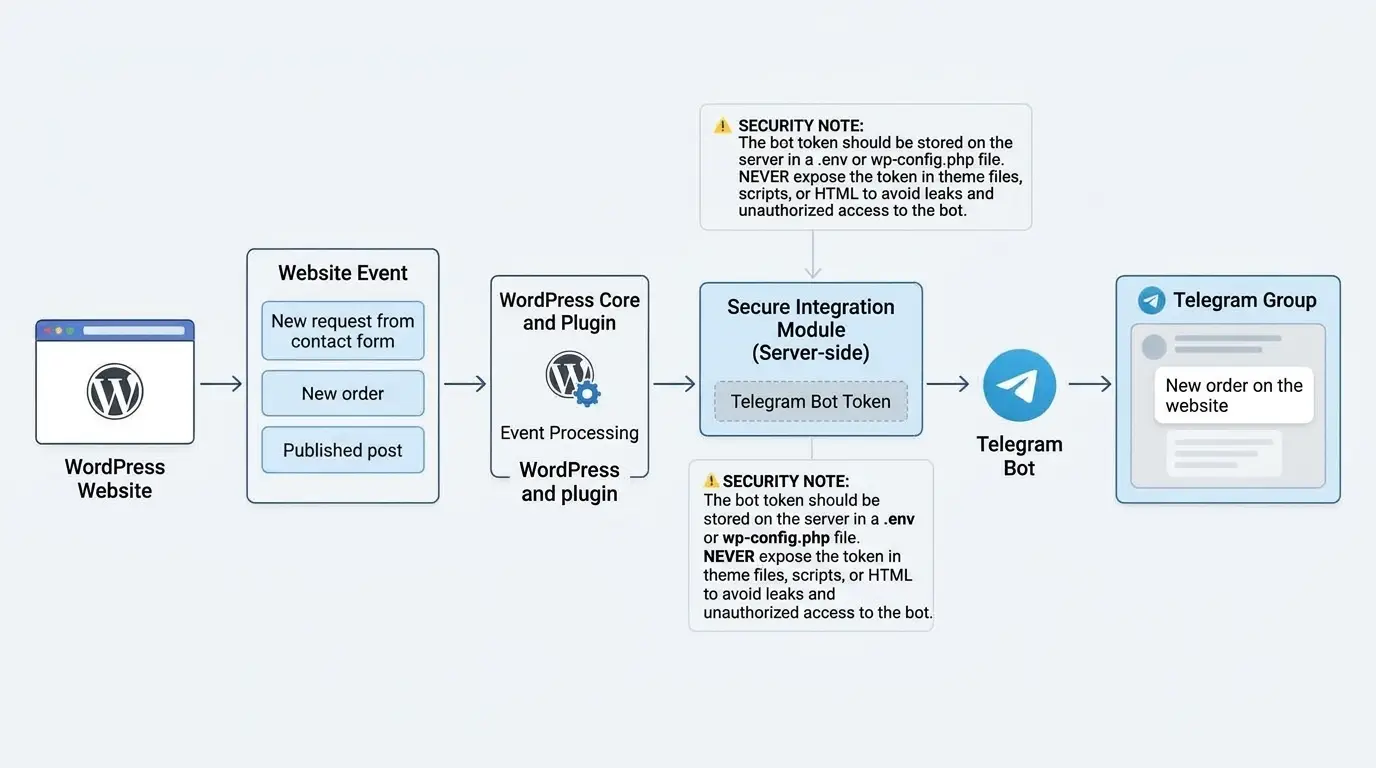
One common scenario is to automatically send notifications from a WordPress site.
For example, you can configure sending messages to Telegram in the following cases:
- new request received from the contact form;
- user placed an order;
- New comment appeared on the site;
- published a new article;
- An error occurred while performing a certain operation;
- need to notify the administrator of an important event.
To implement such an integration, you need:
- Created Telegram bot.
- Bot API Access Token.
- Chat User, Group or Channel ID.
- Code or plugin that will send requests to the Telegram API.
For example, the method sendMessage.
The request looks like this:
https://api.telegram.org/bot<TOKEN>/sendMessage?chat_id=<CHAT_ID>&text=Test messageIn this example:
<TOKEN>: Telegram bot token;<CHAT_ID>: recipient ID;text: message text.
For real use, it is better to send requests using the POST method, and pass the parameters separately. This allows you to handle special characters correctly and avoid text encoding problems.
In WordPress, such integration can be implemented through PHP, using the HTTP API of the platform, or with the help of a specialized plugin.
At the same time, the bot token must be stored on the server in a secure place, and not displayed in the open HTML code of the page.
Automatically Send Messages to a Group
Another use case is the automation of work chats.
For example, a company has a group to process requests from the site. When a user fills out the form, WordPress sends the data to the bot, which sends a message to the group.
In such a scheme, the Chat ID of the group is used, not the User ID of an individual participant.
This allows you to centralize the receipt of messages and not tie the integration to a specific employee.
Checking User Access
Telegram ID can also be used to check access rights.
For example, a bot can allow the execution of administrative commands only to certain users.
Conditional work logic:
- User sends command to bot.
- The bot receives the User ID of the sender.
- Compares it with the list of allowed identifiers.
- If the ID is in the list, executes the command.
- If the ID is missing, it refuses to execute.
This is more convenient than checking the username because the user can change it.
However, a numeric ID is not an authorization mechanism by itself. Access rights, the context of the request, and the protection of the bot itself must also be considered during development.
Common Telegram ID Errors
Even if you have already found the ID you need, it does not guarantee that the integration will work correctly.
Below are the most common problems encountered when setting up Telegram bots.
| Error | Why does it occur? | How to fix |
|---|---|---|
| User ID is used instead of Chat ID | Confused API fields | Check from.id and chat.id |
| Minus has been removed from the group ID | The value was copied incorrectly | Use full ID |
| The old username is used | A user or channel has changed their public name | Get current data |
| The bot does not receive the message | Privacy Mode or webhook settings are not taken into account | Check bot configuration |
| The bot cannot write to the user | The user did not run the bot | Ask to open the bot and send a message |
| The bot does not post to the channel | Necessary rights not granted | Check administrative permissions |
| The API returns an error | Invalid token, ID, or request parameters | Check API request and response |
Error: The Bot Can't Message a User
This is one of the most common situations when setting up Telegram integration for the first time.
Even if you have entered the correct User ID or Chat ID, the bot cannot always initiate a dialogue with a human on its own.
For the bot to be able to send regular messages to a private chat, the user must first interact with it, such as pressing Start.
If the bot should work in a group or channel, it is necessary to check its presence in the chat and the corresponding rights.
Error: Invalid ID Format
When copying a group or channel ID, the minus sign or part of the numbers are sometimes accidentally removed.
For example:
- Correct:
-1001234567890 - Wrong:
1001234567890
As a result, Telegram may return an error because the request is directed to a non-existent or different chat.
Therefore, it is better to copy the identifier directly from the API response, rather than rewriting it manually.
Error: Using getUpdates While a Webhook Is Active
The getUpdates and webhook methods are two different mechanisms for getting updates.
If a webhook is configured for the bot, the getUpdates method cannot be used in parallel.
This is important to consider if you are moving the bot to another server, changing the way messages are handled, or testing integrations.
Is It Safe to Share Your Telegram ID?
A numeric Telegram ID by itself is not a password or account access key.
Knowing this value prevents another person from automatically logging into your Telegram, reading private messages, or managing your profile.
However, this does not mean that ID is completely irrelevant to privacy.
It can be used to identify your account in various integrations, match data or set up automated scripts.
Therefore, a few simple rules should be followed:
- Do not unnecessarily publish personal identifiers publicly.
- Do not transfer the Telegram bot token to third parties.
- Do not enter the Telegram authorization code on third-party sites.
- Do not grant administrative rights to unknown bots.
- Check exactly what data the third-party service receives from you.
It is especially important to distinguish Telegram ID and bot token. The first identifies the user or the chat, and the second provides access to control the bot via an API. Their level of privacy is fundamentally different.
Where to Find a Telegram ID: Quick Reference
If you need to find a specific ID quickly, use this table.
| What to find | The easiest way |
|---|---|
| Own Telegram ID | Info bot |
| Another user's ID | Ask him to use the info bot |
| User ID through own bot | Get message.from.id |
| Private chat ID | Get message.chat.id |
| Group ID | Get message.chat.id in group message |
| Supergroup ID | Via Bot API or info bot |
| Channel ID | Via channel_post.chat.id or getChat |
| Telegram bot ID | Method getMe or message.from.id |
| Message ID | message.message_id field |
If you are a regular user and just want to know your own ID, there is no need to create a bot or work with the API. It is enough to use a proven info bot.
If Telegram is used for automation, integrations, or development, it's best to get tokens through the official Bot API. This allows you to control the process and not depend on third-party services.
FAQ: Frequently Asked Questions About Telegram IDs
What Is a Telegram ID, in Simple Terms?
Telegram ID is a unique numerical identifier that Telegram assigns to users, bots and chats. It is used to recognize relevant objects within the platform and work with the Telegram API.
How Do I Find My Telegram ID on My Phone?
Open Telegram, search for infobot, for example @userinfobot, and click Start. It will show your numerical ID in the reply. This method works on both Android and iPhone.
How Do I Find My Telegram ID on a Computer?
The method is similar to the mobile version. Open Telegram Desktop or the web version, find the info bot, run it and see the response received.
Can I Find a Telegram ID Without a Bot?
Yes. If you are a developer, you can use the Telegram Bot API and get the ID from the corresponding message object. This requires your own bot and access to the API.
In the standard Telegram interface, the numeric User ID is not displayed separately.
Does a Telegram ID Change When the Username Changes?
No. Changing username does not affect the numeric user ID. If a person changes their public profile name, their User ID will remain the same.
Can You Find Someone on Telegram Using Their ID?
A numerical ID alone is not a universal link to a profile. Telegram does not provide the usual user search by arbitrary numeric ID in the standard interface.
Working with a known user via API requires the appropriate context and bot access to this user.
Why Does a Telegram Group ID Start with a Minus Sign?
In the Telegram Bot API, group chats have negative numeric IDs. Supergroups and channels often use a format prefixed with -100. This is a normal feature of the Telegram identification system.
Are User ID and Chat ID the Same?
Not always. User ID identifies a specific user, and Chat ID identifies a dialog or chat. In private correspondence, these values are often the same, but for groups and channels they are different.
Is It Safe to Share Your Telegram ID?
Usually yes. Telegram ID alone does not give access to the account. However, you should not unnecessarily publish personal identifiers and share sensitive data with them.
It is especially important to never share your Telegram bot token with third parties.
How Do I Find the ID of a Private Telegram Channel?
The easiest way is to add your own bot to the channel with the necessary rights and get the ID through the Telegram Bot API. If the bot receives a channel post, the ID is in the field channel_post.chat.id.
Can I Use a Telegram ID to Send Messages Automatically?
Yes. For this, the sendMessage Telegram Bot API method is used. In the chat_id parameter, specify the numeric identifier of the recipient or a supported public chat username.
Is a Telegram ID Confidential Information?
It is not a secret key or a password, but a personal ID can be used to match account information. Therefore, it is worth limiting its distribution if it is not necessary.

