
CSS Styles Reset: Why and How to Reset Browser Styles

Hi! In this post, I’ll explain why CSS styles are reset when building a website with HTML.
Let’s start with an example. Consider the simplest HTML markup:
<!DOCTYPE html>
<html lang="en">
<head>
	<meta charset="UTF-8">
	<meta name="viewport" content="width=device-width, initial-scale=1.0">
	<title>Document</title>
</head>
<body>
	<nav>
		<a href="#">Menu 1</a>
		<a href="#">Menu 2</a>
	</nav>
	<div>Block 1</div>
	<p>Text 1</p>
	<span>Text 2</span>
</body>
</html>
If you inspect the <body> or <p> elements in your browser’s developer tools (for example, in Firefox or Chrome), you’ll see that margins have been added automatically:
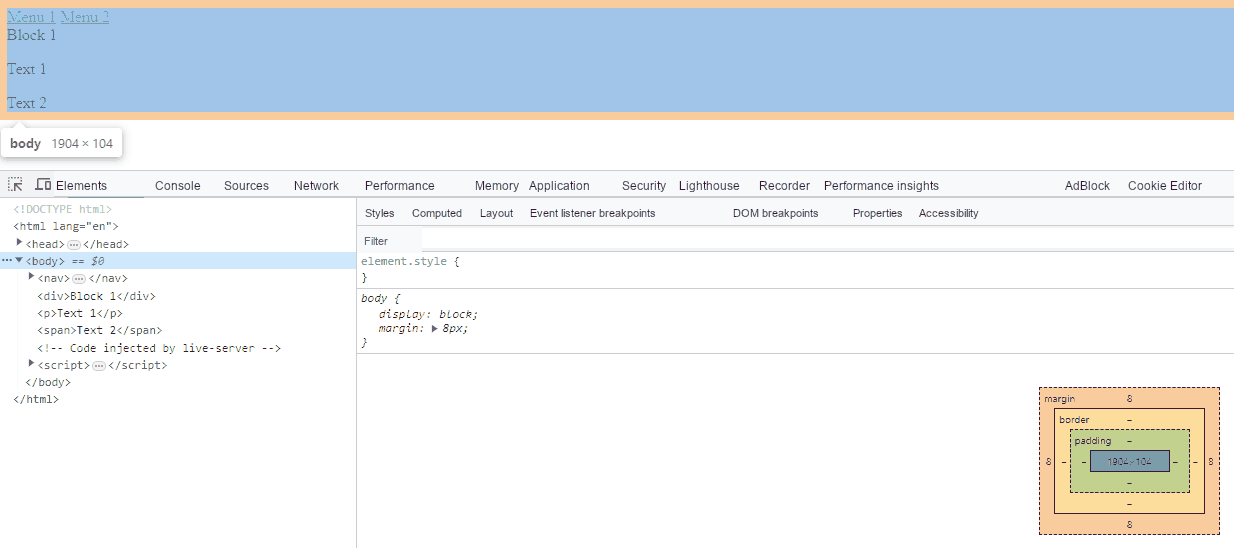
Why does this happen?
Why Do You Need a CSS Reset?
Browsers apply their own default styles to HTML elements. For example:
- The
<h1>heading is larger than<h2>, and both are bold. - Paragraph text in
<p>is smaller and not bold. - Links (
<a>) are underlined and blue. - Unordered lists (
<ul>) have indentation.
The HTML standard does not require any of this formatting. Browsers simply add these styles to make plain HTML more readable when rendered.
Browsers handle elements in similar ways, but not exactly the same. For example, Chrome and Firefox use the padding property to indent unordered lists.
There are also small differences in element dimensions across browsers, which can be misleading while building a layout. You may find, for example, that Firefox adds space above an element while another browser does not. These issues arise from differences in the styles built into each browser.
To minimize inconsistencies between browsers, it’s best to reset styles at the very beginning of a project and start your stylesheet with a “clean slate.” In other words, remove the browser’s built-in formatting and add your own rules.
This approach is known as a CSS reset. In particular, you should include a basic set of styles in every project.
How to Reset CSS Styles
Web developers who build layouts usually have their own set of CSS rules that they use in new projects.
normalize.css (https://necolas.github.io/normalize.css/) is a popular, free, open-source stylesheet.
Here’s an example of the CSS reset styles I use in my work:
/**
 * Reset styles by Mykhailo Petrov
 *
 * v.3.0.1
 *
 */
*,
*::before,
*::after {
  padding: 0px;
  margin: 0px;
  border: 0px;
  -webkit-box-sizing: border-box;
  box-sizing: border-box;
}

*:focus {
  outline: none;
}

html,
body {
  height: 100%;
  min-width: 320px;
  line-height: 1;
}

body {
  color: #000000;
  font-size: 1rem;
  -ms-text-size-adjust: 100%;
  -moz-text-size-adjust: 100%;
  -webkit-text-size-adjust: 100%;
  -webkit-font-smoothing: antialiased;
  -moz-osx-font-smoothing: grayscale;
}

input,
button,
textarea {
  font-family: inherit;
  font-size: inherit;
  font-weight: inherit;
  color: inherit;
}

button {
  cursor: pointer;
  color: inherit;
  background-color: inherit;
}

a {
  color: inherit;
  text-decoration: none;
}

a:link,
a:visited {
  text-decoration: none;
}

a:hover {
  text-decoration: none;
}

ul,
ol,
li {
  list-style: none;
}

img {
  max-width: 100%;
  height: auto;
  vertical-align: top;
  object-fit: cover;
}

h1,
h2,
h3,
h4,
h5,
h6 {
  font-weight: inherit;
  font-size: inherit;
  line-height: inherit;
}
Place reset rules before any other CSS directives. For example:
<!DOCTYPE html>
<html lang="en">
<head>
    <meta charset="UTF-8">
    <meta name="viewport" content="width=device-width, initial-scale=1.0">
    <title>Title</title>

    <link rel="stylesheet" href="assets/css/reset.css">
    <link rel="stylesheet" href="assets/css/style.css">
</head>
<body>
</body>
</html>

