
Why Google Changes Page Titles: Causes, Examples, and How to Fix It

Hi! Google may display a search result title that differs from the one you set in your SEO plugin or in the page's HTML. Instead of your carefully crafted title tag, Google may use the H1, shorten the title, remove repeated words, or generate its own version.
This does not necessarily mean there is a technical issue with your site or that the page has been penalized. Google automatically generates search result titles using more than just the title element: it may also consider the page's visible heading, other headings, link text, and additional signals. Its goal is to help users understand what the page contains.
This is an important SEO nuance. Even if the title is configured correctly in WordPress, Yoast SEO, or Rank Math, there is no guarantee that Google will display it unchanged for every search query.
- What Is a Page Title and Why Does It Matter for SEO
- How a Title Differs from an H1 and Meta Description
- How Google Uses Page Titles
- Why Google Changes Page Titles
- 1. The Title Does Not Match the Page Content
- 2. The Title Is Too Long
- 3. The Title Contains Too Many Keywords
- 4. The Title and H1 Are Not Aligned
- 5. The Site Has Many Duplicate or Boilerplate Titles
- 6. The Title Is Out of Date, but the Content Has Been Updated
- 7. The Title Is Incomplete or the Template Is Broken
- 8. The Title Is in a Different Language from the Main Content
- 9. Google Uses Text from Internal or External Links
- 10. The Site Name Is Repeated in the Title
- Where Google Gets Text for a New Title
- Does a Changed Title Mean Your Site Has an SEO Problem?
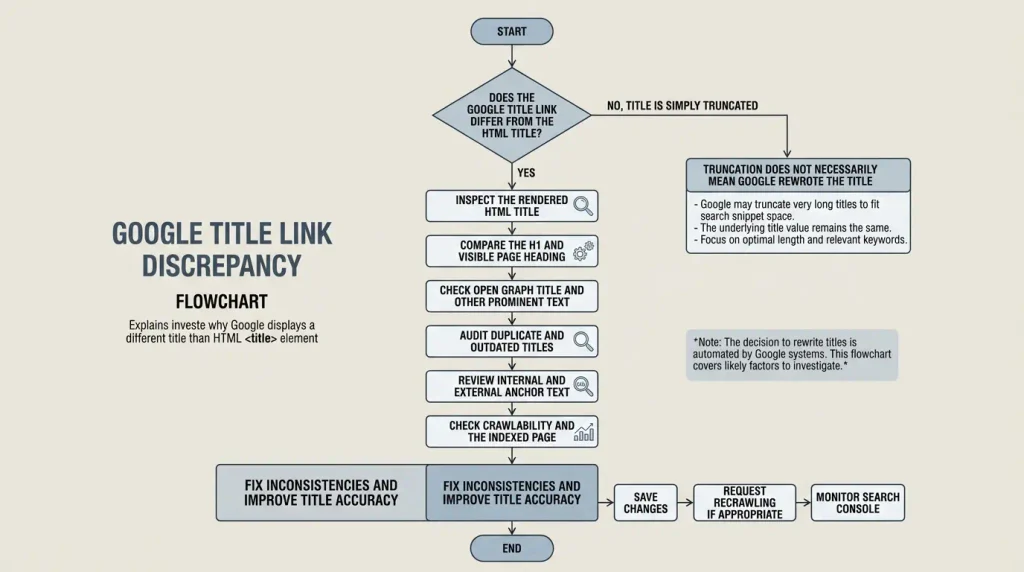
- How to Check Why Google Changed the Title
- Step 1: Compare the Search Result Title with the HTML
- Step 2: Check the H1
-
Step 3: Check
og:title - Step 4: Check Your SEO Plugin Templates
- Step 5: Check the Page in Google Search Console
- Step 6: Inspect the URL with the URL Inspection Tool
- Step 7: Check Indexing and Page Accessibility
- How to Fix a Title When Google Shows a Different One
- Can You Force Google to Keep a Specific Title?
- How to Check Titles in WordPress
- If You Use Yoast SEO
- If You Use Rank Math
- If Titles Change on Many Pages
- How a Title Change Can Affect CTR
- How to Evaluate the Result
- How to Reduce the Chances of Google Rewriting Your Title
- How to Link This Topic to Other SEO Content
- FAQ: Common Questions About Google Changing Page Titles
- Why does Google change a page title?
- Why does Google show a different title than Yoast SEO or Rank Math?
- Does a changed title mean Google has penalized my site?
- Can I stop Google from changing my title?
- Do the title and H1 have to match?
- What is the ideal title length for Google?
- Why does Google change titles on some pages but not others?
- Can Google use the H1 instead of the title?
- Can changing a title affect search rankings?
- Does og:title affect the title shown in Google?
- How long does Google take to update a title after a fix?
- Will requesting reindexing restore the old title?
- Should I change my title if Google shows a different but relevant one?
- Can WordPress caching cause Google to show a different title?
- Conclusion
In this guide, I'll explain why Google changes page titles, how to identify the cause, what to check in WordPress, and how to increase the likelihood that Google will use your title.
What Is a Page Title and Why Does It Matter for SEO
A title is the name of an HTML document, defined with the <title> element in the <head> section. It appears in the browser tab and bookmarks, and is one of Google's main sources for a search result title.
For example, the page code may include an element like this:
<title>How to Configure robots.txt in WordPress: A Step-by-Step Guide</title>This is not the same as the main article heading that visitors see on the page:
<h1>How to Configure robots.txt Correctly in WordPress</h1>The two headings can be similar, but they do not have to match exactly. A title can be more concise, while the H1 can be more detailed and reader-friendly.
Google recommends writing unique, clear, descriptive titles that accurately reflect the content of each page.
How a Title Differs from an H1 and Meta Description
| Element | Purpose | Example |
|---|---|---|
| SEO title | Document title and primary source for the search result title | Why Google Changes Page Titles: Causes and Solutions |
| H1 | The main visible page heading | Why Google Changes Page Titles |
| Meta description | A brief description of the page that Google may use in the search snippet | Why Google Changes Titles and How to Fix It |
| URL | Page address | /google-changes-title/ |
og:title | Title that social platforms may use when generating a preview | Why Google Changes Page Titles |
Do not confuse the SEO title with the meta description. If Google changes the search result title, it does not necessarily change the description as well. These elements are generated separately.
How Google Uses Page Titles
A title is more than a place to include a keyword. It helps Google understand the document's topic and allows users to judge whether a result is relevant.
A good title should:
- accurately describe the page;
- be distinct from titles on other pages of the site;
- include the main topic without excessive keyword repetition;
- make sense without additional context;
- match the language of the main content;
- avoid promising what the content does not deliver.
Do not try to fit every possible keyword into a title. Its purpose is to describe the page clearly, not to become a list of search queries.
Why Google Changes Page Titles
The key point is that Google is not required to display the exact text a site owner entered in the <title>.
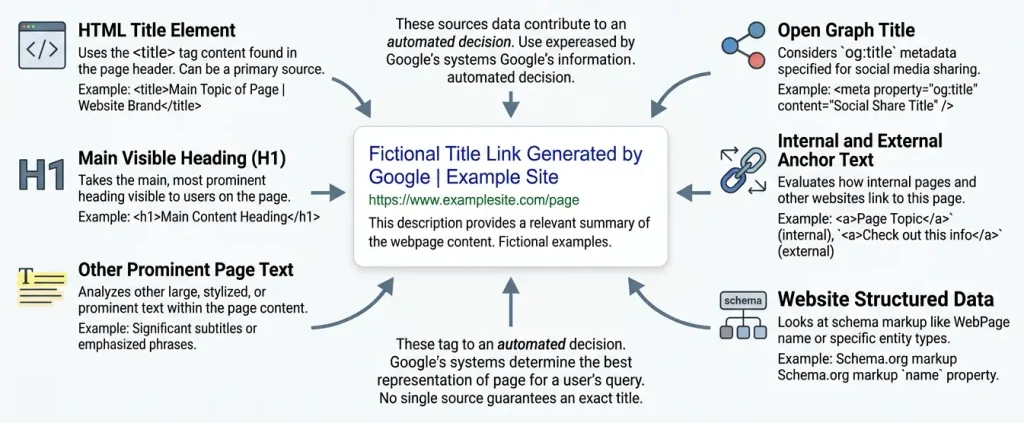
Google automatically generates a title link, the clickable headline that takes users to a page. To do this, it analyzes several information sources, not just the HTML title tag.
Here are the main reasons.
1. The Title Does Not Match the Page Content
This is one of the most common reasons Google changes a title.
Suppose a page is about configuring robots.txt in WordPress, but its title looks like this:
WordPress SEO: The Best Tools for Site OptimizationThe title is technically about SEO, but it does not explain what users will find on the page. If the main text and H1 are about robots.txt, Google may generate a more specific title.
Another example:
| Element | Current version |
|---|---|
| Title | WordPress SEO: The Complete Guide |
| H1 | How to Fix the Error Establishing a Database Connection |
| Main content | A guide to diagnosing a database connection error |
Here, the title describes a topic that is too broad. It does not match the page's main purpose, so Google may prefer different text.
How to fix it: make the title specific and align it with the article's actual content.
For example:
Error Establishing a Database Connection in WordPress: How to Fix ItYou do not have to copy the H1 word for word, but users should immediately understand what the page is about.
2. The Title Is Too Long
Google does not set a universal character limit for the HTML <title> tag. However, a title may be shortened in search results to fit the available space.
For example, you set this title:
How to Configure robots.txt in WordPress, Block Technical Pages from Indexing, and Improve Your Site's SEOThis reads more like a list of several topics than a concise title.
A better option:
robots.txt in WordPress: Setup and Common MistakesThe shorter version explains the topic immediately without trying to target every possible query.
It is useful to distinguish between two things:
- Visual truncation: the title does not fit in the available space.
- Rewriting: Google generates different text using information from the page.
These are different situations. A truncated title does not necessarily mean Google rewrote it.
How to fix it: remove repetition, secondary details, and unnecessary promotional phrases. Put the most important information near the beginning.
3. The Title Contains Too Many Keywords
Keyword stuffing is the unnatural repetition of keywords in an attempt to influence search visibility.
For example:
WordPress SEO, SEO WordPress, SEO for WordPress: The Best WordPress SEOThis title looks artificial and does not tell users what specific value the page offers.
A better option:
WordPress SEO: A Practical Optimization GuideGoogle explicitly recommends avoiding excessive keyword repetition and boilerplate titles.
This does not mean you should avoid using a keyword naturally. If the main query is “Google changes page titles,” you can use it once in the title and add a meaningful qualifier.
4. The Title and H1 Are Not Aligned
This is a common issue on WordPress sites.
The SEO plugin contains one title, while the post editor shows a completely different heading.
For example:
- Title: How to Speed Up WordPress in 2026.
- H1: The Complete Guide to Configuring Caching.
- Page content: A guide to optimizing images.
Each refers to site performance, but they describe different aspects.
Google may use the H1 or other prominent text if it considers it a more accurate description of the page.
However, a difference between the title and H1 is not an error by itself. For example, the title may be shorter for search results, while the H1 is more detailed for readers.
The problem occurs when these elements give conflicting impressions of the content.
What to do:
- Make sure the title reflects the main topic.
- Check that the H1 matches the page content.
- Make the main heading visually prominent.
- Remove unnecessary or competing headings that look like alternative page titles.
5. The Site Has Many Duplicate or Boilerplate Titles
This is especially common on online stores, sites with many categories, and WordPress projects with poorly configured SEO plugin templates.
For example:
| URL | Title |
|---|---|
/wordpress-robots/ | WordPress: The Complete Guide |
/wordpress-canonical/ | WordPress: The Complete Guide |
/wordpress-noindex/ | WordPress: The Complete Guide |
/wordpress-git/ | WordPress: The Complete Guide |
All the pages have the same title, even though their content differs.
As a result, users may find it harder to tell which result matches their query. Google may generate more specific titles based on the page text.
How to fix it: write a unique title for every piece of content.
For example:
How to Configure robots.txt Correctly in WordPressCanonical URLss in WordPress: Setup and Common MistakesNoindex in WordPress: How to Keep Pages Out of SearchGit for WordPress: Branches, Commits, and Deployment
If your site has hundreds or thousands of URLs, check not only individual pages but also the title generation templates.
6. The Title Is Out of Date, but the Content Has Been Updated
This happens when an article is updated regularly but its SEO title is left unchanged.
For example:
- Title:
Google's Website Requirements in 2023 - H1:
Current Google Requirements for Websites - Content: updated recommendations, examples, and instructions.
In this case, the title may give the false impression that the content is outdated.
Google documents cases where the title contains an old date while the page has more current information. In such cases, Google may use newer information from the visible heading.
To avoid this issue:
- do not add a year to the title unless it is genuinely useful;
- update the date in the title if the year is an important part of the query;
- do not change the date just to make the content look fresh;
- check that the title, H1, and article text do not contradict one another.
For evergreen content, it is often better to leave the year out unless it is essential.
7. The Title Is Incomplete or the Template Is Broken
Sometimes an SEO plugin generates an incomplete title because of incorrect variables, template conditions, or missing data.
For example:
| ThePetrovOr:
%title% |Or:
WordPress SEO:These titles do not provide enough information about the page.
Google may use the H1 or other prominent text to generate a more complete title.
On WordPress, check the following:
- title templates in the SEO plugin;
- post and page titles;
- automatic insertion of the site name;
- theme filters and functions;
- plugin conflicts;
- the validity of the HTML delivered to the browser.
8. The Title Is in a Different Language from the Main Content
Suppose an article is written in Ukrainian, but its title looks like this:
WordPress SEO Guide: Complete TutorialIf the main content is in Ukrainian and the English title does not match it, Google may generate a title that better matches the page's language and writing system.
This is especially important for multilingual sites.
Check the following:
- the language of the main content;
- Title;
- H1;
- whether the URL points to the correct language version;
- internal links between language versions;
- hreflang settings if the site has separate localized pages.
Google explicitly recommends matching the title's language and writing system to the main content of the page.
9. Google Uses Text from Internal or External Links
A search result title may be generated using more than the page's own content. Google also analyzes the text of links that point to the page.
Suppose the page title is:
Technical SEO GuideBut internal links to this page regularly use the anchor text:
How to Fix WordPress Indexing IssuesIf the page text, links, and other signals point to a more specific topic, Google may take that information into account when generating the title link.
This does not mean you should rewrite every anchor to influence the title. Internal links should be natural, useful, and accurately describe the page they point to.
What to check: whether other pages on the site use outdated, overly broad, or inaccurate link text for the target page.
10. The Site Name Is Repeated in the Title
For example:
Git for WordPress: ThePetrov | ThePetrovIf the site name is already displayed separately in the search result, Google may remove its repetition from the title link.
This is not necessarily a problem. The key is not to use up the entire title with branding when users are more interested in the page topic.
A practical option:
Git for WordPress: A Practical Guide | ThePetrovYou can add the site name through your SEO plugin's template, but check that the result is not too long or repetitive.
Where Google Gets Text for a New Title
To diagnose the issue correctly, you need to know which sources Google may consider.
| Source | What to check |
|---|---|
HTML <title> | Whether the SEO title in the code is correct |
| H1 | Whether the main heading matches the topic |
| Other headings | Whether there are multiple competing main headings |
og:title | Whether it contains outdated or different text |
| Prominent page text | Whether it matches the title |
| Text of links to the page | Whether the anchor text conflicts with the main topic |
| Internal links | Whether it is clear which page the links point to |
WebSite | Whether the site name is correctly specified in structured data |
These are the sources Google lists in its documentation on how search result titles are generated.
Important: Google does not necessarily use every source for every page, and there is no universal way to force it to choose a specific source.
Does a Changed Title Mean Your Site Has an SEO Problem?
No. A rewritten title is not, by itself, evidence of a penalty, filter, or technical error.
Google may change a title because it considers another version more accurate for users. Sometimes this points to an issue on the page, such as duplicate headings or a mismatch between the title and H1. In other cases, Google is simply generating an alternative title.
Assess the situation using all available signals.
Consider the following questions:
- Does the page match the relevant search queries?
- Are impressions stable in Google Search Console?
- Have clicks and CTR changed?
- Does the title vary for different queries?
- Are there indexing issues?
- Does the content meet user expectations?
If the title changes but the page continues to receive relevant traffic, there is no reason to assume the situation is critical.
How to Check Why Google Changed the Title
Investigate the page's actual state before making changes. Do not immediately rewrite every title on the site.
Step 1: Compare the Search Result Title with the HTML
Open the page in a browser and view its source code.
Find the <title> element in the <head>.
For example:
<head>
  <title>Git for WordPress: A Practical Guide</title>
</head>
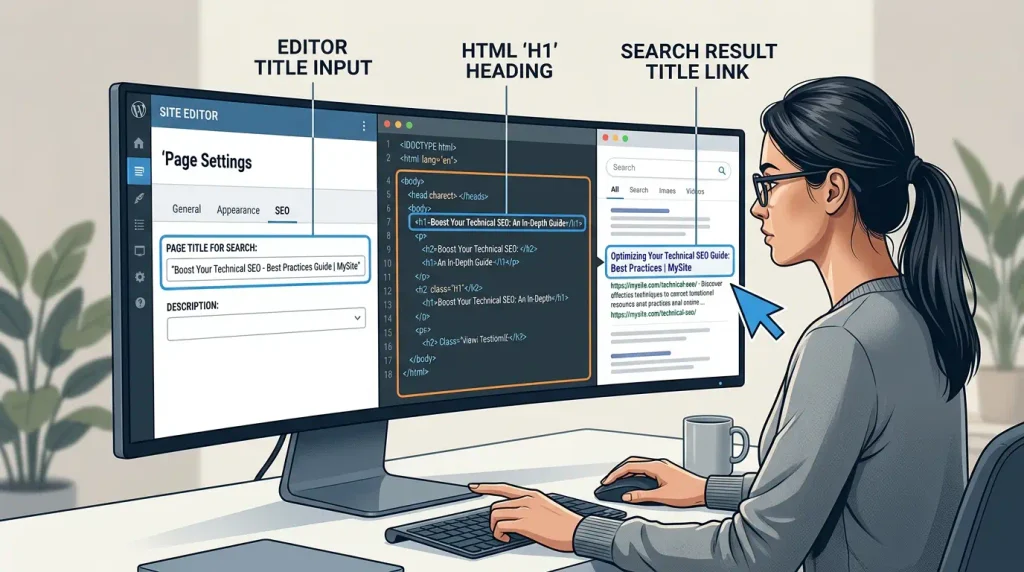
If the code contains different text from what you entered in the admin panel, the issue may involve WordPress, the SEO plugin, the theme, or caching.
Check the HTML actually served by the server, not just the title field in the editor.
Step 2: Check the H1
Find the page's main visible heading.
Compare it with the title.
For example:
- Title:
Canonical URLss in WordPress: Setup - H1:
How to Configure a Canonical URLs in WordPress
This difference makes sense: both headings describe the same topic.
But if the H1 is about robots.txt and the title is about canonicals, find out why the page has conflicting titles.
Step 3: Check og:title
If the page contains:
<meta property="og:title" content="Old article title">and the <title> specifies a different title, check whether both values match the current content.
A difference between og:title and <title> does not automatically mean there is an error. However, conflicting metadata can make site maintenance harder and create inconsistent previews across platforms.
Step 4: Check Your SEO Plugin Templates
In WordPress, a title may be generated automatically from:
- the post title;
- the site name;
- the category;
- the page type;
- the SEO plugin template;
- custom variables;
- theme or plugin functions.
If the same issue occurs across dozens of URLs, look for a shared cause instead of fixing each page individually.
Step 5: Check the Page in Google Search Console
Google Search Console can show which queries generate impressions and clicks for the page.
In the Performance report, select the page and review:
- impressions;
- clicks;
- CTR;
- average position;
- search queries.
Keep in mind that average position and CTR can vary with the mix of search queries, devices, countries, and other factors. Do not attribute every change in performance solely to a rewritten title.
Step 6: Inspect the URL with the URL Inspection Tool
In Google Search Console, open URL Inspection and enter the page address.
This lets you check indexing information and review available crawl details. If a view of the indexed page is available, use it to see what content Google may have seen.
Important: the tool does not provide a guaranteed way to identify the exact reason for every title change.
Step 7: Check Indexing and Page Accessibility
Make sure that:
- the URL returns the expected HTTP status;
- the page is accessible to Googlebot;
- there is no unintended
noindex; robots.txtdoes not block required resources or crawling of the page;- the canonical points to the correct URL;
- the main content is available after rendering.
If Google cannot access the full page content, it may have less information to use when generating a title.
How to Fix a Title When Google Shows a Different One
Once you have diagnosed the issue, make targeted changes.
| Problem | What to do |
|---|---|
| Title does not match the content | Rewrite the title to match the topic |
| Title and H1 conflict | Align their meaning |
| Duplicate titles | Configure unique templates |
| Outdated date | Update the date only when necessary |
| Keyword stuffing | Remove unnatural repetition |
| Empty title | Check the template and metadata generation |
| Wrong language | Match the title to the page's primary language |
| Unnecessary brand repetition | Shorten the site name template |
| Invalid HTML | Check the code, theme, and plugin conflicts |
| Outdated version in the index | Wait for a new crawl or request one |
Do not expect an immediate result after making a fix. Google notes that recrawling and processing updated title sources may take anywhere from a few days to a few weeks.
Can You Force Google to Keep a Specific Title?
No. There is no HTML tag or WordPress setting that guarantees Google will display your chosen title unchanged.
You can improve the quality of the title by using:
- valid HTML
<title>; - an accurate H1;
- clear content;
- consistent metadata;
- natural links;
- a logical page structure.
However, the final title link is generated automatically.
How to Check Titles in WordPress
For WordPress sites, it is useful to follow a dedicated checklist.
If You Use Yoast SEO
- Open the post or page.
- Find the Yoast SEO panel.
- Check the SEO title field.
- Make sure the template variables are generated correctly.
- Save your changes.
- Check the page HTML after saving.
If You Use Rank Math
- Open the relevant post.
- Open the Rank Math settings.
- Check the SEO title field.
- Review the title template.
- Make sure the site name is not duplicated.
- Check the result in the HTML.
Interface labels may vary between plugin versions. The principle is the same: check not only the value you entered but also the title actually generated on the page.
If Titles Change on Many Pages
Check global templates, theme settings, and possible plugin conflicts.
Do not install multiple SEO plugins to manage the same metadata. This can make diagnosis more difficult.
Also check the page cache and CDN if changes in the admin panel are not reflected in the HTML.
How a Title Change Can Affect CTR
CTR is the ratio of clicks to impressions in search results.
Formula:
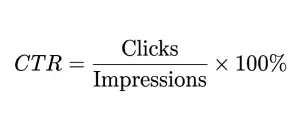
For example, if a page receives 1,000 impressions and 40 clicks, its CTR is 4%.
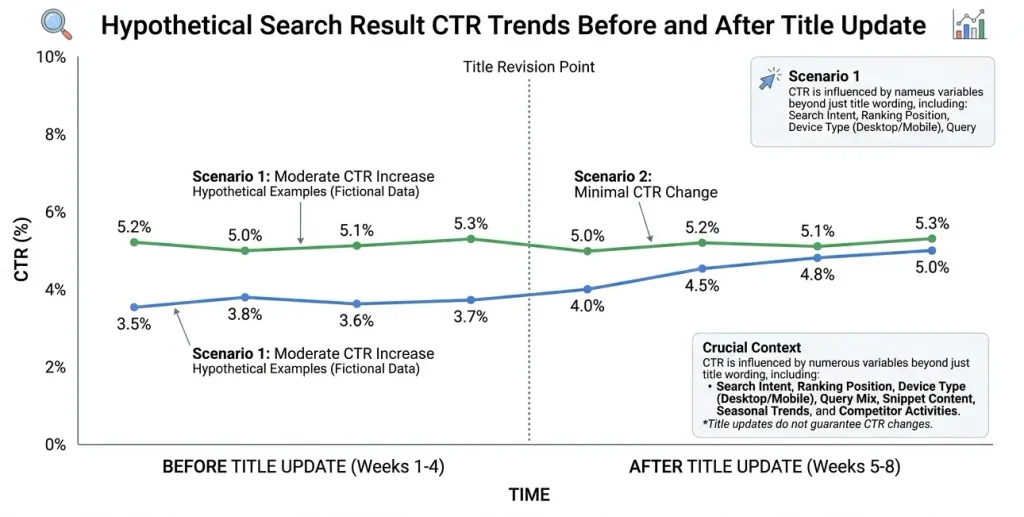
If Google changes the title, several outcomes are possible:
- the new title matches the query more closely and attracts more clicks;
- the new title is less clear;
- the change has no noticeable impact;
- performance changes because of factors unrelated to the title.
So there is no reason to assume that every rewritten title will hurt SEO.
How to Evaluate the Result
- Record the date you changed the title on your site.
- Check when the updated page was reindexed.
- Compare Search Console data across relevant periods.
- Analyze the same or comparable search queries.
- Account for seasonality, rankings, devices, and content changes.
Do not draw conclusions from a single day. Data for a page with low traffic may be too volatile.
How to Reduce the Chances of Google Rewriting Your Title
You cannot completely prevent Google from changing a title. But you can reduce the likelihood that it will consider the title inaccurate or incomplete.
Use this checklist before publishing:
- Every important page has a title.
- The title accurately describes the main topic.
- The primary keyword is used naturally.
- There is no excessive keyword repetition.
- The title is not duplicated across multiple URLs.
- The H1 clearly identifies the main subject of the page.
- The title and H1 do not contradict each other.
- The title's language matches the main content.
- The brand name is not repeated unnecessarily.
- Dates in the title are current when they matter to the topic.
- The
og:titledoes not contain outdated text. - The SEO plugin templates work correctly.
- The page is crawlable and contains the required content.
- Internal links point to the page using relevant anchor text.
There is no need to make every title mechanically identical in length or structure. What matters is accuracy, uniqueness, and clarity.
How to Link This Topic to Other SEO Content
If published on a technical SEO site, this article can become part of a topic cluster about WordPress optimization.
Relevant internal links include:
| Article topic | Example anchor text |
|---|---|
| WordPress SEO | basic SEO setup in WordPress |
| Canonical URLs | how to configure a canonical URL correctly |
| Noindex in WordPress | how to keep pages out of search results |
| robots.txt | how to configure robots.txt in WordPress |
| Internal linking | internal linking best practices |
| Google Search Console | how to check page performance in Google |
| Technical SEO audit | how to run a technical SEO audit |
Add links only where they help readers continue solving their problem. Do not put every anchor in one paragraph.
FAQ: Common Questions About Google Changing Page Titles
Why does Google change a page title?
Google automatically generates search result titles. It may use the H1, other prominent headings, page text, og:title, and link text if it considers them more accurate than the title you specified.
Why does Google show a different title than Yoast SEO or Rank Math?
An SEO plugin generates the page metadata, but it does not control the final title shown in Google. Check the HTML title element, H1, how well they match the content, and any template issues.
Does a changed title mean Google has penalized my site?
No. A title change alone does not prove that your site has been penalized. First check the title quality, how well it matches the page, and other SEO metrics.
Can I stop Google from changing my title?
No. There is no guaranteed way to force Google to keep a specific title in search results. You can only improve its quality and consistency with the page content.
Do the title and H1 have to match?
Not necessarily. They can use different wording as long as they describe the same topic. The important thing is that they do not contradict each other.
What is the ideal title length for Google?
There is no universal character limit for the HTML title element. Titles may be shortened in search results to fit the available space, so write concise, specific titles instead of relying on a fixed character count.
Why does Google change titles on some pages but not others?
Pages can differ in title quality, structure, how well the title matches the content, and other signals. As a result, Google does not necessarily change titles on every URL in the same way.
Can Google use the H1 instead of the title?
Yes. The H1 is one of the sources Google may use to generate a search result title.
Can changing a title affect search rankings?
There is no basis for claiming that every title change automatically improves or lowers rankings. A title helps describe the page; evaluate the result using query relevance, impressions, clicks, and other metrics.
Does og:title affect the title shown in Google?
Google lists og:title as one possible source for generating a title link. However, its presence does not guarantee that Google will use that value.
How long does Google take to update a title after a fix?
After recrawling and processing the page, the change may appear within a few days or weeks. The exact timing depends on when the URL is recrawled and processed.
Will requesting reindexing restore the old title?
A recrawl request helps Google discover the updated page sooner, but it does not force Google to use a specific title. If the title remains inaccurate, Google may continue to change it.
Should I change my title if Google shows a different but relevant one?
Not necessarily. If the title accurately describes the page and does not cause problems for users, first assess the performance and context. Do not change metadata just because the wording differs.
Can WordPress caching cause Google to show a different title?
Yes. Caching can leave an older version of the metadata in the HTML served by the site, but it is not the only possible cause. Check the source code, page cache, CDN, and SEO plugin templates.
Conclusion
If Google changes a page title, that is not a reason to immediately rewrite all the metadata on your site.
First, determine what is actually happening: is the title simply being truncated, generated from another source, or genuinely mismatched with the page content?
In most cases, start by checking the HTML <title>, the H1, SEO plugin templates, duplicate titles, and whether the content is up to date. If the issue affects many URLs, look for a shared cause in the templates and WordPress settings.
The guiding principle is simple: write a title that accurately describes the page for people, rather than merely containing a keyword for search engines. This cannot guarantee that the title will remain unchanged in search results, but it gives Google clearer, more consistent signals.
After making changes, check the page in Google Search Console, request a new crawl if needed, and give Google time to process the updates. Evaluate the result by the quality of the title and the page's search performance, not simply by whether Google chose different wording.

