
Internal Linking: The Complete Guide

Hi! Internal linking is one of the most overlooked aspects of SEO. A site owner may publish articles regularly, optimize titles and meta descriptions, and improve page speed, yet still miss out on organic growth because the pages are poorly connected.
Well-structured internal links help users find relevant information faster and help search engines understand a site's architecture, topical relationships, and the relative importance of individual pages. Internal linking is particularly valuable on large content sites, blogs, e-commerce stores, and websites with extensive related content.
- What Is Internal Linking?
- Why internal linking is important for SEO
- Key Functions of Internal Links
- How internal linking affects Google
- Types of internal links
- 1. Contextual Links
- 2. Links in the menu
- 3. Breadcrumbs
- 4. Links to Related Content
- 5. Links from categories
- 6. Links in the footer
- Internal linking and PageRank
- What Is Anchor Text for an Internal Link?
- Should You Always Use the Exact-Match Keyword in Anchor Text?
- Topic Clusters: A Strong Foundation for Internal Linking
- What Is a Pillar Page?
- Hub & Spoke model
- How to Build an Effective Internal Linking Strategy
- Step 1. Identify Your Most Important Pages
- Step 2. Group Pages into Topic Clusters
- Step 3. Identify High-Authority Pages
- How to Add Internal Links to a New Article
- How to Use Internal Links in Blog Posts
- How to Link to Commercial Pages
- Internal Linking for E-commerce Websites
- How Many Internal Links Should a Page Have?
- Where Should You Place Internal Links?
- Which Pages Should You Prioritize?
- What Are Orphan Pages?
- Important clarification
- How to Find Orphan Pages
- How to Find New Internal Linking Opportunities
- How to Add Internal Links to Older Articles
- Rule "new article → old articles → new article"
- Internal linking in WordPress
- Should nofollow be used for internal links?
- Internal links and canonical
- Internal linking and JavaScript
- Pagination and internal links
- The Most Common Internal Linking Mistakes
- 1. Adding Links Just to Hit a Number
- 2. Using ‘Click Here’ as Anchor Text
- 3. Same exact-match anchor everywhere
- 4. Linking Only to the Homepage
- 5. Ignoring old articles
- 6. Orphan pages
- 7. Links to 404 Pages
- 8. Links to Redirected URLs
- 9. Excessive linking
- 10. Missing Reciprocal Links
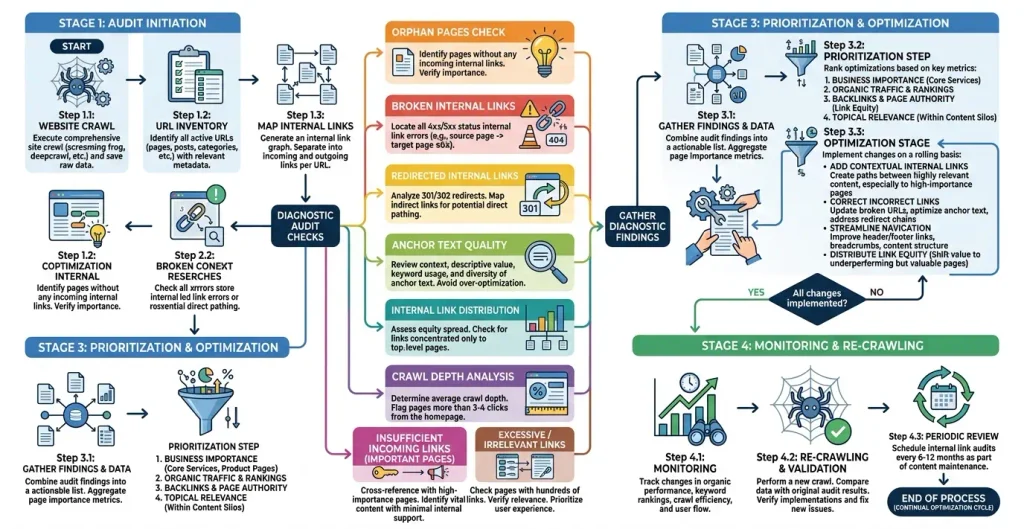
- How to Conduct an Internal Link Audit
- Step 1. Collect All URLs
- Step 2. Find Pages with No Incoming Links
- Step 3. Find Pages with Many Incoming Internal Links
- Step 4. Check Crawl Depth
- Step 5. Review Anchor Text
- Step 6. Check for Broken Links
- Practical strategy: "strong page → weak page"
- How to Build an Internal Linking Structure for a New Website
- How Internal Links Can Help Pages That Already Rank
- Is internal linking important for AI search?
- Tools for Analyzing Internal Links
- A Practical Internal Linking Workflow
- Internal Linking Checklist
- What not to do
- In Summary: The Formula for Effective Internal Linking
- Conclusion
- FAQ: Frequently Asked Questions About Internal Linking
- What Is Internal Linking?
- Does Internal Linking Affect SEO?
- How Many Internal Links Should an Article Have?
- Should Every Article Have Internal Links?
- What Is an Orphan Page?
- Should You Use a Keyword in Anchor Text?
- Is It Harmful to Use the Same Anchor Text Repeatedly?
- Should Internal Links Use the dofollow Attribute?
- Does Internal Linking Pass PageRank?
- Can Internal Linking Improve Google Rankings?
- Should You Link from Older Articles to New Ones?
- Can You Add Too Many Internal Links?
- Does a Small Website Need Internal Linking?
- How Often Should You Audit Internal Links?
- Does a Sitemap Replace Internal Links?
- Which Matters More: Internal or External Links?
This guide explains what internal linking is, how to build an effective internal linking strategy, which anchor text to use, how to create topic clusters, find orphan pages and linking issues, and conduct a comprehensive internal link audit. It also covers practical approaches for WordPress and content-focused websites.
What Is Internal Linking?
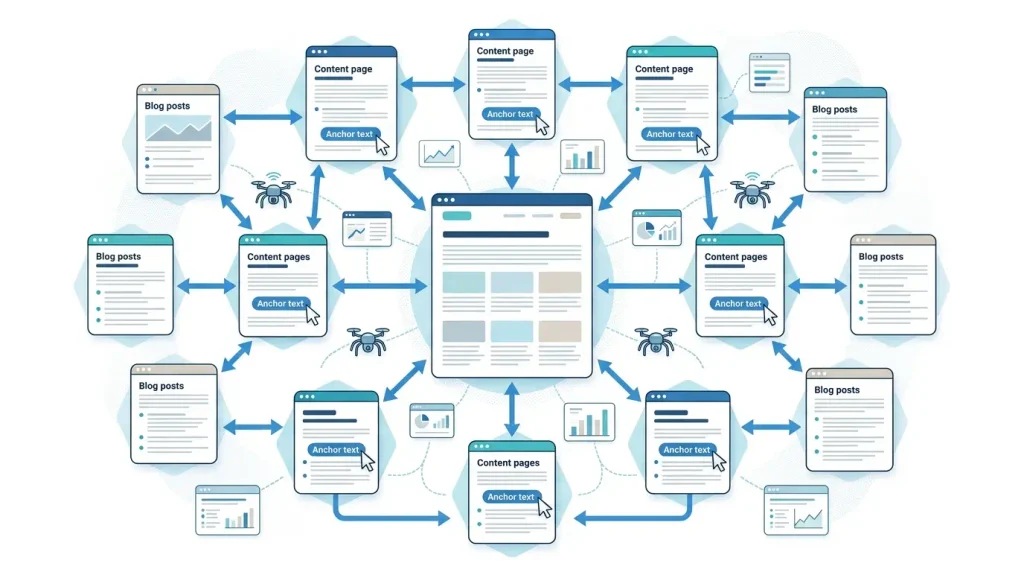
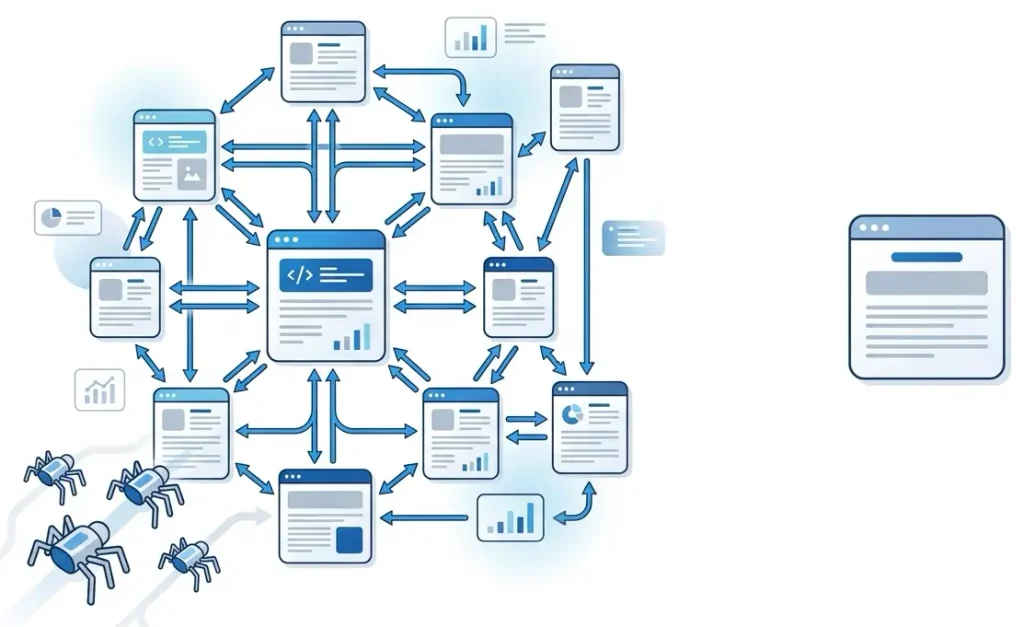
Internal linking is the system of links between pages on the same website.
For example, in an article about SEO, you mention robots.txt and add a link to a separate article:
For more on configuring robots.txt, see the [robots.txt in WordPress guide].
This is an internal link.
Unlike an external link, it does not lead to another domain, but connects pages within your resource.
And while technically an internal link is a normal HTML element <a>, from the point of view of SEO, it performs several important functions at once:
- helps the user navigate to related information;
- helps search engines find pages;
- shows the relationships between materials;
- helps to understand the subject of the landing page;
- transfers part of internal link equity;
- helps determine the relative importance of pages;
- forms the logical architecture of the site.
Google uses links to discover new pages, and the text of the link helps understand the context of the page it leads to.
That is why linking should be considered not as a mechanical addition of links, but as architecture of connections between site materials.
Why internal linking is important for SEO
Let's imagine a site with 300 articles.
Each article can be of high quality in itself. But if the pages are almost unrelated to each other, it is more difficult for the search engine to understand:
- which materials are basic;
- which pages belong to the same topic;
- which articles complement each other;
- which pages are most important for the site;
- how the user should navigate between materials.
Internal linking actually turns a set of individual URLs into integral information system.
Key Functions of Internal Links
| Assignment | What gives |
|---|---|
| Discovery | Helps to find new pages |
| Crawlability | Creates paths to traverse the site |
| Context | Explains the relationship between pages |
| Link equity | Helps distribute internal weight |
| Navigation | Facilitates user movement |
| Architecture | Forms the logical structure of the site |
| Prioritization | Helps highlight important pages |
| UX | Tells you what to read or watch next |
Current SEO guidelines also emphasize that internal links help search engines find content, understand page relationships, and identify important URLs.
How internal linking affects Google
There is an important nuance.
Do not think about internal links according to the principle:
"I will add 20 links - and the page will automatically rise in Google."
SEO works harder.
An internal reference is a signal in the wider system.
It helps Google:
- find URL;
- to understand its connection with other pages;
- determine the context through the link text;
- evaluate its place in the site architecture;
- distribute internal link equity.
At the same time, the number of links in itself is not a magic indicator.
5 relevant links are better than 30 added just for SEO.
Google explicitly recommends creating content primarily for people, not for manipulating search results. This also applies to linking.
Types of internal links
Internal links can be found in different parts of the site.
1. Contextual Links
This is a link within the main text.
For example:
Before launching a new site, it is worth checking robots.txt, to ensure crawlers can access the correct partitions.
This is one of the most valuable types of linking because the link is directly in the thematic context.
2. Links in the menu
For example:
- SEO
- WordPress
- Contacts
- About the site
The menu forms the basic structure of the resource and provides access to important sections.
3. Breadcrumbs
Breadcrumbs can look like this:
Home → SEO → Technical SEO → Robots.txtThey help the user understand where he is and create additional connections between the levels of the structure.
4. Links to Related Content
For example:
Read also:
Noindex in WordPress: The Complete Guide
Canonical URL in WordPress
How to properly configure robots.txt
This block is especially useful for blogs.
5. Links from categories
The category can contain a list of articles:
SEO
- internal linking
- Robots.txt
- Canonical URL
- Noindex
- Sitemap
- Core Web Vitals
Thus, the category becomes a kind of thematic node.
6. Links in the footer
Footer may also contain internal links:
- About the company
- Services
- Contacts
- Blog
- Privacy Policy
But don't turn your footer into a huge list of keywords.
Internal linking and PageRank
One of the reasons why backlinking matters for SEO is — distribution of link equity between pages.
It can be simplified like this.
The site has:
- main page;
- category;
- popular article;
- new article.
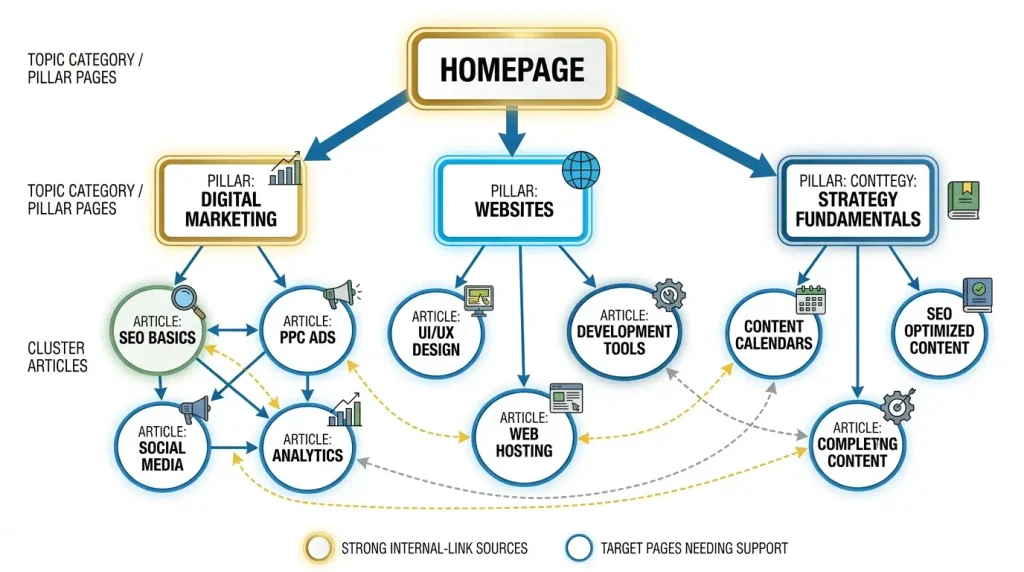
If a popular page receives many quality external links, it may have stronger internal potential.
By adding a relevant internal link from it to another important page, you create a link between them.
Therefore, one of the practical strategies looks like this:
strong page → relevant important page → topic clusterThis is why old articles with organic traffic are often very good sources of internal links for new content.
But you should not perceive PageRank as a simple system:
10 links = 10 times more SEO effect.
Weight distribution depends on the entire structure of the site.
What Is Anchor Text for an Internal Link?
Anchor is the text that the user sees as a link.
For example:
Read more at technical SEO guides.
Text:
technical SEO guides
is an encore.
The anchor should make it clear what is under the link.
Bad choices
- click here;
- read more;
- more details;
- go;
- here.
They don't explain where the link goes.
Better options
Instead of:
To learn more, click here.
is better:
More about robots.txt settings in WordPress Read in a separate guide.
Google and SEO tools recommend using descriptive, natural anchors that help you understand the purpose of the landing page.
Should You Always Use the Exact-Match Keyword in Anchor Text?
No.
This is one of the common mistakes.
Suppose the landing page is optimized for:
internal link
You don't need to make every link like this:
internal link
It is better to use natural options:
- internal linking of the site;
- internal link strategy;
- how to correctly link pages;
- internal links for SEO;
- structure of internal links.
The main thing is that the anchor accurately describes the content of the page.
Naturalness is more important than mechanical key repetition.
Topic Clusters: A Strong Foundation for Internal Linking
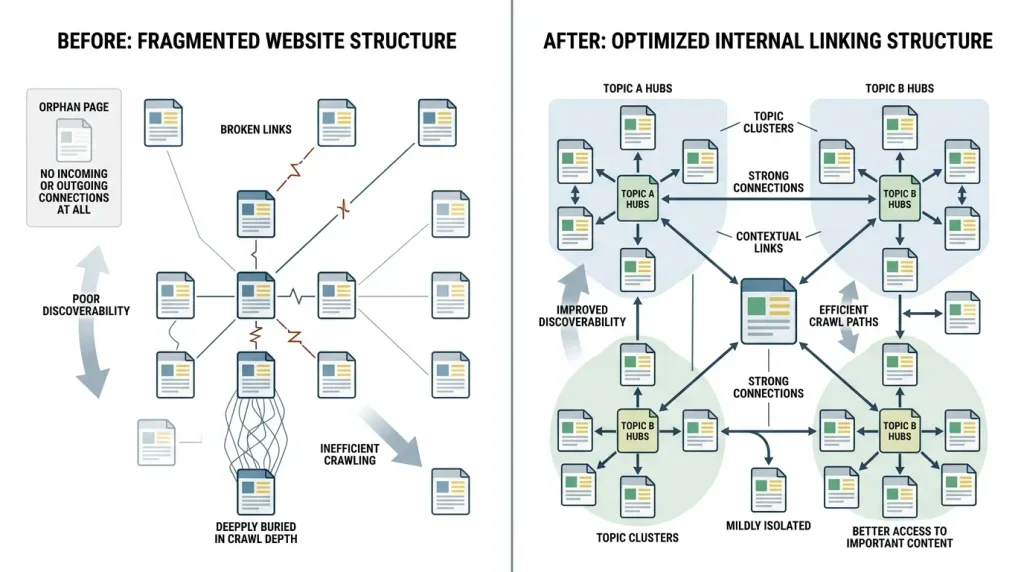
One of the most convenient ways to organize a large site — topic clusters, or thematic clusters.
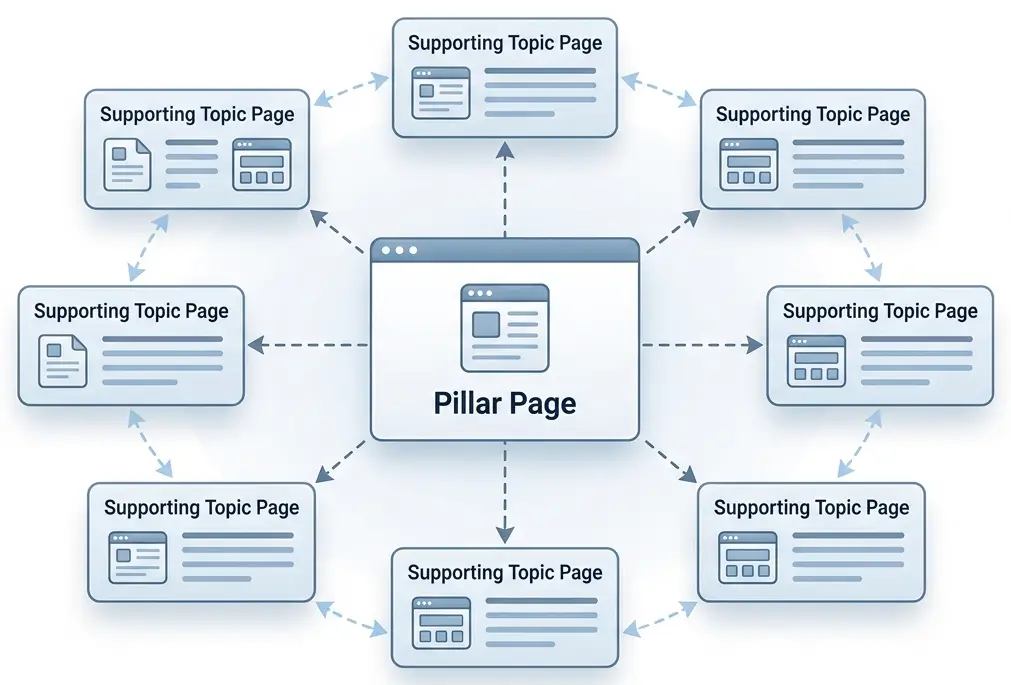
Their basis can be represented as:
Pillar Page → Cluster Pages → Supporting ContentFor example, for an SEO site.
Main topic

SEO site optimization

↓

Subtopics:

technical SEO;
internal linking;
robots.txt;
sitemap.xml;
canonical;
noindex;
Core Web Vitals.

↓

Narrow materials:

how to configure robots.txt in WordPress;
how to fix WordPress Critical Error;
how to fix Error Establishing a Database Connection;
WebP in WordPress;
AVIF vs WebP.
As a result, pages don't just exist on their own.
They form thematic network.
Current SEO guides recommend using the hub-and-spoke/topic-cluster structure for logically linking thematically related materials.
What Is a Pillar Page?
Pillar Page is a large authority page that covers a broad topic and links to more detailed material.
For example:
SEO: a complete guide
may refer to:
- technical SEO;
- keyword research;
- internal link;
- link building;
- SEO content;
- Google Search Console.
And each detailed material can link back to the Pillar Page.
This is how an interconnected structure is formed.
Hub & Spoke model
Simple logic looks like this:
Hub
↓ ↑
Cluster 1
↔
Cluster 2
↔
Cluster 3
↔
Cluster 4
No need to create an artificial rule that every page must link to absolutely every page.
Links should appear where there is a real thematic or navigational connection between the materials.
How to Build an Effective Internal Linking Strategy
It is better to start not with adding links, but with a structure.
Step 1. Identify Your Most Important Pages
Make a list of URLs that are most important for business or SEO.
For example:
| Type | Page |
|---|---|
| Primary | Home |
| Commercial | Services |
| Informational | SEO guide |
| Informational | WordPress guide |
| Convertible | Contacts |
Step 2. Group Pages into Topic Clusters
For each important page, find related materials.
For example:
internal linking

→ anchor
→ PageRank
→ orphan pages
→ topic clusters
→ WordPress
→ SEO audit.
Step 3. Identify High-Authority Pages
Particularly interesting pages are:
- have organic traffic;
- get backlinks;
- rank well;
- have many internal links;
- have been around for a long time and already have an SEO history.
These are good places to link to new or weaker pages.
How to Add Internal Links to a New Article
This is one of the most effective practical processes.
You are publishing a new article.
For example:
"WebP in WordPress: The Complete Guide"
Don't leave her alone.
Find old material where it naturally mentions:
- image optimization;
- site speed;
- PageSpeed;
- WebP format;
- WordPress images;
- Core Web Vitals.
And add a link to a new article from them.
At the same time, link to old relevant material from the new article.
We get:
old pages → new page → old pagesThis is much more powerful than just posting new stuff and waiting for Google to find it via sitemap.
How to Use Internal Links in Blog Posts
For an information site, a simple model works well.
In the introduction
Add a link if it really helps to understand the topic.
In the main part
Refer to:
- detailed explanations;
- related instructions;
- definition of terms;
- next steps.
At the end
Add block:
Read also
But don't rely on him alone.
The most valuable thematic connections occur often directly in the text.
How to Link to Commercial Pages
For a service site, linking should work not only between articles.
For example:
Technical SEO article
can lead to:
→ SEO audit
→ technical optimization
→ consultation.
And the service page can refer to:
→ cases;
→ useful guides;
→ FAQ;
→ relevant areas of work.
In this way, informational content and commercial pages work together.
Internal Linking for E-commerce Websites
For e-commerce, the structure can be much more complicated.
For example:
Home
↓
Category
↓
Subcategory
↓
Product
At the same time, an important role can be played by:
- category;
- subcategories;
- filters;
- brands;
- goods;
- articles;
- guides;
- FAQ.
For example, the article:
"How to choose a laptop for work"
can lead to:
- laptop category;
- specific models;
- characteristics guide;
- brand page.
This creates a logical path from the information request to the product.
How Many Internal Links Should a Page Have?
There is no universal number.
And this is important.
There is no rule:
"The article must have exactly 5 internal links."
Quantity depends on:
- volume of material;
- topics;
- site structure;
- number of relevant pages;
- user intent;
- page type.
Practical guideline:
Add as many links as actually help the user get to the next piece of information they need.
In SEO guides, there are often guidelines for several contextual links in the material, but they should not be turned into a strict norm.
Where Should You Place Internal Links?
Conventionally, the priority can be defined as follows:
| Place | Practical value |
|---|---|
| Main text | ⭐⭐⭐⭐⭐ |
| Navigation | ⭐⭐⭐⭐ |
| Breadcrumbs | ⭐⭐⭐⭐ |
| Related Posts | ⭐⭐⭐⭐ |
| Categories | ⭐⭐⭐⭐ |
| Sidebar | ⭐⭐⭐ |
| Footer | ⭐⭐ |
This does not mean that the footer link is "bad". A simple contextual link within a relevant paragraph usually conveys much more information about the relationship between the two pages.
Which Pages Should You Prioritize?
No need to distribute internal links evenly.
You almost always have pages that are more important than others.
For example:
- service pages;
- category;
- money pages;
- cornerstone content;
- materials with high potential;
- pages that are already in positions 5-20;
- new important materials.
A particularly interesting group are pages that already have impressions and positions, but need additional amplification.
What Are Orphan Pages?
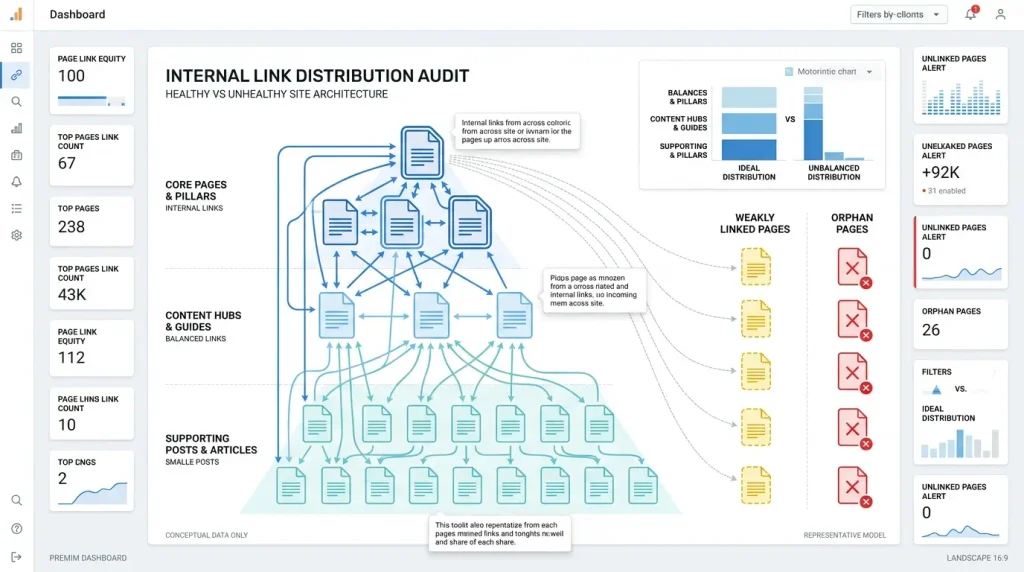
Orphan page, or is an orphan page, is a page to which there are no internal links from other pages of the site.
For example, you have published an article. The URL is in sitemap.xml, the article exists, but no other page on the site links to it. This is a problem of structure.
Orphan pages can be more difficult for crawlers to discover and crawl, and they don't get internal link equity from other pages.
Important clarification
Not every orphan page is an error.
For example, a dedicated technical page or a page that is intentionally not part of the navigation can remain isolated.
Therefore, first you need to determine:
Should this page get organic traffic at all?
If so, it should be included in the normal structure.
How to Find Orphan Pages
For this you can use:
- Google Search Console;
- Screaming Frog;
- Ahrefs;
- Semrush;
- other crawler/SEO platforms.
It is especially useful to compare multiple URL sources:
Crawl + sitemap + Search Console + backlinksThen you can find pages that are in the sitemap or known to the tools, but do not have a normal internal path.
SEO auditors like Ahrefs and Semrush single out orphan pages as an internal structure problem.
How to Find New Internal Linking Opportunities
There is a very simple method.
Suppose you need to strengthen an article:
"Canonical URL in WordPress"
Open Google and use the search:
site: vashdomen.ua canonical
This is how you can find pages where the desired topic is already mentioned.
Next, check each page:
Is it natural to link to the main article here?
If yes, add it.
This is one of the easiest ways to gradually improve your backlinks without a full site audit.
How to Add Internal Links to Older Articles
Old content is often a hidden reserve of SEO.
Let's say you have an article from 2023.
During this time you published:
- 5 new articles;
- 2 guides;
- 1 page service.
And the old article is still getting traffic.
Do not leave it unchanged.
Check:
- are the old links up to date;
- did better pages appear;
- are there links to new materials;
- are there 404 left;
- whether the anchors match the content;
- has the structure of the site changed?
Regular updating of internal links helps the site not to turn into a set of disparate pages.
Rule "new article → old articles → new article"
For a content site, it is useful to embed a link directly into the publication process.
To be published
Find 3-10 old relevant pages.
At the time of writing
Add natural links to them.
After publication
Find old articles and link back to new material.
As a result, each new article immediately enters the already existing thematic network.
Internal linking in WordPress
Adding an internal link in WordPress is technically easy.
In the editor:
- highlight the desired text;
- click the insert link button;
- find the page you want;
- paste URL;
- check anchor;
- save changes.
But the difficulty is not in adding the link itself.
Difficulty — correctly determine where, from where and why it should lead.
For a WordPress site, it is useful to regularly check:
- 404 link;
- redirects;
- orphan pages;
- pages without internal links;
- pages with a large number of incoming links;
- invalid URLs;
- link to old slug;
- duplicate pages.
Should nofollow be used for internal links?
In most normal cases, no.
If this is a normal internal link to an important page of the site, it makes no sense to put:
rel="nofollow"
For SEO-important internal pages, it is worth making sure that the search robot can normally follow the link.
Situations where nofollow is used intentionally for specific technical or functional scenarios need to be checked separately.
The main rule:
Don't add nofollow to internal links just because you read somewhere that it's an "SEO trick".
Internal links and canonical
Canonical and internal linking perform different functions.
Canonical helps to tell the search engine the desired canonical URL version of the page.
An internal link creates a navigational and structural link.
If you have duplicate or very similar URLs, you shouldn't try to solve the problem by just linking.
It is necessary to check separately:
- canonical;
- redirects;
- indexability;
- sitemap;
- internal links;
- URL parameters.
Internal linking and JavaScript
One important technical detail is that the search engine needs to see a normal link.
For SEO, a standard HTML link is a safer base option.
You shouldn't build critical navigation exclusively on complex JavaScript processors.
This is especially important for:
- menu;
- pagination;
- categories;
- goods;
- important articles.
SEO-audits separately pay attention to the fact that internal navigation is accessible to crawlers and implemented as normal links.
Pagination and internal links
Big blogs and stores can have:
/page/2/
/page/3/
/page/4/
These pages are also part of the internal structure.
It is important that the crawler can navigate between pages through normal links.
Do not make the second, third or fourth page of the archive actually inaccessible due to JavaScript or other barriers.
The Most Common Internal Linking Mistakes
1. Adding Links Just to Hit a Number
"20 more links to add."
No.
Must be added are useful link.
2. Using ‘Click Here’ as Anchor Text
This anchor says almost nothing about the landing page.
3. Same exact-match anchor everywhere
Constant mechanical repetition of one key looks unnatural.
Use natural variations.
4. Linking Only to the Homepage
If all the pages link to the homepage, but are hardly related to each other, the site loses a significant part of the potential of the internal architecture.
5. Ignoring old articles
Old pages are often the best sources of internal links.
6. Orphan pages
Important article does not have any internal link.
This is one of the first items to check during an audit.
7. Links to 404 Pages
If a page has been removed and dozens of articles still link to it, you need to fix those links.
8. Links to Redirected URLs
If an internal link leads to a URL that redirects to another URL, it's best to update the internal link itself.
So the user and the crawler get to the right page right away.
9. Excessive linking
When every second sentence contains a reference, the text becomes uncomfortable to read.
10. Missing Reciprocal Links
For example:
Pillar → articlebut:
article → Pillarmissing.
Not every link has to be two-way, but for topic clusters, reciprocal links are often very useful.
How to Conduct an Internal Link Audit
A full audit can be performed in several stages.
Step 1. Collect All URLs
Use:
- sitemap.xml;
- crawler;
- CMS;
- Google Search Console;
- SEO services.
Step 2. Find Pages with No Incoming Links
Create a list:
| URL | Indexable | Organic Traffic | Incoming Internal Links | Action |
|---|---|---|---|---|
| /article-1/ | Yes | Yes | 0 | Add link |
| /article-2/ | Yes | Yes | 1 | Boost |
| /article-3/ | No | No | 0 | Check the need |
| /article-4/ | Yes | No | 5 | Analyze |
Step 3. Find Pages with Many Incoming Internal Links
These can be:
- main;
- category;
- popular articles;
- old materials;
- pages with backlinks.
Then think:
What important pages can be naturally boosted from these URLs?
Step 4. Check Crawl Depth
Crawl depth is the conditional number of transitions required to reach the page.
For example:
Home → Category → Articlehas a shallower depth than:
Main → Category → Subcategory → Archive → ArticleBut you should not turn the "three clicks" rule into a strict Google law. In the SEO industry, this number is often used as a practical guideline, but Google has not set a universal limit of "no more than three clicks".
It is more correct to formulate the principle as follows:
Important pages should not be buried deep in the structure without good reason.
Step 5. Review Anchor Text
Make a list of internal anchors.
Search for:
- "here";
- "more detail";
- "read";
- URL instead of text;
- excessive exact-match anchors;
- anchors that do not match the landing page.
Step 6. Check for Broken Links
Every internal link should go where you expect.
Look especially for:
- 404;
- 410;
- 301;
- 302;
- invalid URLs;
- old slug.
SEO auditors directly identify broken internal links and links to redirected URLs among typical internal structure problems.
Practical strategy: "strong page → weak page"
One of the most useful linking scripts:
- We find a page that ranks well.
- Let's check what she is thematically close to.
- We are finding an important page with weaker results.
- Adding a natural context link.
- After some time we evaluate the changes.
For example:
Popular article about WordPress
↓
internal linking
↓
New article about canonical
This does not guarantee the growth of positions.
But it creates the right conditions for a better internal architecture.
How to Build an Internal Linking Structure for a New Website
If the site is just starting up, the situation is even simpler.
Don't wait until there are 500 articles.
Create the structure in advance.
For example:
Pillar
SEO for WordPress
Cluster

robots.txt;
sitemap.xml;
noindex;
canonical;
internal linking;
Core Web Vitals;
WebP;
AVIF.

Supporting content

For each subtopic:

instructions;
cases;
FAQ;
troubleshooting;
practical examples.
Then each new article immediately gets a place in the system.
How Internal Links Can Help Pages That Already Rank
An interesting SEO scenario - pages in the positions of approx 5–20.
For example, the article already receives:
- impressions;
- clicks;
- certain positions;
- organic traffic.
But she does not go higher.
In such a situation, it is worth checking:
- internal links;
- anchors;
- thematic cluster;
- content quality;
- search intent;
- backlinks;
- technical problems.
linking is not a substitute for quality content.
But if the content already meets the query, the correct structure of internal links can be one of the factors that should be optimized.
Is internal linking important for AI search?
Yes, but you also need to avoid loud statements here.
The internal structure helps to create clear connections between site materials.
When the site has:
- logical categories;
- thematic clusters;
- clear headings;
- descriptive anchors;
- related materials;
its content is easier to interpret as an interconnected system.
But you should not build a link only "under AI".
The basic principle remains unchanged:
First, usability for humans, then technical comprehensibility for search engines.
It is the people-first approach that Google calls fundamental for a successful search.
Tools for Analyzing Internal Links
For a small site, a lot of work can be done manually.
For a large resource, it is better to use specialized tools.
Google Search Console
Useful for understanding which pages Google sees and which URLs get organic impressions.
Screaming Frog
Convenient for technical crawl audit:
- internal links;
- response codes;
- redirects;
- orphan pages;
- anchor text;
- crawl depth.
Ahrefs
Allows you to analyze internal links, pages and link opportunities.
Semrush
Has separate reports for internal structure, orphan pages, distribution of internal links and link problems.
A Practical Internal Linking Workflow
If you need to relink today, use this algorithm.
Step 1. Make a list of the 20-50 most important pages.
Step 2. Divide them into thematic groups.
Step 3. Define pillar pages.
Step 4. For each pillar page, identify supporting materials.
Step 5. Check the orphan pages.
Step 6. Find strong pages with organic traffic.
Step 7. From these, add contextual links to important weaker pages.
Step 8. Add links from new articles to old relevant material.
Step 9. Update old articles and add links to new content.
Step 10. Check the anchors.
Step 11. Remove 404 links and unnecessary redirects.
Step 12. Repeat the crawl and check the result.
Internal Linking Checklist
Before finishing work, check:
- All important pages have internal links.
- No random orphan pages.
- Links to actual URLs.
- Not many internal 404 links.
- No unnecessary internal references to 301/302.
- Anchors describe landing pages.
- No mass use "click here".
- No excessive exact-match.
- Important pages get enough relevant links.
- New articles are linked to old content.
- Old popular articles link to new relevant material.
- Thematic clusters have a logical structure.
- Navigation is available for search engines.
- Internal links are not included just for the sake of quantity.
- linking remains convenient for the user.
What not to do
Remember a few simple rules.
Not required:
add links just for SEO;
is not required:
use the same key anchor in each link;
is not required:
make huge lists of keywords in the footer;
is not required:
leave important pages without internal links;
is not required:
consider sitemap as a replacement for normal internal navigation;
is not required:
consider the number of internal links as the main KPI.
Instead, you need to ask a simple question:
"Does this link help the user and does it explain the logical relationship between the two pages?"
If the answer is yes, the link probably makes sense.
In Summary: The Formula for Effective Internal Linking
Useful content
↓
Logical structure
↓
Thematic clusters
↓
Relevant contextual links
↓
Descriptive anchors
↓
No orphan pages
↓
Regular audit
↓
Constantly updating links between pages
This is the basis of internal linking, which remains relevant regardless of the specific Google algorithm or changes in the design of search results.
Conclusion
Internal linking is not just a set of links between articles.
This site architecture, which determines how easily users and search engines can navigate between related content.
Correct linking helps:
- find new pages;
- understand the structure of the site;
- establish thematic connections;
- transfer internal link equity;
- highlight important pages;
- improve navigation;
- form thematic clusters;
- reduce the number of isolated pages.
At the same time, the main rule remains very simple:
Do not create internal links for the search engine. Build them for a logical user journey, and at the same time make that journey understandable to search engines.
It is this model that best survives algorithm changes, search updates, and the emergence of new search output formats.
FAQ: Frequently Asked Questions About Internal Linking
What Is Internal Linking?
Internal linking is the system of links between pages on the same website. It helps users navigate between related content and helps search engines discover pages and understand how they relate to one another.
Does Internal Linking Affect SEO?
Yes. Internal links help search engines discover pages, understand their context and relationships, and distribute internal link equity across URLs.
How Many Internal Links Should an Article Have?
There is no fixed number. Include as many links as needed to support logical navigation and provide useful context. Do not add links just to reach an arbitrary target.
Should Every Article Have Internal Links?
Important, indexable pages should have at least one logical internal path from elsewhere on the site. Avoid leaving pages that should attract organic traffic accidentally isolated.
What Is an Orphan Page?
An orphan page has no incoming internal links. It may still be accessible through a sitemap, external links, or a direct URL, but it has no internal path from elsewhere on the site.
Should You Use a Keyword in Anchor Text?
You do not have to use the exact-match keyword. Use natural, descriptive anchor text that clearly indicates what the destination page is about.
Is It Harmful to Use the Same Anchor Text Repeatedly?
Repeating an anchor is not automatically a problem, but using the same exact-match anchor mechanically at scale can make a site look unnatural. Vary the wording while keeping it relevant.
Should Internal Links Use the dofollow Attribute?
For internal pages that matter for SEO, there is generally no reason to add the nofollow attribute. Use standard links that search engine crawlers can follow.
Does Internal Linking Pass PageRank?
Internal links are part of link-based signals, including the distribution of PageRank. A site's internal architecture therefore influences how link equity is distributed across its pages.
Can Internal Linking Improve Google Rankings?
Internal linking can support SEO, but it cannot guarantee higher rankings. Results also depend on content quality, search intent, competition, backlinks, technical health, and many other factors.
Should You Link from Older Articles to New Ones?
Yes, when a new article is relevant to an older one. This is one of the simplest ways to integrate new content into your site's structure.
Can You Add Too Many Internal Links?
Yes. When links stop helping users and become a mechanical list of keyword phrases, they make the page harder to use. Relevance and usefulness matter more than quantity.
Does a Small Website Need Internal Linking?
Yes. Even a site with 20–30 pages benefits from a logical structure, and a smaller site is often easier to organize well from the start.
How Often Should You Audit Internal Links?
Review the structure regularly, especially during major content updates and technical audits. Large websites may benefit from more frequent automated crawls.
Does a Sitemap Replace Internal Links?
No. A sitemap helps search engines discover URLs, but it does not replace logical site architecture or navigational links between pages.
Which Matters More: Internal or External Links?
They serve different purposes. External links can affect the authority of a domain and its pages, while internal links let you manage site architecture, navigation, and the distribution of internal link equity. A strong SEO strategy uses both.

