
Google AI Overviews: What They Are and How to Appear in AI Answers

Hi! Google Search is changing rapidly: users are increasingly seeing not just a list of links, but ready-made answers generated by artificial intelligence. One of the most important features of the new search is Google AI Overviews — AI-generated summaries that can appear directly above traditional search results and contain a short answer with links to sources.
For site owners, SEO specialists and content creators, this creates a new opportunity and at the same time a new challenge. Now it is not enough just to rank high for individual keywords. It is important to understand how Google determines the relevant sources for AI-generated answers, which pages can be used in AI Overviews and what needs to be done to make the site's content clear, accessible and useful for generative search.
In this article, we'll explore what Google AI Overviews are, how Google's AI-generated answers work, how they differ from standard search results and AI Mode, and also how to optimize a website for Google AI Search. We'll also cover technical SEO, content structure, search intent, internal linking, structured data, website authority, the use of AI in content creation, and common mistakes.
There is no single "secret AI SEO" or guaranteed way to appear in Google AI Overviews. The most reliable long-term strategy is to create useful, original, trustworthy and well-structured content, that addresses real user queries and at the same time remains accessible to Google Search systems.
- What Are Google AI Overviews?
- How Google AI Overviews Work
- Can You Optimize a Website Specifically for Google AI Overviews?
- Do You Need to Rank #1 on Google to Appear in an AI Overview?
- Why Search Intent Matters Even More
- How to Structure Content for Generative Search
- Answer Specific Questions Clearly
- How Tables Can Improve Content Structure
- Internal Linking for AI Search
- What Is Topical Authority?
- Do AI Overviews Require Special Schema Markup?
- Does Google Require llms.txt?
- Can You Use AI to Write SEO Content?
- What Makes Content More Valuable?
- How to Adapt Your SEO Strategy for AI Search
- 1. Technical SEO
- 2. Semantics
- 3. Content
- 4. Authority
- 5. Internal Linking
- How to Check Whether Your Site Is Ready for AI Overviews
- Technical Checklist
- Content Checklist
- SEO Checklist
- Common Mistakes When Optimizing for Google AI Search
- 1. Search for the "secret AI tag"
- 2. Overuse of keywords
- 3. Mass creation of AI articles
- 4. Copying competitors
- 5. Ignoring Technical SEO
- What WordPress Site Owners Should Do Now
- Step 1. Check indexing
- Step 2: Check robots.txt
- Step 3: Check noindex
- Step 4. Check canonical
- Step 5. Create topic clusters
- Step 6: Improve existing content
- Step 7: Analyze Search Console
- AI Overviews Don't Replace Traditional SEO
- FAQ: Google AI Overviews
- What Are Google AI Overviews?
- Can I guarantee that my page will appear in Google AI Overviews?
- Do I need to rank first on Google?
- Does Google require special schema markup for AI Overviews?
- Do I need to create an llms.txt file?
- Can I use ChatGPT or other AI tools to write articles?
- Do I need to change my WordPress site for AI Overviews?
- What matters most for AI search?
- Conclusion
So let's figure out, how to prepare a site for the age of generative search and improve its chances of being cited as a source in Google's AI-generated answers.
What Are Google AI Overviews?
Google AI Overviews are a Google Search feature that uses generative AI to create a concise summary in response to a search query.
Instead of the user immediately receiving only a list of organic search results, Google may show a concise answer at the top of the page, synthesized from information across several web sources.
Such a response may include:
- a brief explanation of the topic;
- some key facts;
- links to pages used as sources;
- follow-up details;
- suggestions for follow-up searches;
- structured information depending on the query.
This significantly changes the user's interaction with the search engine.
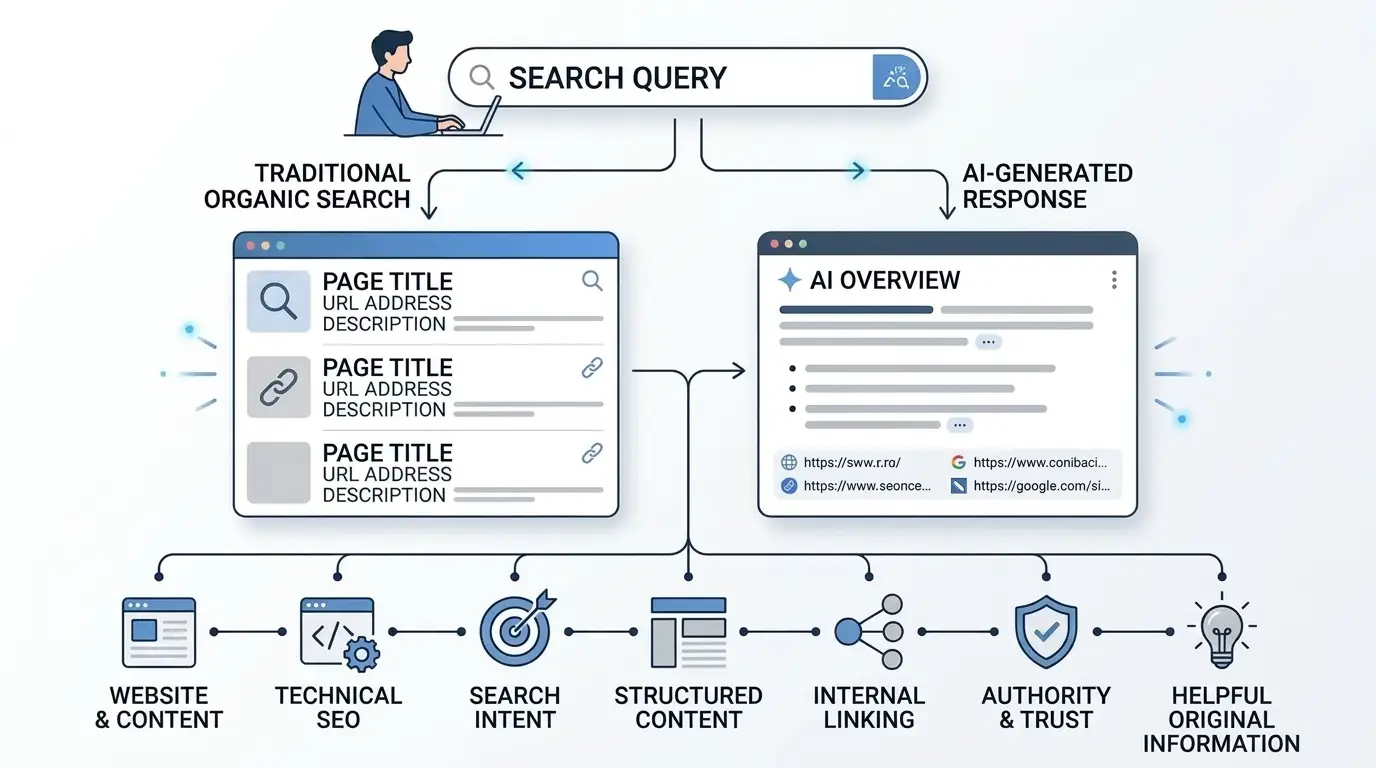
Previously, a typical scenario looked something like this:
search query → results page → go to site → find the answer on the page.With AI Overviews, the scenario may be different:
search query → AI-generated answer → browse sources → go to the most relevant site.For SEO, this means that competition for users' attention is no longer limited to traditional organic search results.
How Google AI Overviews Work
Google's exact internal algorithm is not disclosed, so you should not take any third-party schemes as an official description of how the system works.
In a simplified form, the process can be represented as follows:
- The user enters a search query.
- Google determines the intent of the query and the context required.
- Google finds relevant information in its index.
- For more complex queries, Google can generate an AI Overview.
- The generative system summarizes information.
- Links to relevant web pages may be added to the answer.
- The user can go to the source for detailed information.
It is important to understand: An AI Overview is not simply a copy of text from a single page.
Google can use information from several sources, combine it and form a new answer.
That is why the traditional page optimization for a single keyword no longer describes the entire process of site interaction with generative search.
Can You Optimize a Website Specifically for Google AI Overviews?
This is one of the most important questions for SEO.
Google does not offer a separate set of special meta tags or a special SEO protocol that guarantees the inclusion of a website in AI Overviews.
That is, there is no formula:
add a special tag → get AI Overview.There is also no official guarantee that a page that ranks first in organic search results will automatically be the source of an AI-generated answer.
Instead, Google recommends following the fundamental principles of SEO.
This means:
- the page must be accessible to search engines;
- important content must be accessible to Googlebot;
- the page must match the search intent;
- information should be useful to users;
- content should be clear and well structured;
- site must have a normal technical SEO basis;
- page should not be blocked from being indexed or used in search results.
Therefore, SEO for AI Overviews is not a separate SEO replacement, but an evolution of the core principles of high-quality search content.
Do You Need to Rank #1 on Google to Appear in an AI Overview?
Don't think of AI Overviews as a simple list of results with positions #1, #2, #3.
The page used as the source of the AI-generated answer does not necessarily have to have the top organic ranking for a query.
For Google, the following may be important:
- relevance to a specific query;
- quality of information;
- completeness of the answer;
- source authority;
- content clarity;
- up-to-date information;
- the relevance of the page to a specific search intent.
Therefore, the strategy of "rank #1 first, then think about AI" may be too simplistic.
For modern SEO, it is important to create pages that really answer user questions.
Why Search Intent Matters Even More
One of the key components of optimization for generative search is the correct understanding of search intent.
For example, a user searches for:
“how to configure robots.txt in WordPress”
He is unlikely to need a generic 500-word article about SEO.
He most likely wants to get:
- a finished robots.txt example;
- explanation of directives;
- instructions for WordPress;
- information about what can be blocked;
- information about what should not be blocked;
- file verification method;
- typical errors.
Therefore, a page that answers all these practical questions has a better chance of being useful to users.
And this is important not only for AI Overviews.
This approach simultaneously helps improve traditional SEO.
How to Structure Content for Generative Search
A well-structured text is easier to read not only for humans, but also for search engines.
For long-form articles, use a logical hierarchy:
H1 → H2 → H3For example:
H1: How to configure robots.txt in WordPress
H2: What is robots.txt
H2: Why robots.txt is needed
H2: How to create robots.txt in WordPress
H3: Using an SEO plugin
H3: Using your hosting provider
H3: Manual editing
H2: What You Can Block from Google
H2: Typical errors
H2: FAQ
This structure allows you to divide a large topic into logical information blocks.
Answer Specific Questions Clearly
One practical approach is not to hide the important answer in the ten paragraphs of the introduction.
If the user asks:
"Should /wp-admin/ be blocked in robots.txt?"
it's best to answer directly:
You should not use robots.txt as the main way to protect the WordPress admin area. The robots.txt file is intended to control crawling, not to control access to private resources.
After a short answer, a detailed explanation can be given.
This creates a good structure:
question → short answer → explanation → example → additional nuances.This format is particularly useful for informational queries.
How Tables Can Improve Content Structure
Tables are useful where you need to compare several options.
For example:
| Tool | What is it used for | Main feature |
|---|---|---|
| robots.txt | Crawl control | Not a protection mechanism |
| noindex | Prevents a page from being indexed | Tells search engines how to index a page |
| canonical | Identifies the preferred version of a URL | Helps manage duplicate content |
| XML Sitemap | Helps search engines discover site URLs | Helps search engines discover your pages |
But you don't need to add tables just for SEO.
Their task is to make information clearer.
Internal Linking for AI Search
Internal links remain an important part of a site's SEO structure.
If there are several articles within the same topic cluster on the site, they should be logically linked.
For example, for WordPress SEO you can create a topic cluster:
robots.txt
   ↓
noindex
   ↓
canonical
   ↓
XML Sitemap
   ↓
WordPress indexing
   ↓
technical SEO WordPress
As a result, individual articles cease to be isolated pages.
They form the site's topical structure.
What Is Topical Authority?
Topical authority describes how comprehensively and credibly a site covers a subject.
For example, if the site has one article:
"What is a canonical URL?"
is one page on that topic.
And if there are dozens of quality materials on the site:
- what is canonical;
- how canonical works;
- canonical in WordPress;
- error canonical;
- self-referencing canonical;
- canonical and duplicates;
- canonical in WooCommerce;
- canonical and pagination;
- how to check canonical;
- canonical in Google Search Console;
the site demonstrates broader coverage of the topic.
This does not guarantee inclusion in AI Overviews.
But this structure allows you to create a stronger topical resourcethat better matches a wide set of related searches.
Do AI Overviews Require Special Schema Markup?
This is another common myth.
There is no need to invent a custom schema such as:
AIOverviewSchema
or:
GoogleAISchema
Google does not offer a special structured data type for AI Overviews.
Structured data should be used according to Google's official documentation and the actual content type.
For example, depending on the page, appropriate structured data may be used for:
- Article;
- Breadcrumb;
- Product;
- Organization;
- LocalBusiness;
- Recipe;
- other supported types.
But structured data is not a guarantee that the page will appear in AI Overview.
Structured data helps search engines better understand a page's content and structure.
Does Google Require llms.txt?
There has been a lot of debate around llms.txt.
Some site owners create this file to inform AI systems about the structure of their content.
However, it is important to distinguish between different AI systems and search products.
Google does not require llms.txt for a page to be included in AI Overviews.
Therefore, creating this file is not a required part of Google SEO.
Basic things are much more important to Google:
- page accessibility;
- indexing;
- content quality;
- relevance;
- technical condition of the site;
- clear structure;
- matching the search intent.
Can You Use AI to Write SEO Content?
Using AI to write content should not be the goal of an SEO strategy in itself.
The question is different:
is the final material useful to users?
For example, a bad scenario:
- Take 10 competitor articles.
- Feed them into an AI tool.
- Ask it to rewrite them.
- Publish.
- Add keywords.
- Expect high rankings.
As a result, a text may appear that formally corresponds to the topic, but does not add anything new.
A better approach:
- Define search intent.
- Analyze user questions.
- Form the structure of the material.
- Add your first-hand experience or original data.
- Check the facts.
- Use AI as a research and drafting tool.
- Have a human edit the material.
- Add examples, tables, explanations and practical recommendations.
- Update the content regularly.
That is, AI can be a tool for creating content, but the value of a page should not be reduced to the very fact of its generation.
What Makes Content More Valuable?
For competitive informational queries, it is worth trying to create content with original value.
For example:
- original tests;
- screenshots;
- real examples;
- comparisons;
- tables;
- statistics;
- step-by-step instructions;
- code examples;
- results of experiments;
- errors and ways to correct them;
- answers to related questions.
Content that answers the question:
"What should I do next?" can be especially valuable.
So instead of generic:
Canonical URL is a way to tell the search engine about the main version of the page.
it is better to give practical material:
How to check canonical in WordPress → where to find it in the code → which values are correct → what errors occur most often → how to fix them.
Practical value is what makes an article stand out.
How to Adapt Your SEO Strategy for AI Search
You should not completely abandon traditional SEO.
On the contrary, the fundamentals remain extremely important.
Use this framework:
1. Technical SEO
Check:
- indexing;
- robots.txt;
- sitemap.xml;
- canonical;
- noindex;
- Core Web Vitals;
- mobile usability;
- HTTP status;
- redirects;
- duplicates;
- internal links.
2. Semantics
Define:
- primary keywords;
- long-tail queries;
- user questions;
- related terms;
- search intent.
3. Content
Create materials that:
- answer a specific question;
- have a logical structure;
- contain practical examples;
- do not duplicate competitors;
- are regularly updated.
4. Authority
Show:
- the author;
- expertise;
- sources;
- last updated date;
- first-hand experience;
- real examples.
5. Internal Linking
Link related articles and build topic clusters.
How to Check Whether Your Site Is Ready for AI Overviews
Before publishing or updating an article, you can go through a simple checklist.
Technical Checklist
- The page is accessible to Googlebot.
- The page has no unwanted
noindex. - Important content is present in HTML.
- The canonical URL is set correctly.
- The page has the correct HTTP status.
- The XML sitemap is accessible.
- The page has relevant internal links.
Content Checklist
- The article matches a specific search intent.
- The main answer is already clear at the beginning.
- The content uses a logical H2 and H3 heading structure.
- There are practical examples.
- No unnecessary filler.
- The information is fact-checked.
- The content offers something original.
- Answers to related questions are included in the article.
SEO Checklist
- Optimized Title.
- Optimized meta description.
- Clear URL.
- Correct canonical and robots directives.
- The page includes internal links.
- Images have descriptive alt text.
- Structured data is used where appropriate.
Common Mistakes When Optimizing for Google AI Search
1. Search for the "secret AI tag"
Many site owners look for a special tag that will get their page into an AI Overview.
There is no such universal tag.
2. Overuse of keywords
Generative search does not mean that you have to insert a keyword phrase into every paragraph.
The text should remain natural.
3. Mass creation of AI articles
Hundreds of similar materials do not guarantee organic traffic.
Content quality and usefulness matter more.
4. Copying competitors
If ten sites cover the same topic, the eleventh almost identical article is unlikely to create significant additional value.
You need to look for an opportunity to answer the question better, more clearly or more practically.
5. Ignoring Technical SEO
Even a very high-quality article won't help if Google can't access the page properly.
Therefore, a solid technical foundation remains essential.
What WordPress Site Owners Should Do Now
If you have a WordPress site, you don't need to rebuild your entire SEO strategy just because of the advent of AI Overviews.
A more practical approach is to review the fundamentals.
Step 1. Check indexing
Make sure important pages can be indexed by Google.
Step 2: Check robots.txt
Do not accidentally block important resources or sections of the site.
Step 3: Check noindex
Make sure that the pages you want don't get noindex due to SEO plugin settings.
Step 4. Check canonical
The pages must have correct canonical URLs.
Step 5. Create topic clusters
Do not publish dozens of completely independent articles.
Create groups of materials around main themes.
Step 6: Improve existing content
Sometimes updating an old article can be more useful than creating another one.
Add:
- new examples;
- answers to timely questions;
- tables;
- FAQ;
- internal links;
- up-to-date information;
- practical instructions.
Step 7: Analyze Search Console
Google Search Console remains one of the main tools for analyzing organic search.
Track:
- impressions;
- clicks;
- CTR;
- rankings;
- queries;
- pages;
- changes after updating content.
AI Overviews Don't Replace Traditional SEO
This is fundamentally important.
The arrival of AI-generated answers does not mean that:
SEO is dead → now only AI SEO is needed.Something else happens faster:
SEO → + generative search → + new ways of user interaction with results.Therefore, the basic principles remain:
- useful content;
- a technically sound website;
- correct indexing;
- clear structure;
- authority;
- relevance;
- search intent;
- internal linking.
What changes most is how users find and consume information.
FAQ: Google AI Overviews
What Are Google AI Overviews?
Google AI Overviews are a Google Search feature that uses generative AI to provide concise summaries of search queries, with links to relevant web sources.
Can I guarantee that my page will appear in Google AI Overviews?
No. There is no way to guarantee that a specific page will be featured in an AI Overview.
Do I need to rank first on Google?
Ranking first in organic search does not, by itself, guarantee that a page will be cited as a source in an AI Overview.
Does Google require special schema markup for AI Overviews?
No. There is no special schema markup that guarantees inclusion in Google AI Overviews.
Do I need to create an llms.txt file?
Google does not require an llms.txt file for a page to be eligible for AI Overviews.
Can I use ChatGPT or other AI tools to write articles?
AI can support content research and drafting, but the finished article should be useful, accurate, and genuinely valuable to readers.
Do I need to change my WordPress site for AI Overviews?
You do not need to rebuild your site. Start by checking that your technical SEO, indexing, site structure, and content quality are in good shape.
What matters most for AI search?
No single factor guarantees a place in an AI-generated answer. Focus on useful content that satisfies search intent, and make sure search engines can access and crawl your pages.
Conclusion
Google AI Overviews are gradually changing how users interact with search. Instead of a simple list of links, Google can immediately form a concise, synthesized answer and offer the user sources for further reading.
For site owners, this means that content quality becomes even more important.
At the same time, there is no need to look for a separate, "magic" form of AI optimization.
No AI tag can guarantee that a site will appear in Google AI Overviews. There is no universal llms.txtthat will solve the problem. There is no guarantee that the top position in organic search will automatically turn into a mention in the AI-generated answer.
Instead, focus on the foundation:
technical SEO + quality content + search intent + structured information + internal linking + authority + real benefit to the reader.
This approach helps you maintain traditional organic search visibility and prepare the site for a new search model in which artificial intelligence plays an increasingly important role.
For WordPress sites, this is especially relevant: before looking for special AI optimization methods, you should make sure that robots.txt, noindex, canonical, sitemap, internal structure and indexing are configured correctly.
On this foundation, you can build a content strategy focused not just on keywords, but on users' real questions and needs.

