
Prompt Engineering for Developers: Patterns, Techniques, and Reliable Instructions

Hi! Prompt engineering for developers is no longer about finding a “magic phrase” that makes a model return the right answer.
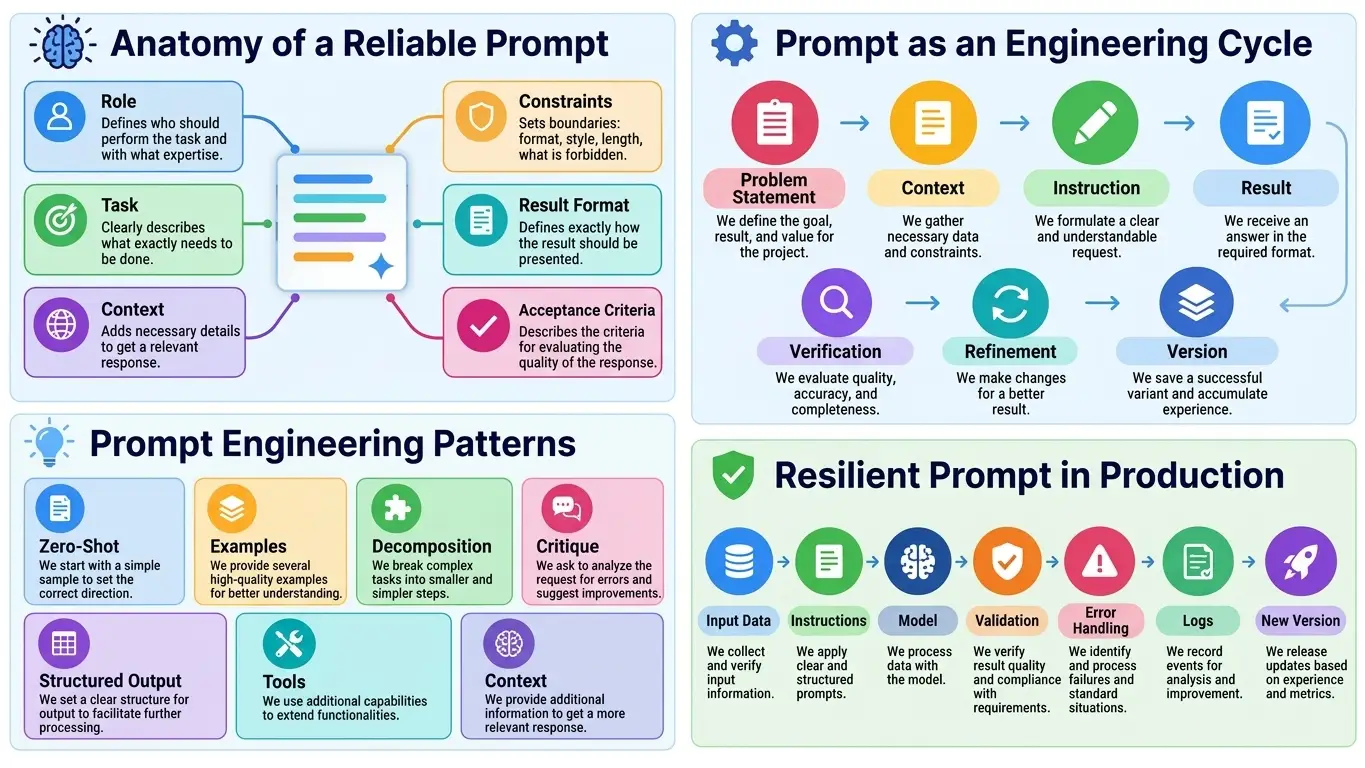
In professional software development, prompts are best understood as specifications for probabilistic systems. They define the task, context, constraints, output format, and acceptance criteria that make results verifiable.
That is why a well-designed prompt has much in common with a good technical specification, API contract, or test case.
Research on prompt engineering for software engineering identifies dozens of recurring patterns that can be grouped by purpose: learning, interaction, specialized task execution, and model optimization.
- What Is Prompt Engineering in Software Development
- The Anatomy of a Reliable Prompt
- A Core Pattern: Role → Task → Context → Constraints → Output
- The Clear Task Definition Pattern
- A Weak Example
- A Better Example
- The Constraints Pattern
- Zero-shot, one-shot and few-shot
- Zero-shot
- Few-shot
- Breaking Down Complex Tasks
- Advantages
- The Critical Review Pattern
- Structured output
- Validation Matters More Than Wording
- Context Matters More Than “Magic Words”
- The Instruction–Data Separation Pattern
- Instructions for Tools and External Actions
- Anti-Patterns That Make Prompts Unreliable
- An Overly Vague Request
- Conflicting instructions
- Too Many Rules
- No Output Format
- No Guidance for Uncertainty
- Trusting the Output Without Validation
- Prompts need to be tested
- How to Measure Prompt Quality
- Prompts as Versioned Artifacts
- A Reliable AI Workflow Architecture
- How to Design Reliable Instructions
- 1. Define the output
- 2. Define the input
- 3. Define the context
- 4. Define the constraints
- 5. Define the format
- 6. Define uncertainty
- 7. Add examples
- 8. Add validation
- 9. Create a test set
- 10. Version the prompt
- A General-Purpose Prompt Template for Developers
- When to Make a Prompt More Complex and When to Simplify It
- What Sets a Production Prompt Apart from an Ordinary Request
- Will Prompt Engineering Replace Traditional Programming?
- Conclusion
- FAQ: Frequently Asked Questions About Prompt Engineering
- What is prompt engineering for developers?
- What makes a good prompt?
- Should you always specify a role?
- When to use it few-shot prompting?
- Should you ask a model to “think step by step”?
- Is it enough to ask the model to return JSON?
- Do prompts need to be versioned?
- Can a good prompt guarantee a correct answer?
- What Is the Most Common Beginner Mistake?
- Will Prompt Engineering Remain Relevant in the Future?
In this article, I’ll cover:
- how to turn a one-off prompt into a maintainable system component.
- how to design prompts for software development;
- the building blocks of a reliable instruction;
- which patterns are most often used;
- when to use zero-shot and few-shot;
- how to decompose complex tasks;
- how to work with structured answers;
- how to reduce ambiguity;
- how to test and version prompts;
- which anti-patterns make AI features unreliable;
- how to turn a one-off prompt into a maintainable system component.
What Is Prompt Engineering in Software Development
Prompt engineering is the process of designing, testing, and refining the instructions and context that shape how a language model behaves when carrying out a specific task.
For developers, this can include:
- code generation;
- refactoring;
- debugging;
- writing tests;
- code review;
- writing documentation;
- requirements analysis;
- API design;
- conversion of unstructured data into structured data;
- classification;
- information extraction;
- working with technical documentation;
- automating engineering workflows.
The main change in thinking is that the prompt should be designed not for a beautiful answer, but for the expected behavior of the system.
Put simply:
A good prompt is not about “how to ask the model.” It is about “how to define a contract for completing a task.”
The Anatomy of a Reliable Prompt
A basic prompt can be represented as a set of independent components.
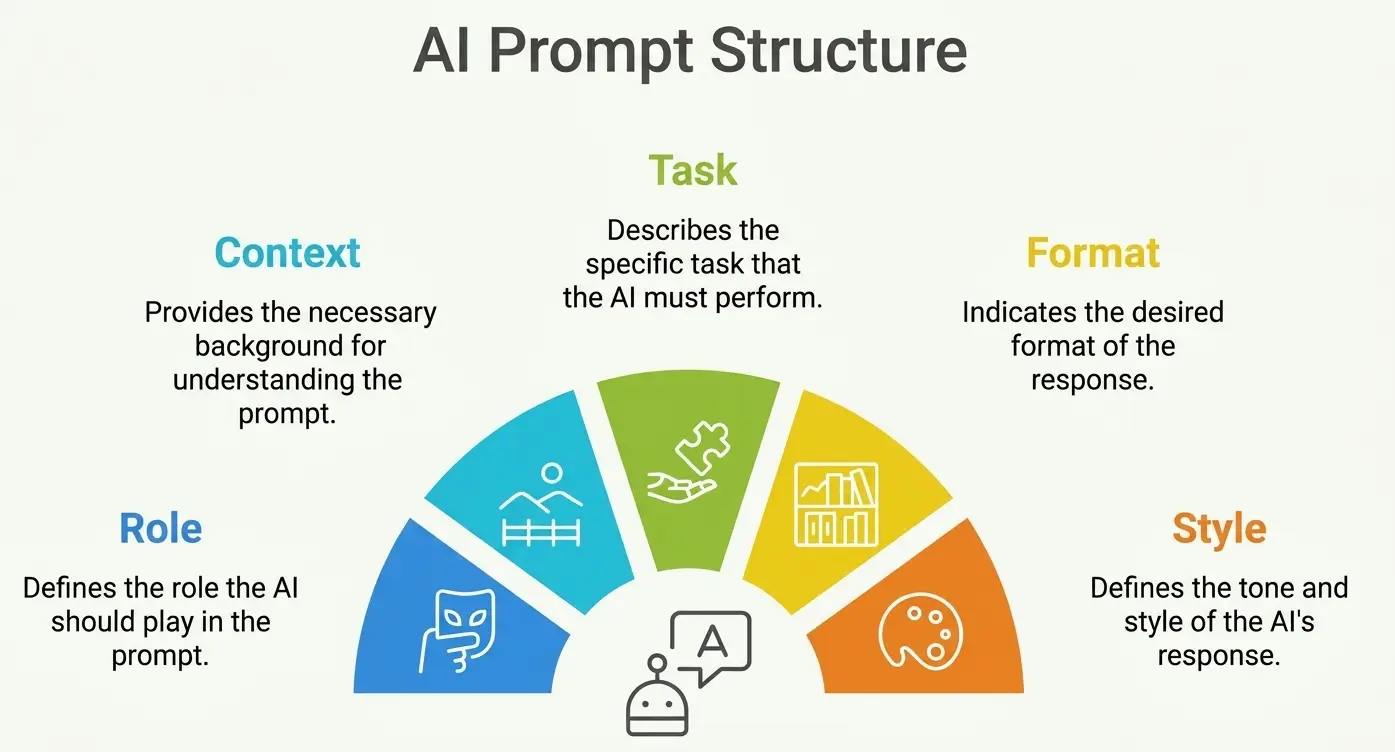
| Component | Purpose | Example |
|---|---|---|
| Role | Defines the professional context | “Act as a technical reviewer” |
| Task | Determines what needs to be done | "Analyze the function" |
| Context | Gives the necessary input | Code, requirements, restrictions |
| Constraints | Reduce the space of acceptable answers | “Do not change the public API” |
| Format | Determines the form of the result | A table, JSON, or a list |
| Criteria | Determine what is considered a good result | "Consider edge cases" |
| Handling uncertainty | Defines behavior when data is missing | "Don't invent missing values" |
Not every prompt needs all the components. But the more critical the task, the more important it becomes to clearly define each of them.
A Core Pattern: Role → Task → Context → Constraints → Output
One of the most reliable ways to structure an instruction is to divide it into logical sections.
For example:
ROLE:
Act as an experienced developer and code reviewer.

TASK:
Analyze the code below and identify potential issues.

CONTEXT:
The code is used in an API service.
Backward compatibility matters.

CONSTRAINTS:
Do not suggest a complete rewrite.
Do not change the public interface.
Consider performance and security.

OUTPUT:
Return a table:
issue | severity | explanation | recommendation.
This structure resembles a technical specification. It reduces the number of hidden assumptions and facilitates further testing.
Practical production guides also recommend treating prompts as versioned and tested artifacts, not as random lines of text.
The Clear Task Definition Pattern
The most common problem is wording that is too general.
A Weak Example
Optimize this code.It is unclear:
- what exactly should be optimized;
- by what criteria;
- whether the API can be changed;
- whether performance or readability matters more;
- whether the full code should be returned;
- how to evaluate the result.
A Better Example
Analyze the function below.

Goal:
Reduce unnecessary operations without changing the function’s behavior.

Consider:
- time complexity;
- redundant computations;
- duplication;
- readability.

Do not change the public API.

First list the issues, then propose an optimized version.
The difference is not in length. It consists in reducing ambiguity.
The Constraints Pattern
An unconstrained instruction often leaves the model too much room for interpretation.
Constraints can specify:
- programming language;
- code style;
- permissible dependencies;
- result format;
- maximum length;
- API contract;
- safety rules;
- prohibited changes;
- compatibility criteria.
Example
Task:
add caching

Restrictions:
- do not change the function signature;
- do not add new external dependencies;
- preserve the current error behavior;
- explain the trade-offs;
- show only the changed parts of the code.
An important principle:
constraints should describe real-world requirements rather than trying to control every step of the model.
Instructions that are too rigid can make the prompt brittle.
Zero-shot, one-shot and few-shot
One of the basic patterns is to show the model examples of desired behavior.
| Method | What to provide | When to use it |
|---|---|---|
| Zero-shot | Only instructions | A simple or clearly defined task |
| One-shot | One example | When the format needs clarification |
| Few-shot | Several examples | When consistent classification or style matters |
Zero-shot
Classify the message as bug, feature, or question.

Return only one category.
Few-shot
Examples:

“The button stopped working after the update” → bug
“Add CSV export” → feature
“How do I configure authentication?” → question

Now classify:
“After signing in, the user sees a blank page.”
Few-shot prompting is especially useful when a verbal description of the rules is insufficient or you need to show the model an example of the expected behavior. This is a widely used pattern in practical prompt engineering for developers.
Breaking Down Complex Tasks
Do not try to complete a complex process with one enormous prompt.
For example, the task:
"Analyze the project, find architectural problems, rewrite problematic modules, add tests and documentation."
It actually contains several different tasks.
It is better to split the process:
1. Analyze
   ↓
2. Identify issues
   ↓
3. Prioritize
   ↓
4. Design a solution
   ↓
5. Implement
   ↓
6. Test
   ↓
7. Review the result
This decomposition can be implemented as a sequence of individual prompts or as a workflow.
Advantages
- it is easier to find errors;
- it is easier to re-launch individual stages;
- each step has clear criteria;
- results can be checked automatically;
- it is easier to change individual parts of the process.
The Critical Review Pattern
A model can do more than generate an output: it can also review that output against explicit criteria.
For example:
Check the proposed solution.

Find:
1. logical errors;
2. omitted edge cases;
3. performance issues;
4. potential security issues;
5. Violation of specified restrictions.

For each problem, indicate:
- a problem;
- reason;
- severity;
- how to fix it.
This is a useful pattern for:
- code review;
- tests;
- SQL;
- architectural solutions;
- technical documentation;
- configurations;
- migrations
A model’s self-review is not an absolute guarantee of correctness. Final verification should use appropriate automated checks or human review.
Structured output
If the output of the prompt is used by another program, plain text is a bad interface.
For example, instead of:
Several problems were found.
The first has high priority...
better define the contract:
{
  "issues": [
    {
      "severity": "high",
      "title": "string",
      "description": "string",
      "recommendation": "string"
    }
  ]
}
Structured output is essential when a model’s response feeds another system component. Asking for JSON is not enough: parse the response, validate it against a schema, and define how errors will be handled.
Validation Matters More Than Wording
One of the key mistakes in AI development is to assume that a good prompt automatically guarantees a good result.
In reality, the architecture should look something like this:
Input data
   ↓
Preparing the context
   ↓
prompt
   ↓
Model
   ↓
Structured output
   ↓
Validation
   ↓
Accept / retry / fallback
   ↓
Application
The model generates a result but it is up to the application to decide whether this result can be trusted.
For structured responses, this means:
- check the syntax;
- validate the schema;
- check types;
- check the permissible values;
- check business rules;
- handle the error;
- repeat the operation if necessary.
In fact, model output should be treated with the same care as untrusted user input.
Context Matters More Than “Magic Words”
In many cases, response quality is improved not by a more complex prompt, but by better context.
Let's compare:
Find the problem in this code.and:
Find the problem in this code.

Context:
- the function is called up to 5000 times per minute;
- the result is cached;
- API must remain compatible;
- errors must be handled without crashing the process;
- the code is executed in an asynchronous environment.

Check:
- performance;
- concurrent access;
- error handling;
- side effects.
The second version gives the model much more information to make the right decision.
But there is an important rule:
Context should be relevant, not merely extensive.
Redundant documents, old requirements, or unrelated pieces of code can degrade the result.
The Instruction–Data Separation Pattern
In complex systems, the prompt often contains:
- persistent rules;
- dynamic data;
- documents;
- code;
- user messages;
- the results of previous steps.
They should be logically separated.
For example:
INSTRUCTIONS
...
CONTEXT
...
INPUT DATA
...
EXPECTED RESULT
...
For large or frequently reused prompts, explicit delimiters and templates make instructions easier to maintain, test, and reuse.
This is especially important for systems where some of the context comes from the user or from external sources.
Instructions for Tools and External Actions
If the model can call tools, APIs, or perform actions, the prompt should define more than just that what to do, but also when not to do it.
For example:
Use the tool only when the provided context is not enough to answer.

Before calling it:
- check that the required parameters are available;
- do not invent missing values;
- do not repeat the same call without a reason.

After the call:
- verify the result;
- do not treat a failed call as successful;
- report uncertainty if the available data is insufficient.
This turns the tool call from an "opportunity" into a controlled workflow element.
Anti-Patterns That Make Prompts Unreliable
An Overly Vague Request
Write good code.Problem: quality criteria are not defined.
Conflicting instructions
Be as short as possible.

Provide a detailed explanation of each decision.
If the priority is not defined, the result becomes unpredictable.
Too Many Rules
Sometimes a developer tries to describe dozens of small steps.
As a result, the prompt becomes:
- complex;
- fragile;
- difficult to test;
- expensive to maintain.
Better to define result, limitations and criteria, rather than micromanaging every internal step.
No Output Format
Analyze this code.What to return?
- text?
- table?
- list?
- fixed code?
- grade?
It is better to clearly define the contract.
No Guidance for Uncertainty
A dangerous option:
Find the correct answer.Better:
If the necessary data is not enough, do not invent a value.
Specify exactly what data is missing.
Trusting the Output Without Validation
Even a well-designed instruction does not replace:
- tests;
- type checking;
- schemas;
- static analysis;
- security checks;
- code review;
- business validation.
Prompts need to be tested
If the prompt is used once, it can be refined manually.
If it is used hundreds or thousands of times, a different approach is needed.
Create a set of test cases.
| Test | What it checks |
|---|---|
| Typical case | Basic behavior |
| Empty input | Handling missing data |
| Incorrect input | Error resilience |
| Boundary value | Edge cases |
| Unexpected format | Validation |
| Conflicting data | Behavior under ambiguity |
| A very large context | Handling constraints |
| Mixed instructions | Structural consistency |
After each prompt change, the tests must be run again.
This already resembles ordinary software engineering:
Change
  ↓
Tests
  ↓
Assessment
  ↓
Decision
  ↓
New version
How to Measure Prompt Quality
"The answer looks better" is not a sufficient criterion.
Define metrics.
For example:
| Metric | What it measures |
|---|---|
| Accuracy | How correct the output is |
| Completeness | Whether all requirements are covered |
| Format | Whether the output matches the contract |
| Stability | How reproducible the output is |
| Errors | Rate of unsuccessful responses |
| Latency | Execution time |
| Cost | Resources per request |
| Fallback rate | How often a retry is needed |
For production systems, it is important to optimize the balance of quality, reliability, speed, and cost, not just a single metric.
Prompts as Versioned Artifacts
Store prompts used in your application alongside the code or in another version-controlled system.
For example:
prompts/
├── code-review/
│   ├── prompt-v1
│   ├── prompt-v2
│   └── tests/
├── classification/
│   ├── prompt-v1
│   └── tests/
└── extraction/
    ├── prompt-v1
    └── tests/
For each version, it is useful to know:
- what has changed;
- why it changed;
- what tests were added;
- which results have improved;
- which results regressed.
Thus, the prompt becomes a full-fledged part of the engineering process.
A Reliable AI Workflow Architecture
A reliable workflow can follow this sequence:
Input
 ↓
Normalization
 ↓
Context
 ↓
Instructions
 ↓
Model
 ↓
Parsing
 ↓
Validation
 ↓
Business checks
 ↓
Output
 ↓
Logs and metrics
 ↓
Evaluation
 ↓
Prompt update
This is far more reliable than the simpler architecture:
User → Prompt → Model → ResponseThe latter is suitable for an experiment. The former is for a system you need to maintain.
How to Design Reliable Instructions
When writing a prompt, it's helpful to go through a short checklist.
1. Define the output
What exactly should be produced?
2. Define the input
What data is available to the model?
3. Define the context
What facts are needed to make the right decision?
4. Define the constraints
What can't be done?
5. Define the format
How should the system get the result?
6. Define uncertainty
What should happen if there is not enough information?
7. Add examples
If a description is not enough, provide representative examples.
8. Add validation
How can you determine programmatically whether the output is acceptable?
9. Create a test set
Test more than just the happy path.
10. Version the prompt
Do not change a production prompt without a way to roll back.
A General-Purpose Prompt Template for Developers
Here is a basic template that can be adapted for most engineering tasks:
ROLE
Act as [role].

TASK
Complete [specific task].

CONTEXT
Known facts:
- [fact 1]
- [fact 2]
- [fact 3]

INPUT DATA
[data]

CONSTRAINTS
- [constraint 1]
- [constraint 2]
- [constraint 3]

QUALITY CRITERIA
The output must:
- [criterion 1]
- [criterion 2]
- [criterion 3]

UNCERTAINTY
If information is insufficient:
- do not make up values;
- state what is missing;
- label assumptions.

OUTPUT FORMAT
[exact format]

VALIDATION
Before finishing, check:
- [criterion 1]
- [criterion 2]
- [criterion 3].
This template is not a universal rule. Its strength lies in providing a structure that you can shorten or expand to fit the task.
When to Make a Prompt More Complex and When to Simplify It
Not every task requires a complex design.
| Situation | Recommended approach |
|---|---|
| Simple question | A short instruction |
| Code generation | Context + constraints + format |
| Code review | Criteria + format + edge cases |
| Classification | Rules + few-shot |
| Data extraction | Schema + validation |
| Complex workflow | Decomposition |
| Automatic action | Contract + checks + fallback |
| Production system | Versioning + evals + monitoring |
The main principle:
The complexity of a prompt should match the complexity of the task, not the ambition of its author.
What Sets a Production Prompt Apart from an Ordinary Request
An ordinary request:
Write a function for data processing.A production instruction:
TASK:
Implement a function that normalizes input records.

INPUT:
An array of objects that may have missing fields.

BEHAVIOR:
- keep valid records;
- replace missing optional fields with a defined value;
- mark invalid records as errors.

CONSTRAINTS:
- do not change the API;
- do not use external dependencies;
- do not lose information.

OUTPUT:
Return a structured object containing:
- results;
- errors;
- statistics.

VALIDATION:
Account for an empty array, duplicates,
missing fields, and invalid types.
The second version does more than “explain the task better” — it defines a contract that can be validated.
Will Prompt Engineering Replace Traditional Programming?
No.
On the contrary, the more actively AI is integrated into development, the more important classic engineering practices become:
- clear specifications;
- types;
- tests;
- contracts;
- validation;
- logging;
- monitoring;
- version control;
- code review;
- threat modeling.
The prompt is only one layer of the system.
The best results come not from an “ideal prompt,” but from combining:
high-quality context + clear instructions + the right format + automated validation + testing + error handling.
This approach corresponds to the modern vision of prompt engineering as an engineering discipline, and not a set of tricks for one-time dialogues.
Conclusion
For developers, prompt engineering is primarily about designing the interface between software and a probabilistic model.
A reliable prompt:
- clearly defines the task;
- conveys the necessary context;
- sets realistic limits;
- determines the format of the result;
- describes behavior under uncertainty;
- uses examples where they really help;
- breaks down complex tasks into manageable stages;
- undergoes automatic or human validation;
- tested on a set of real and extreme cases;
- is versioned and improved based on measurable results.
The most useful mental model is simple:
A prompt is not a magic command for AI. It is a specification to be designed, tested, versioned and maintained.
It is this approach that allows you to move from random code generation to predictable AI tools that can be integrated into a real software engineering workflow.
FAQ: Frequently Asked Questions About Prompt Engineering
What is prompt engineering for developers?
It is the design and testing of instructions for language models to obtain predictable results in software processes: code generation, testing, analysis, documentation, classification, and automation.
What makes a good prompt?
A good prompt clearly defines the task, provides the necessary context and constraints, specifies the expected output format, and explains what to do when information is insufficient.
Should you always specify a role?
No. A role is useful when you need a particular professional perspective or evaluation criteria. It may be unnecessary for simple tasks.
When to use it few-shot prompting?
Use few-shot prompting when you need to show a specific format, classification style, or expected output—and a verbal description of the rules is not enough.
Should you ask a model to “think step by step”?
Not always. For complex tasks, clearly define the criteria, context, and expected output. A model’s internal reasoning should never replace validation of its output.
Is it enough to ask the model to return JSON?
No. For production systems, the result should be parsed and checked according to the expected schema. If necessary, there should be a retry or fallback mechanism.
Do prompts need to be versioned?
Yes, if the prompt is part of a software product or automated process. Versioning allows you to track changes, run regression tests, and roll back to a previous version.
Can a good prompt guarantee a correct answer?
No. Prompting reduces ambiguity and helps guide the model, but is not a substitute for validation, tests, or other engineering control mechanisms.
What Is the Most Common Beginner Mistake?
Trying to find a “magic phrasing” instead of clearly defining the task, context, constraints, and acceptance criteria.
Will Prompt Engineering Remain Relevant in the Future?
Yes, but its form will change. As models advance, individual wording tricks will matter less thancontext engineering, structured contracts, tools, evaluation, validation and reliability of the entire workflow. That is why the most durable skills are not specific syntax tricks, but principles for reducing ambiguity and controlling outcomes.

