
WordPress Site Structure: How to Plan Pages and Sections

Hi! Planning a well-structured WordPress website is the foundation of a successful online presence. It affects how easily users navigate your site, how quickly search engines index your pages, how effective your SEO can be, and how easily your website can grow over time.
Many site owners start with design or content, but the structure determines how logically pages connect. If visitors cannot find what they need within a few clicks, or Google cannot understand the content hierarchy, even a high-quality website may lose visibility in search results.
- What Is WordPress Site Structure?
- Why Plan Your Site Structure Before Building?
- The Main Types of WordPress Pages
- Static Pages
- Example of a Static Page Structure
- Blog Posts
- Example of a Blog Structure
- How to Build a Clear Section Hierarchy
- Rules for Building a Hierarchy
- Planning the Main Navigation
- A Practical Main Menu
- What Should Your URL Structure Look Like?
- A Good Example
- A Poor Example
- Recommended URL Structure
- Key Recommendations
- Categories or Tags?
- Categories
- Tags
- How to Organize Service Pages
- A Well-Organized Structure
- What Does a Complete Sitemap Look Like?
- WooCommerce Store Structure
- Example of an Online Store Structure
- Essential Store Information Pages
- Internal Linking as Part of Your Site Structure
- An Example of a User Journey
- SEO Internal Linking
- Which Pages Should Link to Each Other?
- Recommendations
- Mobile Navigation and UX
- Best Practices
- Which Pages Should Every Website Have?
- WordPress SEO Site Structure
- A Clear Heading Hierarchy
- Example Heading Structure
- Keyword Mapping
- A Complete Sitemap
- Common Site Structure Mistakes
- The Most Common Mistakes
- A Step-by-Step Plan for Building Your Site Structure
- Conclusion
- WordPress Site Structure FAQ
- What’s the difference between pages and posts in WordPress?
- How many levels deep should a website structure go?
- Which is better: categories or tags?
- What is the best URL structure for WordPress?
- Does a business website need a blog?
In this guide, we’ll look at how to build an effective WordPress site structure, which pages to create, and how to organize your menus, categories, URLs, and internal links in line with current SEO best practices.
What Is WordPress Site Structure?
Site structure is the logical system that organizes all of a website’s pages, sections, and connections. It defines the path users take from the homepage to the information they need.
In WordPress, site structure consists of several key elements:
- static pages;
- blog posts;
- categories;
- tags;
- the main menu;
- URLs;
- internal links;
- custom post types, when needed.
A well-organized structure helps you achieve three important goals:
- Improve the user experience (UX).
- Make it easier for search engine crawlers to index your site.
- Create a strong foundation for SEO.
Why Plan Your Site Structure Before Building?
One of the most common mistakes is creating pages at random after WordPress is already up and running. Over time, duplicate content, confusing URLs, unnecessary categories, and cluttered menus start to appear.
Planning ahead helps you avoid these problems.
| Benefit | What it gives your site |
|---|---|
| Logical hierarchy | Clear, simple navigation |
| Well-planned URLs | Better SEO optimization |
| Fewer duplicates | Cleaner indexing |
| Scalability | Easy addition of new sections |
| Internal linking | Higher user engagement |
Before development begins, it’s a good idea to map out your site (create a sitemap) and then build that structure in WordPress.
The Main Types of WordPress Pages
One of WordPress’s key features is the distinction between pages and posts. They serve different purposes.
Static Pages
Static pages are designed for evergreen information. They aren’t tied to a publication date and can be arranged in a hierarchical structure.
Typical pages include:
- Home
- About
- Services
- Portfolio
- Contact
- Privacy Policy
Example of a Static Page Structure
Services
│
├── Website Development
├── SEO Services
├── UX/UI Design
└── Technical Support
This structure lets you create a dedicated SEO landing page for each service.
Blog Posts
Posts are used for articles, news, guides, and other informational content. They’re organized by categories rather than nested pages.
Example of a Blog Structure
Blog
│
├── WordPress
├── SEO
├── WooCommerce
├── Content Marketing
└── Web Design
Each category creates its own archive page, which contributes to a clear topical structure across your site.
How to Build a Clear Section Hierarchy
The main rule is simple: users should be able to reach any page within two or three clicks from the homepage.
A well-planned structure might look like this:
Home
│
├── Services
│   ├── Landing Pages
│   ├── Business Websites
│   └── WooCommerce
├── Portfolio
├── Blog
│   ├── WordPress
│   ├── SEO
│   └── Content
├── About
└── Contact
In this model, every section has a clear purpose, and the hierarchy never goes beyond three levels.
Rules for Building a Hierarchy
- Keep the main menu to no more than six or seven top-level items.
- Limit the hierarchy to three levels.
- Place each page in one logical section.
- Use short, clear section names.
Planning the Main Navigation
Your menu is the website’s navigation hub. It’s often the first place users go to understand how your site is organized.
A Practical Main Menu
| Menu item | Purpose |
|---|---|
| Home | Starting point |
| Services | The company’s core services |
| Portfolio | Examples of completed work |
| Blog | Helpful resources |
| About | Information about the company |
| Contact | Get in touch |
Avoid adding dozens of items to the main menu. Larger websites can use dropdown menus to keep navigation manageable.
What Should Your URL Structure Look Like?
WordPress permalinks should be as simple and descriptive as possible.
A Good Example
site.com/services/wordpress/A Poor Example
site.com/?p=458Recommended URL Structure
site.com/
│
├── services/
│   ├── landing-page/
│   ├── corporate-website/
│   └── woocommerce/
├── blog/
│   ├── wordpress/
│   ├── seo/
│   └── content-marketing/
├── portfolio/
└── contact/
Key Recommendations
- Use Latin characters only.
- Separate words with hyphens.
- Leave dates out of URLs.
- Avoid long, deeply nested URLs.
- Make sure each URL describes the page content.
Categories or Tags?
WordPress offers two ways to classify content: categories and tags.
Categories
Categories create the main topical structure of your blog.
For example:
- WordPress
- SEO
- WooCommerce
- Marketing
Each post should belong to one category—or two at most.
Tags
Tags highlight additional topics or features covered in a post.
For example:
- Elementor
- Gutenberg
- Core Web Vitals
- Rank Math
Avoid creating a tag for just one post. Doing so can create a large number of thin archive pages with little value.
How to Organize Service Pages
For a business website, each service should have its own landing page.
A Well-Organized Structure
Services
│
├── Website Development
│   ├── Landing Page
│   ├── Corporate Website
│   └── Online Store
│
├── SEO Services
│   ├── SEO Audit
│   ├── Technical SEO
│   └── Local SEO
│
├── UX/UI Design
│
└── Technical Support
Each child page can target a different search query, helping you avoid competing with your own pages in search results.
What Does a Complete Sitemap Look Like?
Before development begins, it’s helpful to create a complete sitemap.
Home
│
├── About
│   ├── Team
│   └── Company History
│
├── Services
│   ├── Website Development
│   │   ├── Landing Page
│   │   ├── Corporate Website
│   │   └── Online Store
│   ├── SEO
│   └── Support
│
├── Portfolio
│   ├── Business
│   ├── E-commerce
│   └── Startups
│
├── Blog
│   ├── WordPress
│   ├── SEO
│   ├── WooCommerce
│   └── Marketing
│
└── Contact
This plan will become the foundation for your future menu, URLs, and internal linking.
WooCommerce Store Structure
If you’re building a website with WooCommerce, its architecture needs to account for more than standard pages. It should also include product categories, product pages, brands, and essential store information. A well-organized structure makes it easier for shoppers to browse and helps search engines crawl your catalog more effectively.
Example of an Online Store Structure
Home
│
├── Shop
│   ├── Laptops
│   ├── Smartphones
│   ├── Tablets
│   └── Accessories
│
├── Brands
│   ├── Apple
│   ├── Samsung
│   └── Lenovo
│
├── Deals
├── Blog
├── Shipping & Payment
├── Warranty
└── Contact
Essential Store Information Pages
In addition to the product catalog, an online store should include pages that build customer trust and meet e-commerce requirements:
- Shipping and Payment
- Warranty
- Returns
- Privacy Policy
- Terms of Use
These pages are often linked from the website footer.
Internal Linking as Part of Your Site Structure
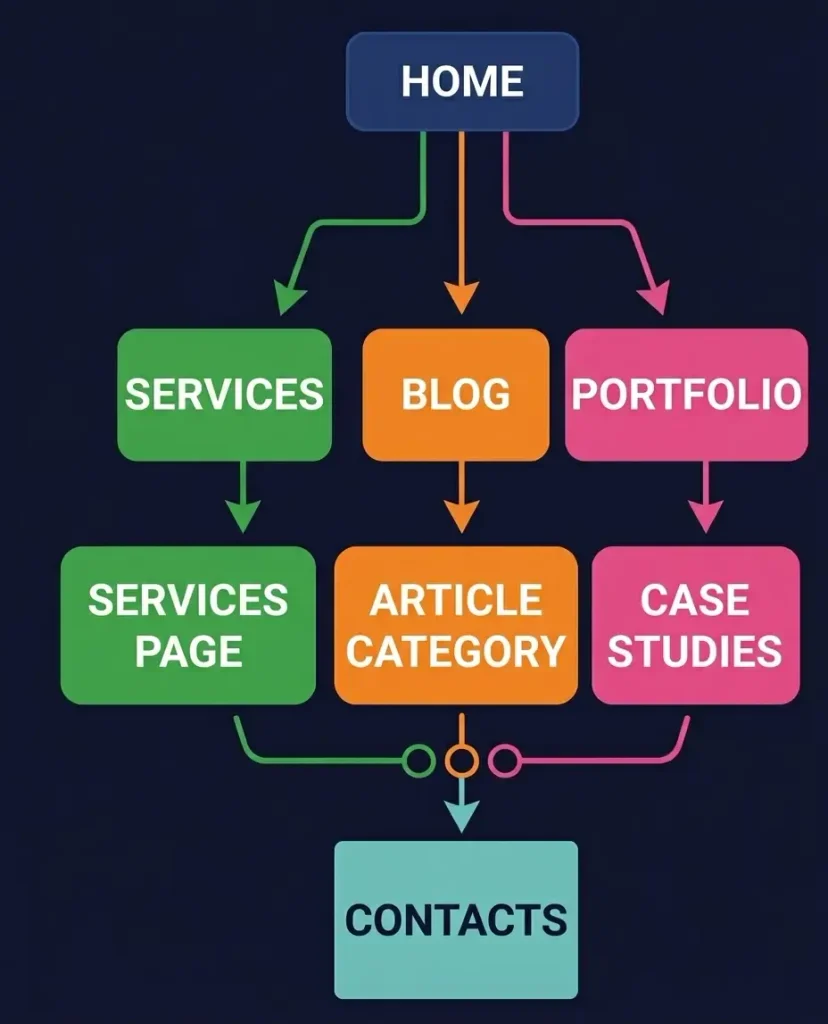
Even a perfect hierarchy won’t be effective without internal links. Internal linking helps visitors explore related content and helps search engine crawlers identify the most important pages on your site.
An Example of a User Journey
Home
   │
   ▼
Services
   │
   ▼
Corporate Website
   │
   ▼
Project Case Study
   │
   ▼
Blog Article
   │
   ▼
Inquiry Form
SEO Internal Linking
Which Pages Should Link to Each Other?
| Main page | Link to |
|---|---|
| Service page | Case studies, FAQs, articles |
| Blog article | Services, related articles |
| Portfolio page | The relevant service |
| Homepage | The most important sections |
Recommendations
- Add a “Related reading” section.
- Link case studies to relevant service pages.
- Use breadcrumbs.
- Avoid adding too many internal links to a single page.
Mobile Navigation and UX
Most people browse websites on their phones, so your structure should work just as well on every screen size. Clear navigation and a shallow hierarchy can improve both user behavior and conversion rates.
Best Practices
- Limit the main menu to six or seven items.
- Use a compact hamburger menu.
- Make navigation buttons easy to tap.
- Choose clear section names.
- Make contact details easy to find.
Which Pages Should Every Website Have?
Whatever your industry, most WordPress websites need a core set of pages.
| Page | Priority |
|---|---|
| Home | Required |
| About | Required |
| Services / Shop | Required |
| Portfolio | Recommended |
| Blog | Required |
| Contact | Required |
| Privacy Policy | Required |
| Cookies | Recommended |
| Terms of Use | As needed |
These pages form the basic architecture of most business websites.
WordPress SEO Site Structure
SEO starts with more than keywords—it starts with the right architecture. WordPress supports SEO-friendly permalinks and logical page organization out of the box, but results depend on how you put that structure into practice.
A Clear Heading Hierarchy
Each page should have just one H1 heading. Organize the sections that follow logically with H2 and H3 headings.
Example Heading Structure
H1 WordPress Site Structure
|
├── H2 What site structure means
├── H2 Planning your pages
│   ├── H3 Static pages
│   └── H3 Posts and categories
├── H2 Main navigation
├── H2 URL structure
├── H2 Internal linking
└── H2 Common mistakes
Keyword Mapping
Don’t try to target every keyword on a single page. Instead, create separate content for related search queries.
| Search query | Target page |
|---|---|
| WordPress site structure | Main guide |
| WordPress menu | Dedicated article |
| WordPress permalinks | SEO guide |
| WordPress categories | How-to article |
| Internal linking | Detailed guide |
This approach helps prevent keyword cannibalization and builds a topical cluster.
A Complete Sitemap
Before launching a project, map out all of its sections. The sitemap can serve as a brief for your designer, developer, and SEO specialist.
Home
│
├── About
│   ├── Team
│   └── Company History
│
├── Services
│   ├── Website Development
│   │   ├── Landing Page
│   │   ├── Corporate Website
│   │   └── Online Store
│   ├── SEO Services
│   ├── UX/UI Design
│   └── Technical Support
│
├── Portfolio
│   ├── Business
│   ├── E-commerce
│   └── Startups
│
├── Blog
│   ├── WordPress
│   ├── SEO
│   ├── WooCommerce
│   └── Marketing
│
└── Contact
This pyramid-style structure is easy to understand for both visitors and search engines.
Common Site Structure Mistakes
Even a small website can lose SEO potential if its pages are organized poorly.
The Most Common Mistakes
- Putting too many items in the main menu.
- Creating a hierarchy with more than three levels.
- Duplicating categories and tags.
- Using long or confusing URLs.
- Leaving out internal links.
- Creating multiple pages for the same search query.
- Using technical labels instead of clear page titles.
All of these issues make indexing more difficult and navigation less intuitive.
A Step-by-Step Plan for Building Your Site Structure
Follow these steps to avoid having to rebuild your site after launch.
- Define the purpose of your website.
- List all the pages you need.
- Group pages into topical sections.
- Map out the site structure.
- Plan the main menu.
- Set up SEO-friendly URLs.
- Create blog categories.
- Plan your internal links.
- Test navigation on mobile devices.
- Only then start adding content to your site.
Conclusion
A well-planned WordPress site structure is a strategic foundation for easy navigation, effective SEO, and future growth. The strongest architecture follows a pyramid: homepage → main sections → subsections → individual pages. This clear hierarchy helps search engines index your content and makes it easier for visitors to find what they need.
WordPress Site Structure FAQ
What’s the difference between pages and posts in WordPress?
Pages are for evergreen content, such as information about your company, services, and contact details. Posts are used for blog articles and news, and are organized into categories.
How many levels deep should a website structure go?
Ideally, no more than three levels. This keeps navigation clear and makes it easier for search engines to index your pages.
Which is better: categories or tags?
Categories create the main structure of your blog, while tags add more specific topical labels. For SEO, avoid creating a large number of tags that each apply to just one post.
What is the best URL structure for WordPress?
Use short, readable URLs with Latin characters and hyphens between words. Leave out dates and technical parameters.
Does a business website need a blog?
Yes. A blog can attract organic traffic from informational searches, demonstrate your expertise, and support internal linking across your site.

