
WordPress Without Elementor: Can You Build a Fast Website Without a Page Builder?

Hi! WordPress without Elementor is a practical way to build modern, fast, and functional websites. For some projects, skipping a page builder can simplify the architecture, reduce dependencies, and give developers more control over the HTML, CSS, JavaScript, and WordPress templates.
The key point is that using Elementor or choosing not to use it does not, by itself, determine a website's speed. A site without a page builder can also be slow if it has a bloated theme, dozens of plugins, unoptimized images, poor hosting, or an excessive amount of JavaScript.
Conversely, a website built with a page builder can still be well optimized.
So rather than asking, “Do you need Elementor?”, ask:
Does this site need a visual page builder, or can it be implemented with a simpler architecture based on WordPress, Gutenberg, a custom theme and custom code?
- What Does WordPress Without Elementor Mean?
- Why Consider a WordPress Site Without a Page Builder?
- Is WordPress faster without Elementor?
- How to Build a WordPress Website Without a Page Builder
- 1. WordPress + Gutenberg
- 2. WordPress + custom theme
- 3. Block Theme + Site Editor
- 4. Gutenberg + custom blocks
- 5. Fully custom development
- Diagram: WordPress Architecture Without a Page Builder
- How WordPress Without a Page Builder Differs from Elementor
- Why a custom theme can be fast
- CSS minification
- JavaScript optimization
- Images are one of the biggest factors affecting site speed
- Do You Need Gutenberg If You're Not Using Elementor?
- Gutenberg does not mean "simple site"
- Benefits of Custom Blocks
- When to Build a Fully Custom Theme
- What About an Online Store?
- WordPress Without Elementor: What It Means for SEO
- How to Test WordPress Performance Without Elementor
- LCP
- INP
- CLS
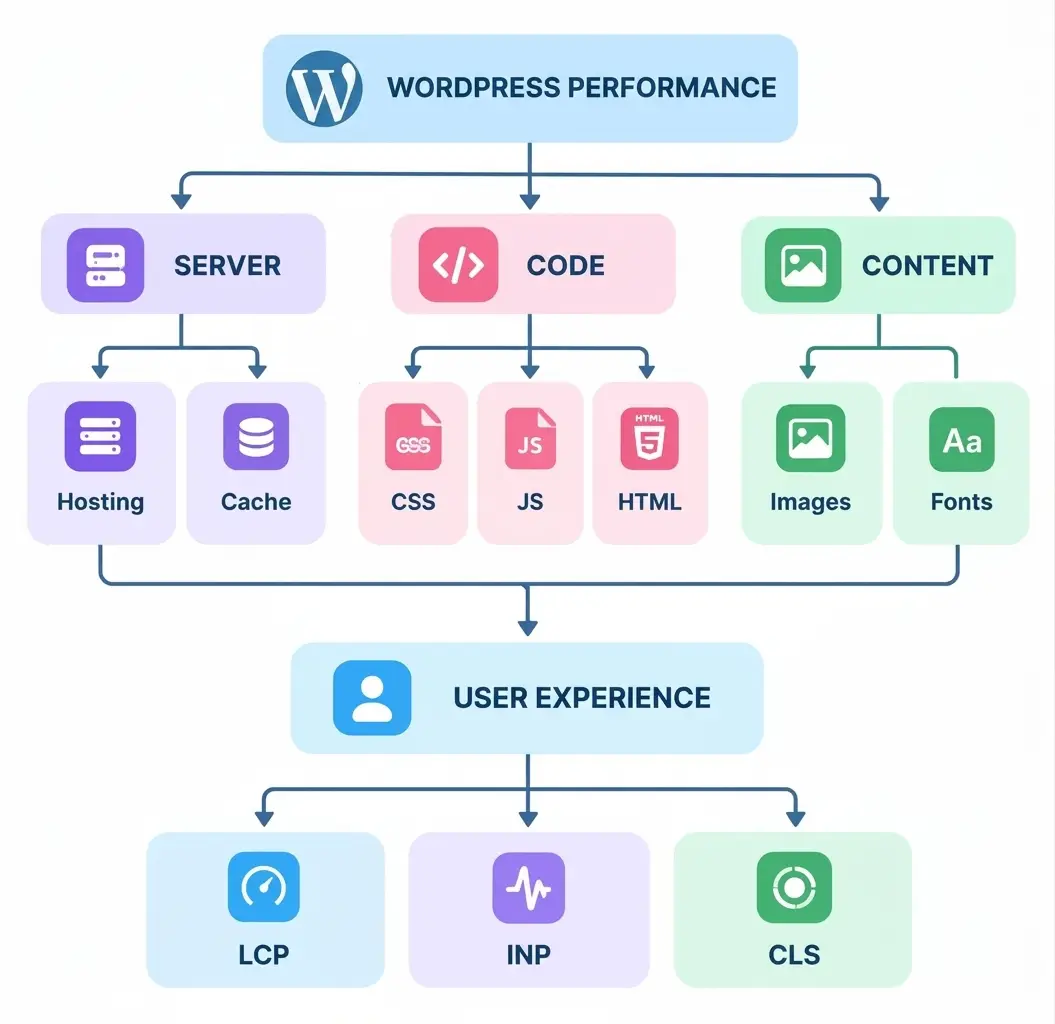
- Diagram: What Affects WordPress Speed
- Why You Shouldn't Chase a 100/100 Score
- How to Keep WordPress Lightweight Without a Page Builder
- Server
- Theme
- WordPress
- Images
- JavaScript
- CSS
- WordPress Without Elementor: Pros and Cons
- Advantages
- 1. More control
- 2. Fewer dependencies
- 3. It is more convenient to optimize the code
- 4. Flexibility
- 5. Independence from a specific page builder
- 6. Ease of scaling for the developer
- Disadvantages
- 1. Development expertise required
- 2. Higher initial development cost
- 3. It is necessary to think over the editing system
- 4. Not everything can be changed quickly
- 5. Quality architecture is required
- WordPress Without Elementor or With It: What Should You Choose?
- When Elementor can be a better choice
- Who can develop WordPress without Elementor?
- An Example of a Well-Structured Architecture
- Security and support
- Responsiveness without Elementor
- Website accessibility without a page builder
- WordPress Without a Page Builder and Semantic HTML
- The main mistake: thinking that speed depends only on Elementor
- Site A
- Site B
- What Makes a WordPress Site Fast?
- How to Test a Site Properly
- Can You Build a Fast WordPress Website Without Elementor?
- Quick Checklist: WordPress Without Elementor
- WordPress without Elementor: Conclusion
- FAQ: WordPress without Elementor
- Can I build a WordPress site without Elementor?
- Will WordPress run faster without Elementor?
- Can I create a modern website design without Elementor?
- Do I need Gutenberg if I don't use Elementor?
- Can I build a landing page without Elementor?
- Can I build an online store without Elementor?
- Is WordPress better for SEO without Elementor?
- Do I need coding skills to build WordPress without a page builder?
- Can I build a WordPress site without a page builder myself?
- Can I use Gutenberg with a custom WordPress theme?
- Is a custom WordPress theme faster than a pre-built theme?
- Does Elementor directly affect Google rankings?
- Which is faster: Gutenberg or a custom WordPress theme?
- Can I build a WordPress site without any page builder?
WordPress officially supports both classic PHP themes and modern block themes, where much of a site's structure is built with blocks and managed in the Site Editor.
What Does WordPress Without Elementor Mean?
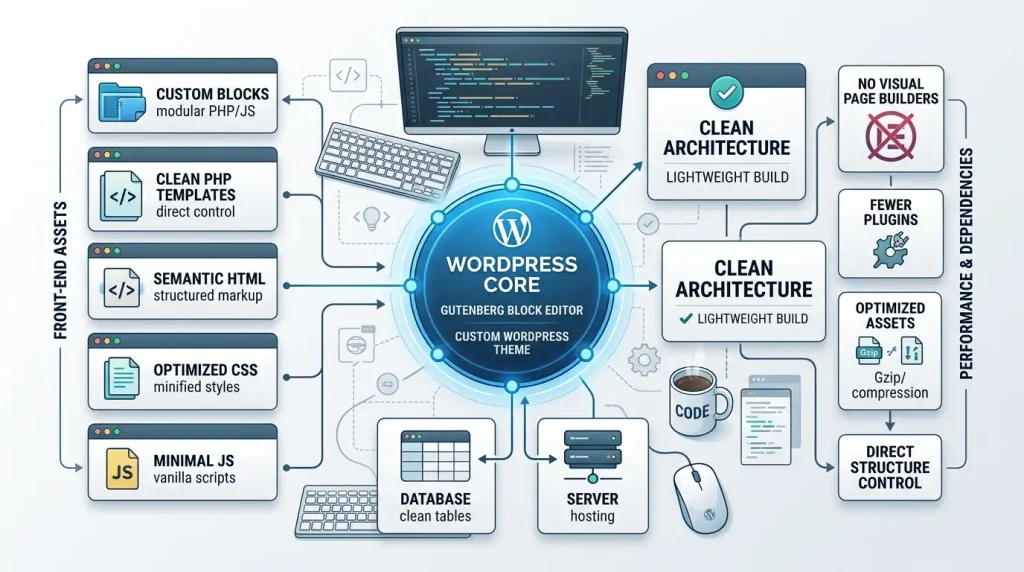
WordPress without Elementor means building a site without relying on Elementor as its primary page builder.
Choosing not to use Elementor does not mean giving up WordPress. Developers can still use the platform's core features, including:
- Block Editor;
- Gutenberg;
- block patterns;
- templates;
- template parts;
theme.json;- PHP templates;
- HTML;
- CSS;
- JavaScript;
- WordPress hooks;
- WordPress REST API;
- custom fields;
- custom post types;
- custom blocks;
- plugins.
In other words, a WordPress site without a page builder does not have to be coded entirely from scratch.
You can use the standard WordPress editor without installing Elementor, WPBakery, Beaver Builder, or another page builder.
The modern Block Editor uses a modular system of blocks. Individual blocks can contain text, headings, images, video, buttons, and other page elements. WordPress also lets developers create custom blocks and extend the editor.
Why Consider a WordPress Site Without a Page Builder?
Visual page builders solve a clear problem: they let users create complex layouts without in-depth knowledge of HTML, CSS, or PHP.
It is very convenient.
However, for a professionally developed site especially when the design is already finalized in Figma or another design tool a drag-and-drop editor may be less necessary.
In that case, a developer can implement the design directly using:
- HTML;
- CSS;
- PHP templates;
- WordPress functions;
- Gutenberg;
- custom blocks;
theme.json;- minimal JavaScript.
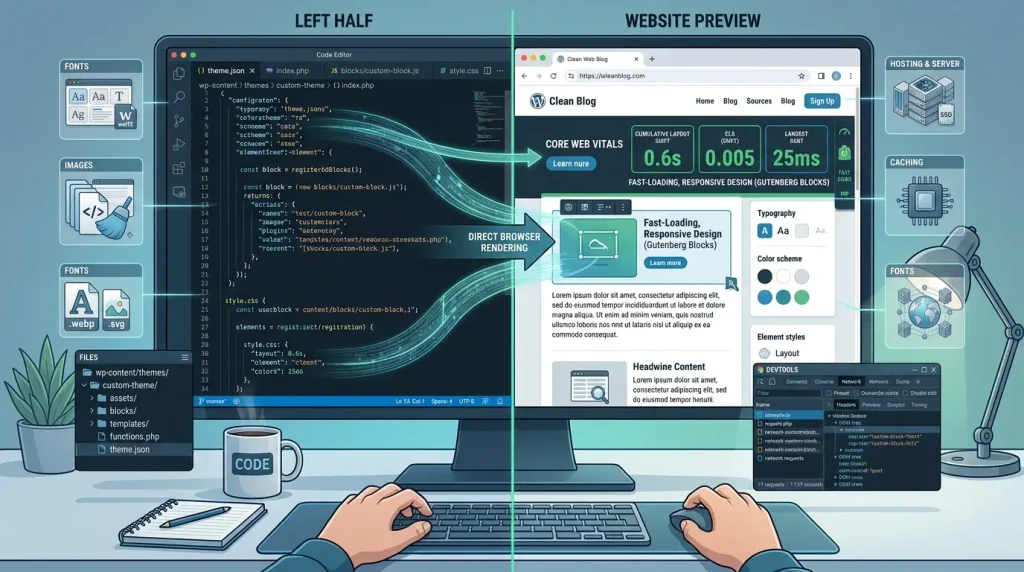
This gives the developer greater control over the final HTML and how each page behaves.
Is WordPress faster without Elementor?
It can be but there is no guarantee.
This is one of the article's most important points.
You can't simply assume:
“A site uses Elementor, so it must be slow.”
It's just as inaccurate to claim:
“A site has no Elementor, so it is guaranteed to be fast.”
Website performance depends on many factors:
| Factor | Effect on speed |
|---|---|
| Hosting | Very high |
| Server caching | High |
| Number of plugins | High |
| Theme quality | High |
| JavaScript | High |
| CSS | Medium to high |
| Images | Very high |
| Fonts | Medium |
| HTML structure | Medium |
| Database | Medium to high |
| CDN | Depends on the project |
| Page builder | One possible factor |
| WordPress Settings | Medium |
Elementor's own documentation notes that slow performance can result from a site's configuration, plugins, theme, server, images, and other components not just the page builder.
The right approach is to optimize the entire system rather than blame a single technology.
How to Build a WordPress Website Without a Page Builder
There are several basic approaches.
1. WordPress + Gutenberg
The simplest option is to use WordPress's standard Block Editor.
Content is formed from blocks:
- Heading;
- Paragraph;
- Image;
- Gallery;
- List;
- Quote;
- Buttons;
- Columns;
- Group;
- Cover;
- Query Loop;
- Custom blocks.
This approach works particularly well for:
- blogs;
- information sites;
- corporate sites;
- small catalogs;
- content projects;
- sites with regularly edited content.
WordPress describes the Block Editor as a modular system for building pages from individual blocks.
2. WordPress + custom theme
For professional WordPress development without Elementor one of the most interesting options is a custom theme.
The developer can create a structure:
/wp-content/themes/custom-theme/
│
├── style.css
├── functions.php
├── index.php
├── front-page.php
├── home.php
├── single.php
├── page.php
├── archive.php
├── search.php
├── 404.php
│
├── header.php
├── footer.php
├── sidebar.php
│
├── template-parts/
│   ├── hero.php
│   ├── cards.php
│   └── content.php
│
├── assets/
│   ├── css/
│   ├── js/
│   └── images/
│
└── screenshot.png
With this architecture, the developer has control over nearly every part of the site.
WordPress Theme Developer Handbook separately describes theme structure, templates, functions.php, connecting resources, theme.json and other theme development mechanisms.
3. Block Theme + Site Editor
Another modern option — block theme.
A block theme does not necessarily rely on classic PHP templates.
A block theme lets you use blocks to build:
- header;
- footer;
- content;
- sidebar;
- record templates;
- archives;
- pages;
- individual parts of the design.
WordPress notes that block themes let you edit the site's main areas including the header, footer, and sidebar through the Site Editor.
This distinction matters:
Building WordPress without Elementor does not mean returning to an old model where everything must be written manually in PHP.
Modern WordPress already includes its own visual editing tools.
4. Gutenberg + custom blocks
For more complex sites, Gutenberg can be combined with custom blocks.
For example, a developer creates a block:
Hero Section
├── Heading
├── Description
├── CTA
└── Image
Or:
Services Grid
├── Service Card
├── Service Card
├── Service Card
└── Service Card
Editors get a convenient interface, while developers retain control over each component's HTML, CSS, and logic.
This is a middle ground between:
fully custom development
and
a fully visual page builder.
5. Fully custom development
For some projects, you can minimize or eliminate visual editing tools altogether.
For example:
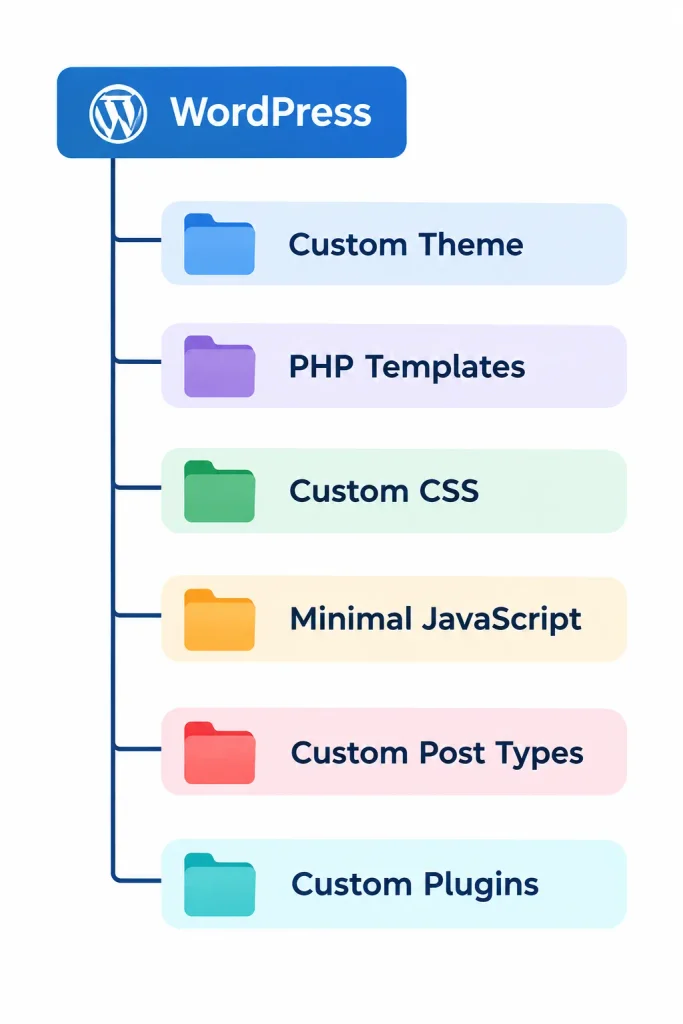
This approach is particularly suitable when:
- a unique design is needed;
- the site has a non-standard structure;
- maximum control is required;
- few dependencies are important;
- the site has complex business logic;
- project must scale.
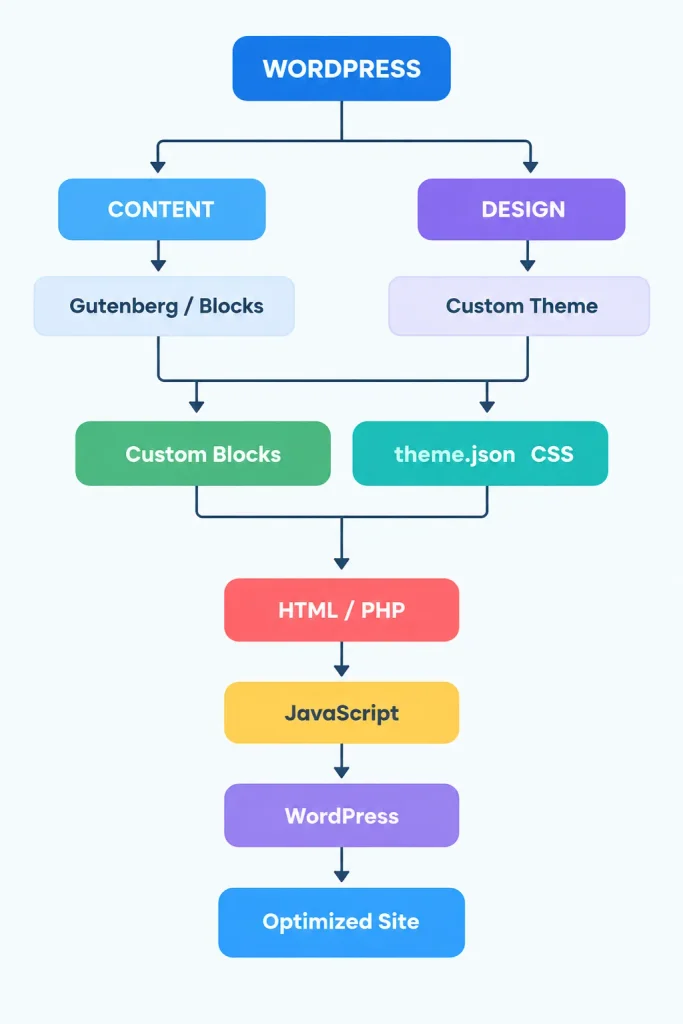
Diagram: WordPress Architecture Without a Page Builder
The code below can be turned into a visual diagram:
How WordPress Without a Page Builder Differs from Elementor
Let's look at the key differences.
| Characteristics | WordPress without page builder | Page builder |
|---|---|---|
| Visual editing | Available through Gutenberg / Site Editor | Usually more advanced |
| HTML control | High | Depends on the page builder |
| CSS control | High | High, but depends on the implementation |
| Ease of use for beginners | Medium | High |
| Design implementation speed | Faster for developers | Faster for users |
| Number of dependencies | May be smaller | May be higher |
| Customization | Very high | High |
| Design transfer from Figma | Developer-friendly | Depends on the page builder |
| Dependency on a specific builder | None | Yes |
| Architecture control | High | Partially restricted |
| Coding required | Higher | Lower |
| Convenience for content manager | Implementation dependent | Often high |
Why a custom theme can be fast
A custom theme's main advantage is not the magical absence of Elementor.
The real advantage is control.
The developer can load only the resources a particular page actually needs.
For example:
if ( is_page_template( 'templates/contact.php' ) ) {
    wp_enqueue_style(
        'contact-page',
        get_template_directory_uri() . '/assets/css/contact.css',
        [],
        '1.0'
    );
}
This way, contact-page CSS does not need to load across the entire site.
The same principle applies to JavaScript.
CSS minification
A custom project can avoid relying on one oversized, universal CSS file.
For example:
assets/css/
|
├── base.css
├── header.css
├── footer.css
├── home.css
├── blog.css
└── contact.css
The required styles can then be loaded based on the page type.
That does not mean every site should be split into dozens of files.
At the same time, splitting styles too aggressively can also be counterproductive.
The right structure depends on:
- site size;
- caching;
- assembly method;
- number of pages;
- HTTP/2 or HTTP/3;
- resource loading strategies.
JavaScript optimization
JavaScript can have a greater impact on site interactivity than you might expect.
A site without Elementor can still be slow if it includes:
- many libraries;
- unnecessary animations;
- large JS files;
- third-party widgets;
- trackers;
- live chat tools;
- pop-up systems;
- carousels;
- redundant AJAX requests.
The principle is straightforward:
Don't load JavaScript just because you can.
If a button works without JavaScript, it may not need JavaScript at all.
Images are one of the biggest factors affecting site speed
Even a perfectly coded theme can't compensate for a hero image that weighs 5–10 MB.
To keep WordPress fast, optimize:
- physical dimensions of images;
- format;
- compression;
srcset;sizes;- lazy loading;
- preload the critical image;
- the right ratio of quality to size.
It is especially important to optimize LCP image.
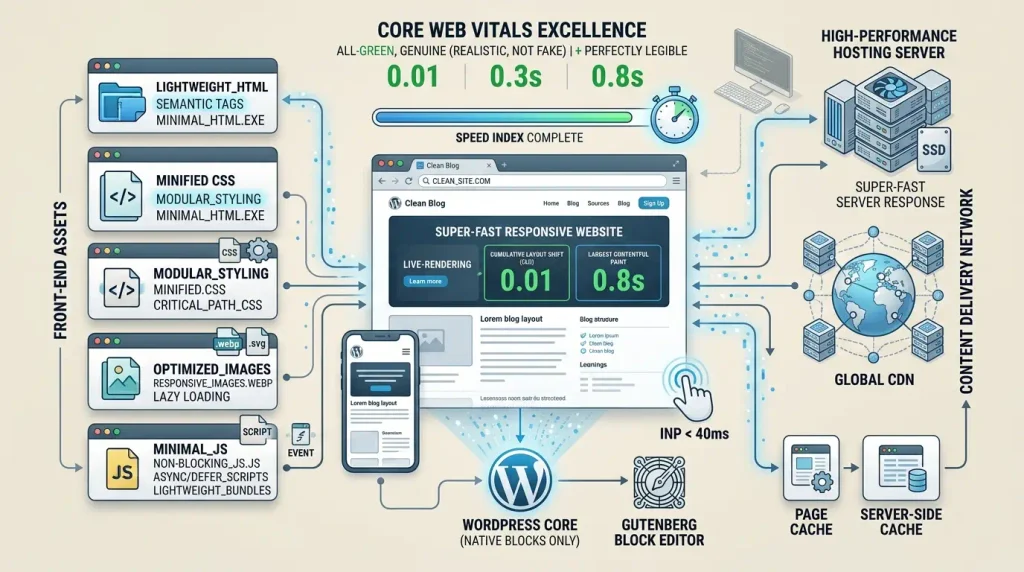
Google uses Core Web Vitals to measure real-world user experience. The key metrics are LCP, INP, and CLS. As a general guide, aim for an LCP of 2.5 seconds or less, an INP below 200 ms, and a CLS below 0.1.
Do You Need Gutenberg If You're Not Using Elementor?
For most content-focused sites, Gutenberg is a useful option.
The reason is straightforward:
Without a visual editor, even simple page edits may require help from a developer.
Gutenberg lets content editors manage the content themselves.
For example:
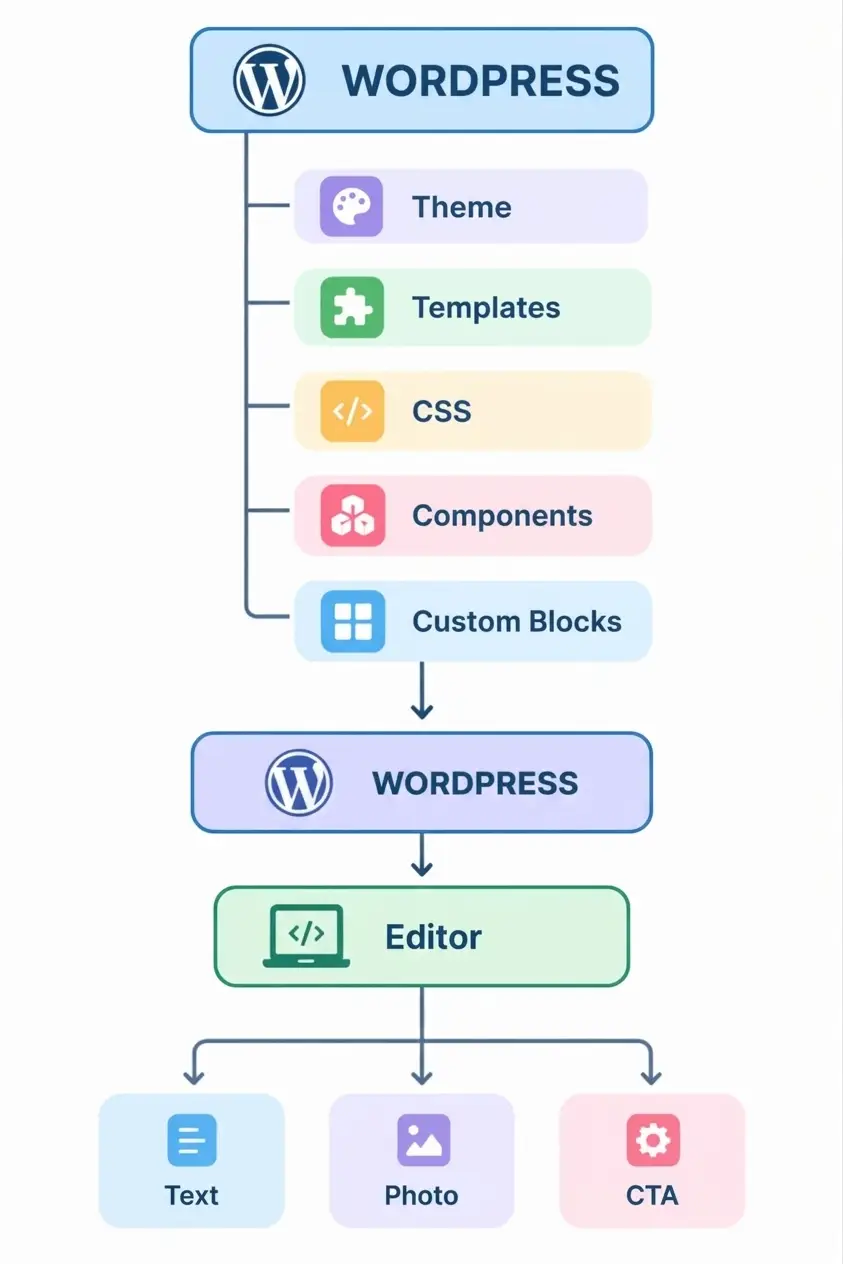
The result is a site that remains easy to manage without relying on a heavyweight page builder.
Gutenberg does not mean "simple site"
Gutenberg is sometimes seen as a tool for blogs alone.
In fact, the block-based approach can underpin a complex website.
For example, you can create your own components:
Hero
Pricing Table
Feature Grid
Testimonials
FAQ
Team
Portfolio
Product Card
CTA
Contact Form
Stats
Timeline
Content editors can then combine these components in the editor.
In this case, the developer creates the logic of the component once.
Benefits of Custom Blocks
Let's imagine that there are 50 pages on the site.
Each page uses the same structure:
[Heading]
[Description]
[3 cards]
[CTA]
Instead of manually styling each page, you can create your own block.
For example:
Service Cards Block
│
├── title
├── description
├── cards
│   ├── icon
│   ├── title
│   ├── text
│   └── link
└── button
This creates a more consistent and controlled system.
When to Build a Fully Custom Theme
WordPress development without Elementor is especially interesting for projects where:
- a unique design is needed;
- the UI/UX design is ready;
- high performance is essential;
- precise HTML structure is needed;
- the site uses many templates;
- custom post types are needed;
- API integration is required;
- non-standard features are needed;
- needs to minimize dependence on third-party solutions.
For example:
Corporate site
Home
|
├── About
├── Services
├── Projects
├── Blog
├── Contacts
└── Careers
For such a site, a page builder is not always a necessity.
What About an Online Store?
An online store can also run on WordPress without Elementor.
The basis can be:
- WooCommerce;
- custom theme;
- Gutenberg;
- custom templates;
- CSS;
- JavaScript;
- custom components.
However, online stores often involve more complex functionality, including:
- directory;
- filters;
- variations;
- basket;
- checkout;
- personal account;
- AJAX;
- search;
- payments;
- delivery.
The architecture should therefore be evaluated on a project-by-project basis.
Removing a page builder alone will not solve an online store's performance problems.
WordPress Without Elementor: What It Means for SEO
Using Elementor—or not using it—is not, by itself, an SEO factor.
Search engines consider a much broader set of page-quality and technical factors:
- content usefulness;
- query relevance;
- document structure;
- HTML quality;
- mobile responsiveness;
- speed;
- Core Web Vitals;
- internal linking;
- metadata;
- indexing;
- canonical;
- structured data;
- availability of content for the search robot.
Google emphasizes that page experience includes many components and that Core Web Vitals are only one part of the picture. A strong Core Web Vitals score does not guarantee a top position in Google Search.
WordPress without Elementor is not an SEO strategy in itself.
It is simply one possible architectural choice.
How to Test WordPress Performance Without Elementor
After development, don't judge performance by eye alone.
Test the site with performance tools and real-world data.
Main focus:
LCP
Measures how quickly the largest visible element loads.
INP
Measures how quickly a page responds to user input.
CLS
Measures visual layout stability as the page loads.
You should also check:
- TTFB;
- number of requests;
- CSS size;
- JavaScript size;
- fonts;
- image;
- cache;
- server;
- third-party scripts.
Diagram: What Affects WordPress Speed
Why You Shouldn't Chase a 100/100 Score
WordPress optimization can sometimes become a race to achieve a perfect score in a single test.
But a real website also needs to support its business goals.
For example, if the site needs:
- analytics;
- cookie consent;
- online chat;
- CRM;
- payment system;
- video;
- interactive forms;
they cannot always be simply removed for the sake of a perfect synthetic test.
Google also notes that strong PageSpeed or Core Web Vitals scores do not guarantee higher search rankings.
The goal of optimization
is not to achieve an impressive test score, but to create a fast, useful website for real people.
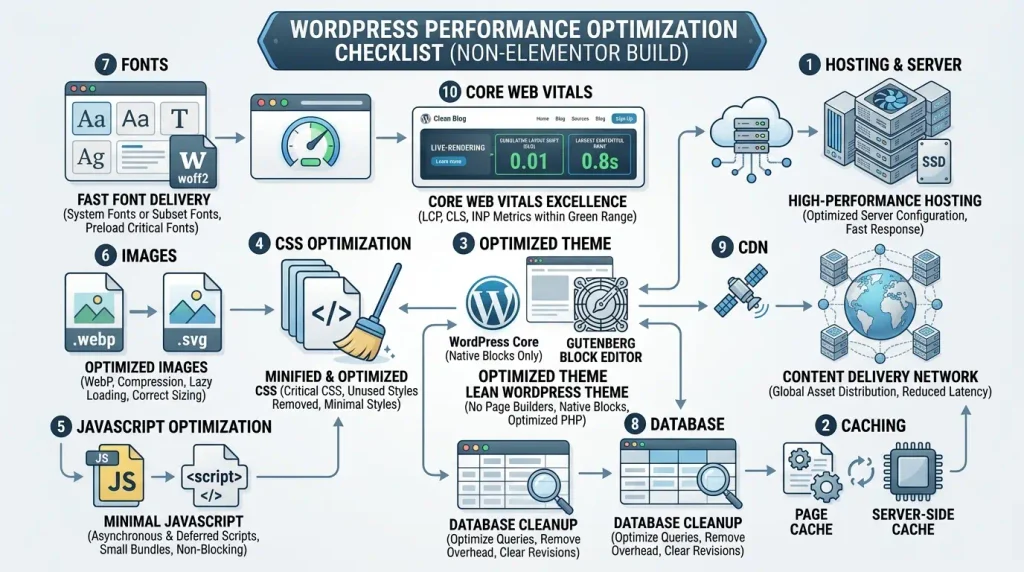
How to Keep WordPress Lightweight Without a Page Builder
Use this practical checklist:
Server
- reliable hosting;
- a current PHP version;
- server-side caching;
- HTTP/2 or HTTP/3;
- CDN if necessary;
- an optimized database.
Theme
- minimal redundant code;
- semantic HTML;
- adaptive layout;
- optimized CSS;
- minimal JavaScript;
- properly enqueued assets.
WordPress
- the latest stable version;
- as few unnecessary plugins as possible;
- an optimized foundation;
- properly configured caching.
Images
- WebP or AVIF where appropriate;
- appropriate dimensions;
- compression;
- responsive image sizes;
- lazy loading for images below the fold.
JavaScript
- load only what is necessary;
deferor other relevant strategies;- avoid loading a library for a single small function;
- control third-party scripts.
CSS
- remove unused code;
- minify styles;
- load critical styles appropriately;
- avoid oversized, all-purpose stylesheets.
WordPress Without Elementor: Pros and Cons
Advantages
1. More control
Developers control the theme structure, templates, CSS, and JavaScript.
2. Fewer dependencies
A well-planned architecture can reduce reliance on third-party components.
3. It is more convenient to optimize the code
When developers control the architecture, they can see exactly what gets loaded.
4. Flexibility
A custom theme can accommodate almost any design.
5. Independence from a specific page builder
The site is not tied to a particular page builder's structure.
6. Ease of scaling for the developer
For large projects, a well-managed codebase can be easier to maintain.
Disadvantages
1. Development expertise required
You may need to work with HTML, CSS, PHP, and JavaScript more often.
2. Higher initial development cost
Building a custom theme usually takes longer than assembling a simple site from ready-made blocks.
3. It is necessary to think over the editing system
Decide in advance which parts of the site administrators should be able to edit.
4. Not everything can be changed quickly
Without a well-designed Gutenberg editing experience, complex changes may require a developer.
5. Quality architecture is required
A poorly built custom theme can be harder to maintain than a well-structured off-the-shelf theme.
WordPress Without Elementor or With It: What Should You Choose?
There is no one-size-fits-all answer.
The right choice depends on the project.
| Scenario | Recommended approach |
|---|---|
| A simple blog | Gutenberg |
| Corporate site | Gutenberg / custom theme |
| Unique design | Custom theme |
| Complex content portal | Custom theme + blocks |
| Landing page for quick start | Page builder can be handy |
| A site frequently edited by marketers | Page builder or a well-thought-out block system |
| Maximum HTML control | Custom development |
| A large number of unique templates | Custom theme |
| Minimum codebase on the frontend | Custom theme |
| A small site with a typical design | Gutenberg / ready-made theme |
When Elementor can be a better choice
It would be wrong to conclude that WordPress without Elementor is always better.
Page builders have real advantages.
For example, if the site requires:
- a quick launch;
- frequent updates without a developer;
- assembly from prebuilt components;
- testing different landing pages;
- handoff to the marketing team;
- frequent design changes.
In these situations, a visual page builder can significantly reduce development time.
Elementor itself also has its own optimization tools, including optimized resource loading, element caching, and image optimization mechanisms.
The question, then, is not:
"Elementor - bad or good?"
A better question is:
"Which architecture best meets the requirements of a particular site?"
Who can develop WordPress without Elementor?
This approach is especially well suited to:
- WordPress developers;
- frontend developers;
- agencies;
- companies with their own development team;
- owners of unique designs;
- large content projects;
- businesses that need custom functionality.
For people without programming experience, a page builder is often easier to use.
For developers, WordPress without a page builder offers far more control over the finished product.
An Example of a Well-Structured Architecture
One possible architecture looks like this:
WordPress Core
│
├── Custom Theme
│   │
│   ├── Templates
│   ├── Template Parts
│   ├── CSS
│   ├── JavaScript
│   └── theme.json
│
├── Custom Blocks
│   │
│   ├── Hero
│   ├── Cards
│   ├── CTA
│   └── FAQ
│
├── Custom Plugin
│   │
│   ├── Business Logic
│   ├── API
│   └── Custom Post Types
│
└── WordPress Database
This architecture separates:
content → design → functionality → business logic.That separation matters far more to a project's long-term maintainability than whether Elementor is installed.
Security and support
A clear dependency structure is another benefit of a controlled architecture.
When a site consists of:
- WordPress;
- custom theme;
- several required plugins;
it is easier for developers to understand and troubleshoot the system.
However, this does not make a site secure by default.
Regular maintenance still includes:
- update WordPress;
- update themes;
- update plugins;
- create backup copies;
- check access rights;
- use HTTPS;
- control third-party integrations.
Responsiveness without Elementor
Another misconception is that a page builder automatically makes responsive design easier.
In reality, responsive design primarily depends on:
- CSS;
- media queries;
- fluid layouts;
- flexible containers;
- responsive typography;
- responsive image sizes;
- correct HTML structure.
For example:
.container {
    width: min(100% - 32px, 1200px);
    margin-inline: auto;
}

.grid {
    display: grid;
    grid-template-columns: repeat(3, 1fr);
    gap: 24px;
}

@media (max-width: 900px) {
    .grid {
        grid-template-columns: repeat(2, 1fr);
    }
}

@media (max-width: 600px) {
    .grid {
        grid-template-columns: 1fr;
    }
}
There is no page builder dependency here.
Website accessibility without a page builder
Custom development also gives teams more precise control over accessibility.
For example:
- semantic HTML tags;
- correct header hierarchy;
altfor images;- keyboard navigation;
- focus states;
- correct labels;
- ARIA where it's really needed;
- contrast;
- accessible forms.
At the same time the absence of Elementor does not automatically make the site accessible.
Accessibility comes from thoughtful design and testing.
WordPress Without a Page Builder and Semantic HTML
A custom theme lets you build a semantic structure such as:
<header>
    ...
</header>

<nav>
    ...
</nav>

<main>
    <article>
        <header>
            <h1>...</h1>
        </header>

        <section>
            ...
        </section>
    </article>

    <aside>
        ...
    </aside>
</main>

<footer>
    ...
</footer>
This gives developers full control over the document structure.
The main mistake: thinking that speed depends only on Elementor
Consider two hypothetical websites.
Site A
- without Elementor;
- poor hosting;
- 15 unnecessary plugins;
- large JPEGs;
- 2 MB JavaScript;
- third-party trackers;
- missing cache.
Site B
- Elementor;
- quality server;
- optimized images;
- cache;
- CDN;
- control of third-party scripts;
- optimized resources.
You can't assume Site A will be faster simply because it doesn't use Elementor.
The architecture matters more than the name of the technology.
What Makes a WordPress Site Fast?
| Component | What to do |
|---|---|
| Hosting | Choose a high-performance server |
| WordPress | Keep WordPress up to date |
| Theme | Minimize redundant code |
| Plugins | Keep only the necessary plugins |
| CSS | Optimize and minify |
| JS | Load only what's needed |
| Images | Compress and scale |
| Fonts | Minimize the number of fonts |
| Cache | Configure caching |
| CDN | Use as needed |
| Database | Optimize queries |
| Third-party | Control third-party scripts |
| Core Web Vitals | Monitor regularly |
How to Test a Site Properly
After development, run through several cycles of:
Development
   ↓
Testing
   ↓
Performance Audit
   ↓
Identify issues
   ↓
Optimization
   ↓
Retest
   ↓
Production
   ↓
Monitor real-user data
It is especially important to test:
- main;
- article;
- category;
- service page;
- contacts;
- form page;
- pages with many images;
- mobile version.
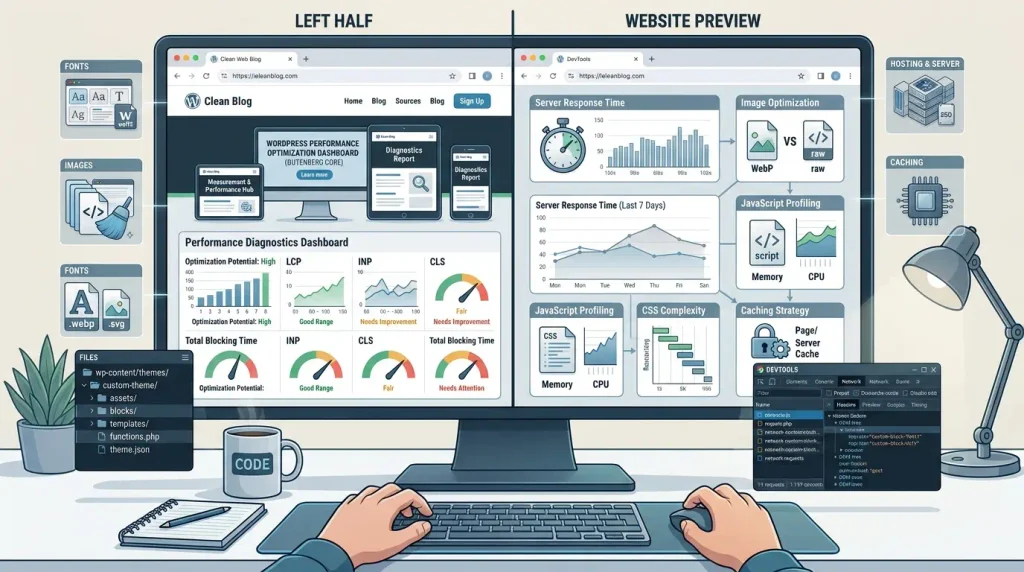
Can You Build a Fast WordPress Website Without Elementor?
Yes, you can.
You can build a site that is:
- fast;
- adaptive;
- SEO-friendly;
- available;
- scalable;
- convenient for administration;
- completely custom.
But simply removing Elementor will not make it so.
It takes a coordinated effort across the entire stack:
Custom architecture
   +
Optimized code
   +
Reliable hosting
   +
Caching
   +
Optimized images
   +
Controlled JavaScript
   +
Well-structured CSS
   +
Quality user experience
   +
Core Web Vitals
   ↓
Fast website
Quick Checklist: WordPress Without Elementor
Before launch, make sure you have:
- Elementor is not required functionally;
- selected the right theme;
- defined template structure;
- well-thought-out system of Gutenberg blocks;
- no extra plugins;
- CSS optimized;
- JavaScript is minimized;
- images are optimized;
- fonts are optimized;
- caching is configured;
- verified server;
- checked mobile version;
- verified by Core Web Vitals;
- tested accessibility;
- checked by SEO;
- configured backups;
- site tested before production.
WordPress without Elementor: Conclusion
WordPress without Elementor is a viable approach to professional web development.
A site can be built with:
- Gutenberg;
- Block Editor;
- block themes;
- Site Editor;
- custom theme;
- PHP templates;
- custom blocks;
- HTML;
- CSS;
- JavaScript;
- custom plugins.
Modern WordPress already provides the tools for this approach. Its official documentation covers classic and block themes, templates, blocks, and the Site Editor.
The main advantage of WordPress development without Elementor is not simply the potential for less code.
Most importantly, it gives developers control over the site's architecture.
The developer can decide:
- which HTML to generate;
- which CSS to load;
- which JavaScript is required;
- which resources should be on a specific page;
- how to organize templates;
- how Gutenberg works;
- which components administrators can edit;
- how to implement business logic.
Still, avoiding Elementor should not become a goal in itself. If a page builder speeds up development and meets the project's needs, using one may be the right choice.
The best approach is not to choose between “page builder” and “code” as absolutes, but to design an architecture around the needs of the specific website.
If a project calls for maximum control, a unique design, fewer dependencies, and deep frontend optimization, WordPress without a page builder can be an excellent fit.
FAQ: WordPress without Elementor
Can I build a WordPress site without Elementor?
Yes. You can build a WordPress site without Elementor using Gutenberg, the Block Editor, the Site Editor, a block theme, or a custom theme with PHP, HTML, CSS, and JavaScript.
Will WordPress run faster without Elementor?
It may, but there is no guarantee. Performance also depends on the theme, plugins, hosting, caching, images, JavaScript, CSS, and other parts of the setup.
Can I create a modern website design without Elementor?
Yes. You can create a modern design with Gutenberg, custom blocks, CSS, a block theme, or a fully custom theme.
Do I need Gutenberg if I don't use Elementor?
No, but Gutenberg can make content much easier to manage. Developers can also build custom blocks for a site's specific needs.
Can I build a landing page without Elementor?
Yes. You can create a landing page with a custom WordPress template, Gutenberg, or custom blocks.
Can I build an online store without Elementor?
Yes. WooCommerce can run with a custom theme and templates, without Elementor. The right architecture depends on the store's complexity.
Is WordPress better for SEO without Elementor?
Not automatically. SEO depends on content, site structure, technical setup, performance, mobile usability, and many other factors—not simply on whether Elementor is installed.
Do I need coding skills to build WordPress without a page builder?
Custom development typically requires HTML, CSS, PHP, JavaScript, and WordPress API knowledge. Gutenberg can make routine content editing possible without coding.
Can I build a WordPress site without a page builder myself?
Yes, if you use a ready-made theme and Gutenberg. A fully custom site usually requires WordPress development skills.
Can I use Gutenberg with a custom WordPress theme?
Yes. This is a practical combination: developers control the theme and components, while editors manage content in the block editor.
Is a custom WordPress theme faster than a pre-built theme?
Not necessarily. Code quality and architecture matter more than whether a theme is custom. A well-built pre-made theme can be fast, while a poorly built custom theme can be slow.
Does Elementor directly affect Google rankings?
Don't reduce SEO to whether Elementor is present. Google evaluates many signals, and Core Web Vitals are only one part of the page-experience picture.
Which is faster: Gutenberg or a custom WordPress theme?
It depends on the project. Gutenberg may be all a content-focused site needs; a custom theme offers more control over structure, templates, and the frontend.
Can I build a WordPress site without any page builder?
Yes. A site can run on WordPress core with a custom or block theme, Gutenberg, and the plugins it needs—without a separate page builder.

