
Pre-Built vs Custom WordPress Theme: Which Should You Choose?

Hi! Choosing a theme is one of the first important decisions when building a WordPress website. The theme shapes much of the site's appearance, template structure, styling, and overall user interface. But site owners often face one key question: Pre-built WordPress theme or custom theme: which should you choose?
A pre-built WordPress theme lets you launch quickly with an existing design, templates, and settings. A custom WordPress theme, by contrast, is developed for a specific project and can be tailored closely to its design, structure, functionality, and performance requirements.
WordPress supports both classic themes and modern block themes, which let you edit much more of a site through the Site Editor. The official WordPress documentation describes both approaches to theme development.
- What Is a Pre-Built WordPress Theme
- Types of Pre-Built WordPress Themes
- What Is a Custom WordPress Theme
- Pre-Built vs Custom WordPress Themes: The Key Differences
- Pre-Built vs Custom WordPress Themes
- Advantages of a Pre-Built WordPress Theme
- 1. Faster launch
- 2. Lower upfront costs
- 3. A rich set of built-in features
- 4. Easier maintenance for a typical website
- Disadvantages of a Pre-Built WordPress Theme
- 1. Unnecessary features
- 2. Design limitations
- 3. Dependence on the theme developer
- 4. Extensive customization can erase the benefits
- Advantages of a Custom WordPress Theme
- 1. Complete design freedom
- 2. Control over the code
- 3. Optimization for a specific project
- 4. Control over technical SEO
- 5. Fewer unnecessary dependencies
- 6. Better control over scalability
- Disadvantages of a Custom WordPress Theme
- 1. Higher upfront cost
- 2. Longer development time
- 3. Ongoing technical support is needed
- Pre-Built vs Custom: Which Theme Costs Less in the Long Run?
- Pre-Built vs Custom Themes: Which Is Faster?
- SEO: Which Theme Is Better?
- Pre-Built vs Custom Themes: Design
- Do You Need a WordPress Child Theme?
- When Is a Pre-Built WordPress Theme the Right Choice?
- When Should You Commission a Custom WordPress Theme?
- A Middle Ground: Pre-Built Theme + Customization
- 10 Signs a Pre-Built Theme Is Not Right for You
- Security: Pre-Built vs Custom Themes
- Responsiveness: Pre-Built or Custom Theme?
- Planning for WordPress Site Growth
- How to Choose a WordPress Theme: A Step-by-Step Guide
- Step 1: Define the type of website
- Step 2: List the templates you need
- Step 3: Define the design
- Step 4: Define the functionality
- Step 5: Consider future growth
- Step 6: Look beyond the development budget
- Decision Matrix
- Pre-Built or Custom Themes for Different Types of Websites
- The Biggest Mistake: Choosing a Theme by Appearance Alone
- Technical considerations
- Performance
- SEO
- Future growth
- Conclusion: Pre-Built or Custom WordPress Theme?
- FAQ: Pre-Built or Custom WordPress Theme?
- Which is better: a pre-built or custom WordPress theme?
- Will a custom WordPress theme be faster than a pre-built one?
- Does a WordPress theme affect SEO?
- How much does a custom WordPress theme cost?
- Can you customize a pre-built WordPress theme?
- What is a WordPress child theme?
- Can you build a website without a pre-built theme?
- When does a pre-built theme stop being cost-effective?
- Do you need a custom theme for an online store?
- Can you switch from a pre-built theme to a custom one later?
- Should you use a free WordPress theme?
- Which theme should you choose for a corporate website?
- Can you build a custom WordPress theme from a pre-built one?
So the question is not simply “Which theme is better?”. A better question is which approach best fits the website, budget, timeline, design, and plans for the project's growth.
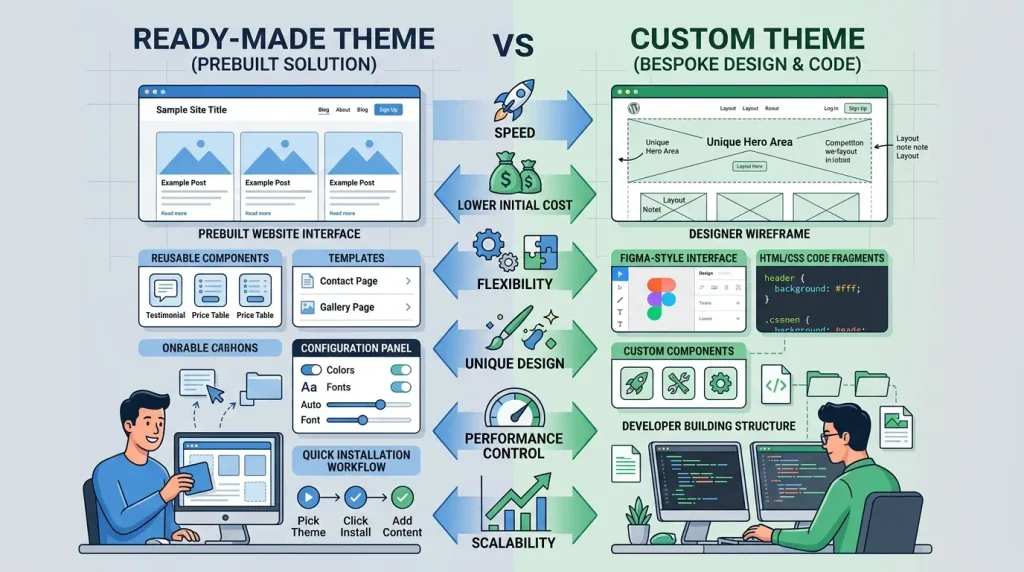
What Is a Pre-Built WordPress Theme
A pre-built WordPress theme is a ready-made collection of files, templates, styles, settings, and features that you can install on a website and adapt to your needs.
The WordPress directory offers a wide range of free themes, alongside a commercial theme market. Its official directory also lets you filter themes by type, features, block editor support, responsiveness, and other criteria.
A pre-built theme typically includes:
- ready-made page layouts;
- post templates;
- archive templates;
- a header and footer;
- CSS styles;
- typography;
- menus;
- color settings;
- ready-made components;
- layout options;
- support for specific WordPress features;
- and sometimes additional features and integrations.
For example, after installing a theme, users can change the logo, colors, fonts, menus, widgets, or individual design elements without building the entire website from scratch.
Types of Pre-Built WordPress Themes
Broadly speaking, they fall into several categories:
- Multipurpose themes — designed for different types of websites.
- Niche themes — built for specific industries or purposes.
- Block themes — built around the Site Editor and WordPress block system.
- Minimalist themes — include a relatively small set of features.
- Feature-rich themes — offer extensive settings and ready-made components.
Block themes have a particular advantage: the Site Editor lets you edit parts of a site including the header, footer, templates, and other elements without having to modify the theme itself.
What Is a Custom WordPress Theme
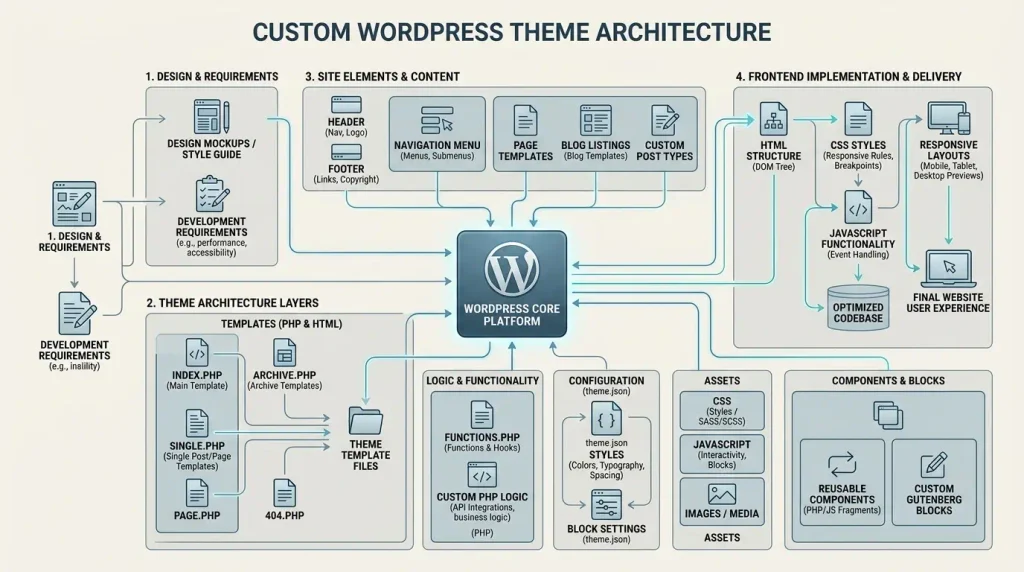
A custom WordPress theme is a theme developed specifically for a particular website.
It can be built from an existing design in Figma, Adobe XD, or another source, or developed directly from a project brief.
When building a custom theme, the developer can define:
- the HTML structure;
- the CSS architecture;
- JavaScript;
- the WordPress template structure;
- page types;
- post templates;
- archives;
- the header;
- the footer;
- menus;
- components;
- blocks;
- WooCommerce templates;
- how CSS and JavaScript are loaded;
- font loading;
- the data structure;
- the behavior of individual elements.
The official WordPress documentation covers theme structure, templates, style.css, functions.php, theme.json, block theme templates, and other components used in development.
The defining feature of a custom theme is that it is built not for an abstract user, but for a specific project.
Pre-Built vs Custom WordPress Themes: The Key Differences
In simple terms, the difference is this:
Pre-built theme: a general-purpose product is created first, and the website is adapted to fit it.
Custom theme: the needs of a specific website are defined first, and the theme is then built to meet them.
These are fundamentally different approaches.
For example, if a company needs a simple 5–10-page corporate website, a pre-built theme may cover most of its needs.
But for a large corporate portal with a non-standard structure, a complex template system, a specialized UI, and minimal third-party code, custom theme development may be the better option.
Pre-Built vs Custom WordPress Themes
| Criteria | A pre-built WordPress theme | A custom WordPress theme |
|---|---|---|
| Time to launch | Fast | Requires development |
| Upfront cost | Usually lower | Usually higher |
| Design uniqueness | Limited | High |
| Flexibility | Depends on the theme | Very high |
| Code control | Limited or partial | Full |
| Optimization for a specific site | Limited | Can be precisely tailored |
| Scalability | Depends on the architecture | Planned around the project |
| Updates | Depends on the developer | Controlled by the owner/developer |
| Theme developer dependency | Can be high | Depends on your team |
| Launch time | Shorter | Longer |
| Unique UI | Not always | Yes |
| Unnecessary features | Possible | Can be minimized |
| Support | Theme developer or community | In-house team/developer |
| Control over HTML structure | Limited | High |
| Suitable for an MVP | High | Not always justified |
Important: this does not mean a pre-built theme is automatically slow or a custom theme is automatically fast. The quality of the implementation matters more than whether you choose a pre-built or custom theme.
Advantages of a Pre-Built WordPress Theme
1. Faster launch
This is one of the main reasons people choose a pre-built theme.
You do not have to start from an empty folder. The core components are already in place, so much of the work can be focused on configuration.
This is especially useful for:
- small business websites;
- blogs;
- information portals;
- personal websites;
- simple landing pages;
- MVPs;
- experimental projects.
2. Lower upfront costs
Building a fully custom theme requires more time from specialists.
With a pre-built theme, some of the work has already been done:
- design;
- basic layout and markup;
- templates;
- styles;
- components;
- responsive behavior;
- some of the functionality.
As a result, the initial budget can be significantly lower.
However, it is important to look beyond the initial price.
A cheaper theme may later lead to substantial costs for:
- customization;
- resolving conflicts;
- optimization;
- replacing components;
- maintenance;
- additional plugins.
3. A rich set of built-in features
Modern themes can offer a wide range of settings.
You may get:
- ready-made templates;
- blocks;
- patterns;
- design variations;
- color settings;
- typography;
- multiple header layouts;
- multiple footer layouts;
- ready-made pages.
Modern block themes and the Site Editor offer a particularly broad range of options.
4. Easier maintenance for a typical website
If your site uses a popular theme, documentation, support, or a user community may be available.
That makes it less likely you will be left without guidance on how to configure it.
Before buying or installing a theme, check:
- when it was last updated;
- compatibility with your current version of WordPress;
- documentation;
- maintenance;
- its update history;
- user reviews;
- code quality;
- its dependencies.
Disadvantages of a Pre-Built WordPress Theme
1. Unnecessary features
A common issue with multipurpose themes is that they include many features a particular website may not need.
For example, a theme may include:
- dozens of components;
- multiple header types;
- various sliders;
- a portfolio;
- galleries;
- extra widgets;
- integrations;
- custom settings;
- different page layouts.
Leaving half of these features unused does not automatically make a site slow, but it can make the architecture harder to maintain and optimize.
2. Design limitations
A pre-built theme comes with its own design logic.
Even with extensive settings, you may reach a point where the design calls for changes the theme was not built to support.
At that point, you may need to:
- write additional CSS;
- modify templates;
- add JavaScript;
- use a child theme;
- build custom blocks;
- modify PHP;
- work around the theme's own limitations.
Sometimes the number of changes grows so large that a pre-built theme is no longer the cost-effective option.
3. Dependence on the theme developer
A pre-built theme is a third-party product.
That makes the following questions important:
- Will it continue to receive updates?;
- Will support remain available?;
- Will it remain compatible with WordPress?;
- Could its architecture change?;
- Could the developer discontinue it?
If the developer stops maintaining the theme, the site owner may have to migrate to another theme or move to a custom solution.
4. Extensive customization can erase the benefits
Suppose a pre-built theme is inexpensive.
But after installing it, the client needs to:
- completely redesign the header;
- rework the footer;
- change the blog structure;
- build a custom catalog;
- rewrite the product page;
- redesign the mobile experience;
- remove some features;
- add custom components.
In this situation, the theme may serve only as a starting point for extensive rework.
Sometimes it makes more sense to build a custom WordPress theme from scratch.
Advantages of a Custom WordPress Theme
1. Complete design freedom
The main advantage is the ability to bring a design to life as closely as possible to the original mockup.
You do not have to adapt the design to fit a pre-built theme.
Instead, the theme is built around the design.
This is especially important for:
- brand-focused websites;
- large companies;
- SaaS;
- specialized services;
- portals;
- catalogs;
- online stores;
- websites with a custom design system.
2. Control over the code
With a custom theme, the team has control over its structure.
You can decide:
- which CSS files are needed;
- which JavaScript is used;
- which templates are required;
- how the HTML is generated;
- which components are loaded;
- where third-party libraries are used;
- which features belong in the theme.
WordPress provides a standard theme structure, with separate mechanisms for templates, styles, functionality, and global settings.
3. Optimization for a specific project
A custom theme is not only a way to create a unique design; it also lets you shape the front end around the website's actual needs.
For example, you can:
- minimize the number of third-party libraries;
- load assets only where they are needed;
- optimize CSS;
- optimize JavaScript;
- handle fonts efficiently;
- control the HTML structure;
- avoid unnecessary components;
- optimize templates.
However, it is important to understand: a custom theme is not automatically fast.
A poorly built custom theme can be slower than a well-optimized pre-built one.
4. Control over technical SEO
A custom theme can be developed with SEO requirements in mind from the outset.
For example:
- semantic HTML structure;
- a clear heading hierarchy;
- optimized templates;
- control over internal links;
- proper image handling;
- responsive behavior;
- metadata management through the appropriate tools;
- Core Web Vitals optimization;
- structured data where appropriate.
The theme itself is only one part of SEO. Results are also influenced by content, site structure, internal linking, the server, plugins, images, and many other factors.
5. Fewer unnecessary dependencies
When a theme is built for one website, there is no need to bundle every feature that might be useful to thousands of other users.
This makes the architecture easier to control.
For example, if the website does not need:
- a slider;
- a portfolio;
- dozens of widgets;
- multiple menu types;
- a demo importer;
- dozens of button styles;
they simply do not need to be included in the theme.
6. Better control over scalability
A custom theme can be especially valuable for projects expected to grow over several years.
The architecture can account for:
- future content types;
- new templates;
- multilingual support;
- integrations;
- WooCommerce;
- user accounts and dashboards;
- APIs;
- custom blocks;
- complex catalogs;
- filters;
- specialized page types.
This does not guarantee that future challenges will not arise, but it lets you build a foundation around a specific roadmap.
Disadvantages of a Custom WordPress Theme
1. Higher upfront cost
Custom theme development requires input from:
- a designer;
- a front-end developer;
- a WordPress developer;
- a QA tester;
- and sometimes an SEO specialist.
Not every project needs a separate person for each role, but the workload is still greater than simply installing a pre-built theme.
2. Longer development time
A pre-built theme can be installed quickly.
A custom theme requires:
- requirements analysis;
- design work;
- component preparation;
- front-end implementation;
- WordPress integration;
- template development;
- testing;
- optimization;
- bug fixes;
- launch preparation.
So a custom theme may not be the right choice when a project needs to launch as quickly as possible.
3. Ongoing technical support is needed
A pre-built theme may have an author and official support.
A custom theme has no such external provider.
You need access to:
- a developer;
- an in-house team;
- documentation;
- a code repository;
- an update process;
- backups.
This is particularly important for long-term projects.
Pre-Built vs Custom: Which Theme Costs Less in the Long Run?
Comparing only the price of the theme itself gives an incomplete picture.
You need to account for TCO (total cost of ownership).
For example:
Total cost =
development
+ customization
+ plugins
+ maintenance
+ updates
+ fixes
+ optimization
+ future migration
For a small website, a pre-built theme may remain cost-effective throughout its lifecycle.
For a large project, continually adapting a pre-built theme can gradually increase costs.
So do not ask only:
“How much does the theme cost?”
Also ask:
“What will the entire website cost over the next several years?”
Pre-Built vs Custom Themes: Which Is Faster?
One of the most common myths is:
“A custom theme is always faster.”
In reality, that is not guaranteed.
Site speed depends on:
- code quality;
- the amount of CSS;
- JavaScript;
- fonts;
- images;
- plugins;
- caching;
- the server;
- CDN;
- the database;
- page structure;
- third-party integrations.
A well-optimized pre-built theme can outperform a poorly coded custom one.
But a custom theme gives you more control over exactly what gets loaded on the page.
SEO: Which Theme Is Better?
There is no universal SEO rule that says:
“A custom theme is automatically better.”
Google does not rank a website simply based on whether its theme is pre-built or custom.
How well the website is implemented matters more.
For SEO, check:
- mobile responsiveness;
- speed;
- Core Web Vitals;
- semantic HTML structure;
- headings;
- internal linking;
- indexability;
- canonical tags;
- the sitemap;
- hreflang tags on multilingual sites;
- structured data;
- whether search engines can access the content.
A properly optimized pre-built theme can therefore work perfectly well for SEO.
Pre-Built vs Custom Themes: Design
| Scenario | Pre-built theme | Custom theme |
|---|---|---|
| Simple design | ✅ | ✅ |
| Distinctive brand | ⚠️ | ✅ |
| Unusual UI | ⚠️ | ✅ |
| Standard blog | ✅ | ⚠️ |
| Corporate website | ✅ | ✅ |
| Large portal | ⚠️ | ✅ |
| Complex catalog | ⚠️ | ✅ |
| MVP | ✅ | ⚠️ |
If your business already has a distinctive design that needs to be reproduced as accurately as possible, a custom WordPress theme usually offers greater freedom.
Do You Need a WordPress Child Theme?
You do not always need to build a completely new theme from the start.
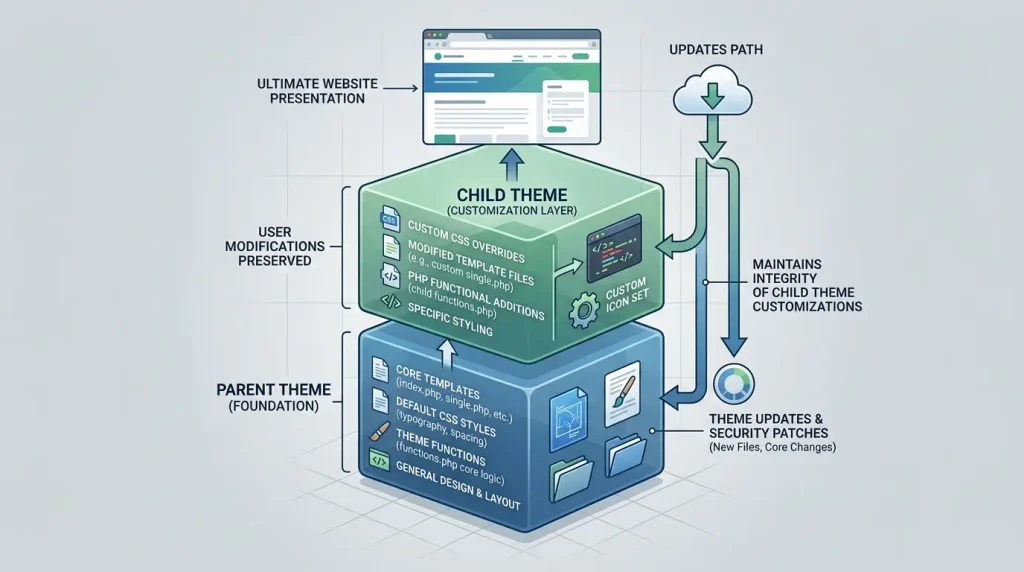
If a pre-built theme is almost right, you can use a child theme — a child theme.
A child theme lets you modify or extend a parent theme without editing its files directly. This helps preserve your changes when the parent theme is updated.
A typical setup:
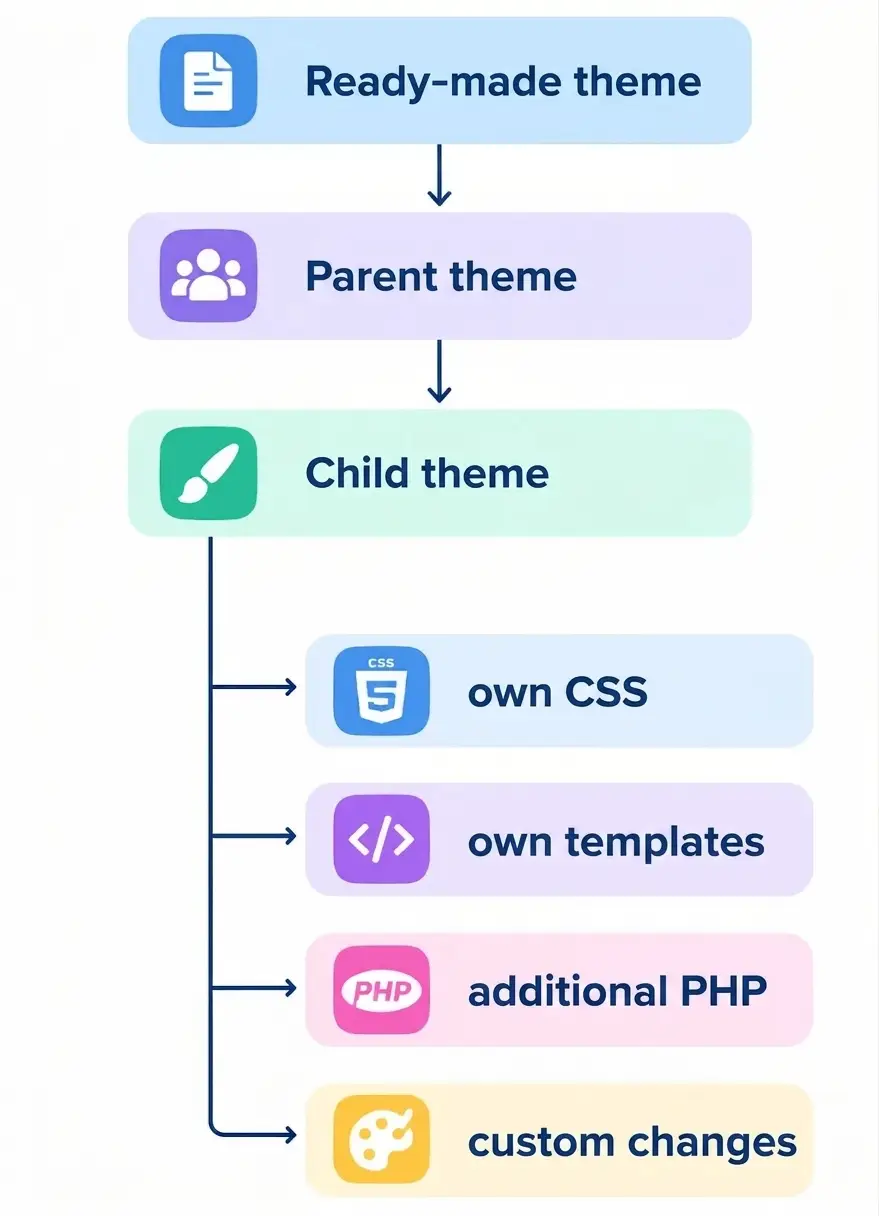
This is a good option when you only need to make a limited number of changes.
WordPress also notes that extensive customization in a child theme can make maintenance more difficult. For major changes, building a complete custom theme may be a better choice.
When Is a Pre-Built WordPress Theme the Right Choice?
A pre-built theme can be a practical choice if:
- you need to launch quickly;
- your budget is limited;
- the website is relatively simple;
- the design is conventional;
- there are no complex integrations;
- you do not need a completely custom structure;
- the theme is actively maintained;
- you need an MVP;
- the website is being built to test an idea.
Example
A small business needs a website with:
- Home;
- About;
- Services;
- Blog;
- Contact.
If a quality pre-built theme can deliver the right design without too many compromises, custom theme development may be unnecessary.
When Should You Commission a Custom WordPress Theme?
A custom theme makes sense if:
- you have a unique design;
- the website is a key part of your brand;
- you need a non-standard structure;
- there are many content types;
- you need complex templates;
- the front end needs precise optimization;
- you have a long-term growth plan;
- the website has specific business logic;
- you need full control over the code;
- pre-built themes force you to make too many compromises.
A Middle Ground: Pre-Built Theme + Customization
You do not have to choose only between:
“a pre-built theme”
and
“a 100% custom theme built from scratch”.
There is a middle ground:
a quality base theme with carefully controlled customization.
For example:
Pre-built theme
     │
     ├── custom design
     ├── child theme
     ├── custom CSS styles
     ├── custom templates
     ├── custom blocks
     └── required integrations
This approach can work well when the theme's underlying architecture fits the project's requirements.
The key is to avoid turning customization into an endless struggle against the original theme's limitations.
10 Signs a Pre-Built Theme Is Not Right for You
Watch for these warning signs:
- You constantly have to force the design to fit the theme.
- Every change requires a large amount of CSS.
- You have to rewrite the standard templates.
- You rely on numerous plugins solely to work around the theme's limitations.
- The theme loads many unnecessary assets.
- Custom pages depend on complicated workarounds.
- The theme documentation does not explain key parts of its architecture.
- Theme updates regularly cause problems.
- You are planning a major expansion of functionality.
- The developer is effectively rewriting most of the theme.
If several of these issues apply, it may be time to reconsider the approach.
Security: Pre-Built vs Custom Themes
Do not assume that:
“A custom theme is more secure.”
Security depends on how the theme is built and maintained.
A pre-built theme may be well maintained and updated regularly.
A custom theme can contain vulnerabilities if it was developed without following WordPress standards.
For either option, it is important to:
- keep WordPress up to date;
- update the theme;
- update plugins;
- use HTTPS;
- restrict access;
- create backups;
- review third-party code;
- avoid questionable modified themes;
- audit the PHP code.
Responsiveness: Pre-Built or Custom Theme?
A modern website should work well on:
- smartphones;
- tablets;
- laptops;
- large monitors.
Pre-built themes often come with responsive design.
But that does not mean the responsive behavior will be ideal for your specific content.
A custom theme lets you build responsive behavior around a specific design.
So do not just ask:
“Is the theme responsive?”
Also ask:
“Does my website display properly across different screen sizes?”
Planning for WordPress Site Growth
When choosing a theme, think beyond the website as it exists today.
Ask yourself:
- What might the site need a year from now?
- Will you add an online store?
- Will it need multilingual support?
- Will you add new post types?
- Will you need user accounts?
- Will you need a catalog?
- Will you need a CRM integration?
- Will you need an API?
- Will the volume of content grow?
If your future plans differ significantly from what a pre-built theme is designed to support, it is worth accounting for that from the outset.
How to Choose a WordPress Theme: A Step-by-Step Guide
Step 1: Define the type of website
It could be a:
- blog;
- corporate website;
- a portfolio;
- online store;
- catalog;
- media site;
- news portal;
- service platform;
- informational website.
Step 2: List the templates you need
For example:
- Home;
- About;
- Services;
- Individual service;
- Blog;
- Post;
- Category;
- Search;
- 404 page;
- Contact.
Step 3: Define the design
If you already have a design in Figma, check how closely it can be reproduced with your chosen theme.
If nearly everything needs to change, that is a point in favor of custom development.
Step 4: Define the functionality
Make a list:
[ ] Forms
[ ] Multilingual support
[ ] WooCommerce
[ ] Catalog
[ ] Filters
[ ] User accounts
[ ] API
[ ] CRM
[ ] Search
[ ] Custom post types
[ ] Custom fields
[ ] Integrations
Step 5: Consider future growth
If the website is intended to be a long-term product, its architecture should account for future changes.
Step 6: Look beyond the development budget
Compare:
initial cost + customization + maintenance + future changes.
Decision Matrix
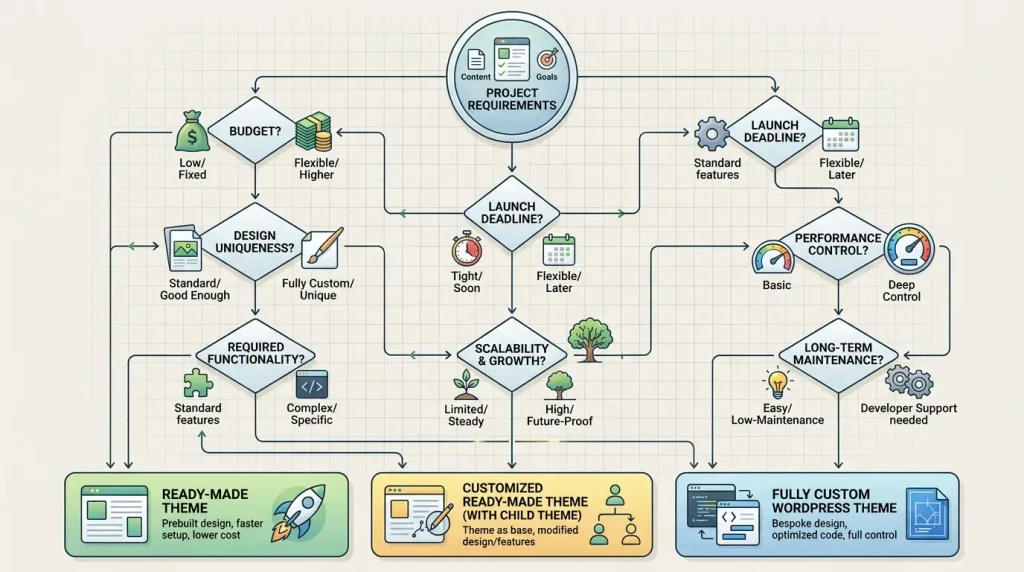
You can use the following framework to assess a project:
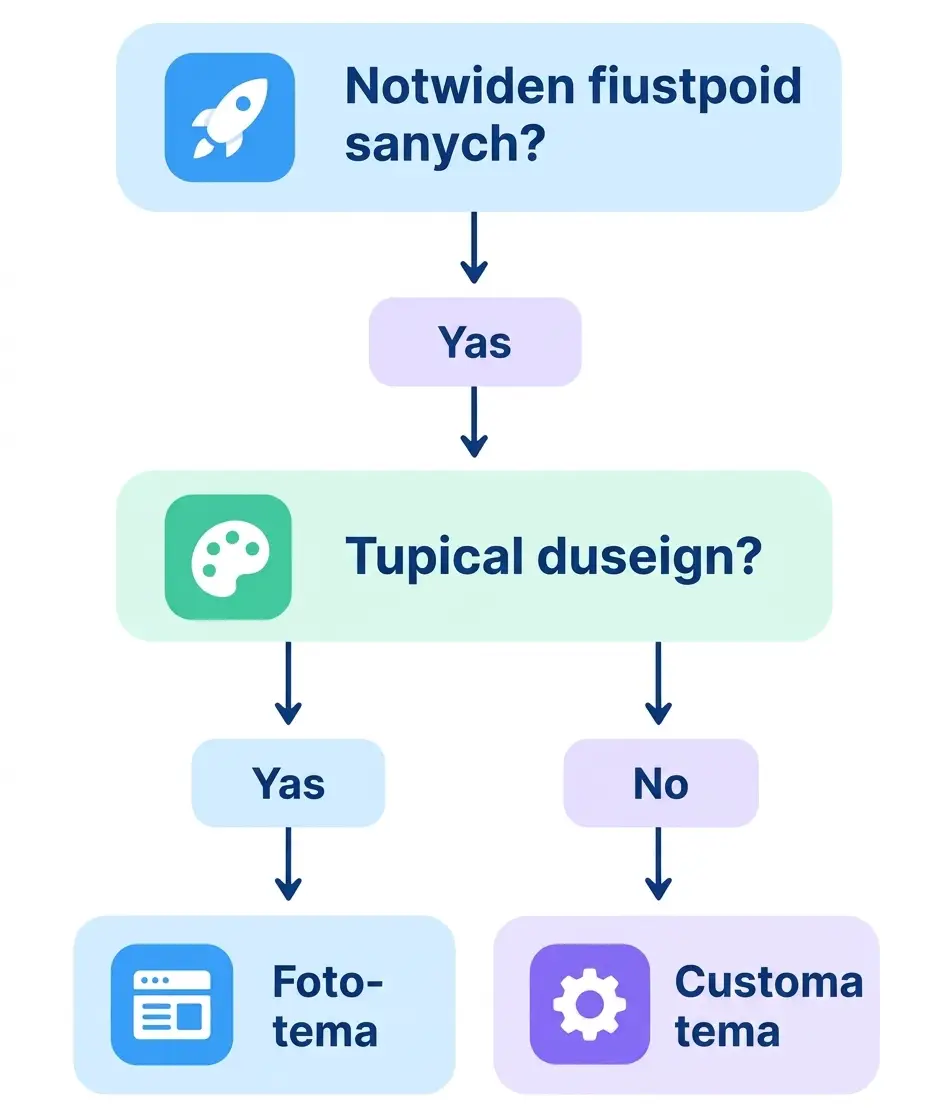
If you need a quick launch but have a distinctive design, consider a base theme with limited customization.
If the project is complex, long-term, and has many specialized requirements, evaluate a fully custom build.
Pre-Built or Custom Themes for Different Types of Websites
| Website type | Recommended approach |
|---|---|
| Personal blog | Pre-built theme |
| Simple small business website | Pre-built theme |
| MVP | Pre-built theme |
| Simple corporate website | Pre-built or customized |
| Distinctive brand website | Custom or heavily customized |
| Large corporate portal | Custom |
| Complex catalog | Custom / specialized |
| Large information portal | Custom |
| Specialized service | Custom |
| Online store | Depends on requirements |
| Website with a custom design system | Custom |
These are guidelines, not hard-and-fast rules. The right choice depends on an analysis of your requirements.
The Biggest Mistake: Choosing a Theme by Appearance Alone
A polished demo site does not necessarily mean the theme is right for your project.
Before choosing, review:
Technical considerations
- the theme structure;
- templates;
- documentation;
- updates;
- compatibility;
- dependencies.
Performance
- CSS;
- JavaScript;
- fonts;
- images;
- third-party assets.
SEO
- HTML;
- headings;
- templates;
- the mobile experience;
- indexability.
Future growth
- customization options;
- child theme support;
- blocks;
- templates;
- future integrations.
Conclusion: Pre-Built or Custom WordPress Theme?
There is no one-size-fits-all answer to the question: “pre-built or custom WordPress theme?” .
The right choice depends on the specific project.
A pre-built WordPress theme can be a good choice when you need a fast launch, a moderate budget, and a standard site structure.
A custom WordPress theme makes sense when you need a unique design, full control over the structure, specialized functionality, and room to scale over the long term.
There is also a practical middle ground: a pre-built theme with controlled customization or a child theme.
Before choosing, consider the whole project not just the theme price:
design + functionality + performance + SEO + maintenance + scalability + total cost of ownership.
This approach helps you decide whether a pre-built theme is right for you or whether it is time to move to a custom WordPress theme.
FAQ: Pre-Built or Custom WordPress Theme?
Which is better: a pre-built or custom WordPress theme?
It depends on your website's requirements. A pre-built theme suits quick launches and standard projects, while a custom theme is better for a distinctive design, complex functionality, and full control over the architecture.
Will a custom WordPress theme be faster than a pre-built one?
Not necessarily. Speed depends on code quality, CSS, JavaScript, images, fonts, plugins, the server, and optimization. A custom theme's advantage is the greater control it gives you over the code and the assets that load.
Does a WordPress theme affect SEO?
Yes. A theme can affect technical aspects of a website, including its HTML structure, responsiveness, speed, templates, and content accessibility. But a custom theme alone does not guarantee higher Google rankings.
How much does a custom WordPress theme cost?
There is no fixed price. The cost depends on the number of templates, design complexity, functionality, integrations, responsive requirements, and optimization needs.
Can you customize a pre-built WordPress theme?
Yes. You can use the theme's settings, CSS, custom templates, blocks, or a child theme. WordPress recommends using a child theme to modify an existing theme without editing its files directly.
What is a WordPress child theme?
A child theme uses a parent theme as its foundation and lets you add custom changes separately from the parent theme's files. This helps preserve your customizations when the parent theme is updated.
Can you build a website without a pre-built theme?
Yes. WordPress supports custom theme development. Block themes use templates, among other components, theme.json, blocks, and the Site Editor, while classic themes can use PHP, CSS, and JavaScript.
When does a pre-built theme stop being cost-effective?
When adapting it requires rewriting a substantial part of its templates, styles, and functionality. In that case, customization and maintenance costs may outweigh the benefits of using a pre-built foundation.
Do you need a custom theme for an online store?
Not always. A simple store can use a compatible pre-built theme. But if it needs a specialized catalog, complex filters, unique product pages, or custom business logic, a custom theme may be a better fit.
Can you switch from a pre-built theme to a custom one later?
Yes. Before making major changes to the site, assess its current architecture, content, templates, plugins, and dependencies so that any future migration can be managed carefully.
Should you use a free WordPress theme?
Yes, if it meets your website's needs, has clear documentation and support, receives regular updates, and does not impose technical limitations. The official WordPress directory offers thousands of themes, including block themes.
Which theme should you choose for a corporate website?
A quality pre-built theme may be enough for a simple corporate website. For a large branded site with a distinctive design, complex templates, and a long-term growth plan, consider a custom theme.
Can you build a custom WordPress theme from a pre-built one?
Yes. Technically, you can use several approaches: a child theme, a theme fork, or a new theme that builds on selected existing components. The right choice depends on the scope of the changes. WordPress notes that extensive changes in a child theme can make maintenance harder, so a complete custom theme may be preferable for major modifications.

